
Inspiring
August 5, 2025
Answered

How can I adjust the comp project on the screen?

  • August 5, 2025
  • 2 replies
  • 235 views

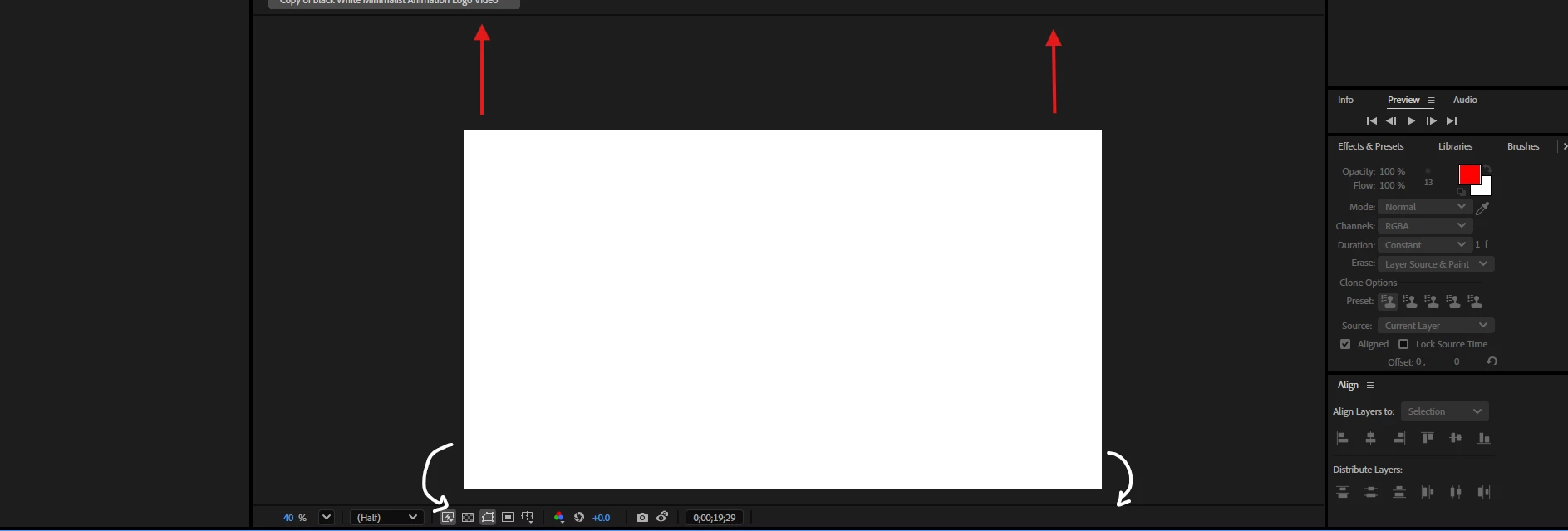
(See picture below) How can I adjust the view of the comp view in AE? There is so much space at the top and so little in the bottom, where the red arrows are, I want the comp to somehow be moved up higher and be even in space top and bottom so I can see clearly. Whenever I zoom, it zooms in unevely and I can only see part of the comp if I zoom over 33%. It was fine before but I don't know what I did to change it... 
Correct answer b.otlowski

Hi, you can move the comp view by using the Hand Tool. You can select it from the top menu or by pressing H on the keyboard, but I usually just use the scroll wheel. Clicking the scroll wheel temporarily activates the Hand Tool, and scrolling up or down changes the zoom level.

Cheers
Bart


2 replies

b.otlowski
Community Expert
b.otlowskiCommunity ExpertCorrect answer
Community Expert
August 6, 2025

Hi, you can move the comp view by using the Hand Tool. You can select it from the top menu or by pressing H on the keyboard, but I usually just use the scroll wheel. Clicking the scroll wheel temporarily activates the Hand Tool, and scrolling up or down changes the zoom level.

Cheers
Bart


Inspiring
August 6, 2025

Thank you this worked as well!

Kevin-Monahan
Community Manager
Community Manager
August 6, 2025

Hi Lynda,

See if this article assists you: https://adobe.ly/3Hlq5Ir. Let us know!


Thanks,

Kevin


Kevin Monahan - Sr. Community & Engagement Strategist – Pro Video and Audio
Inspiring
August 6, 2025

Thank you!
