
Participant
January 29, 2020
Question

How can I scroll down inside a script UI panel in After Effects?

  • January 29, 2020
  • 2 replies
  • 2229 views

I don't know if the title makes sense, but I installed some scripts on After Effects, and some of them are bigger than my screen resolution and I can't access some options.

I just need to find a way to scroll down and see the rest of the panel to use the scripts properly.

My screen resolution is 1366x768.
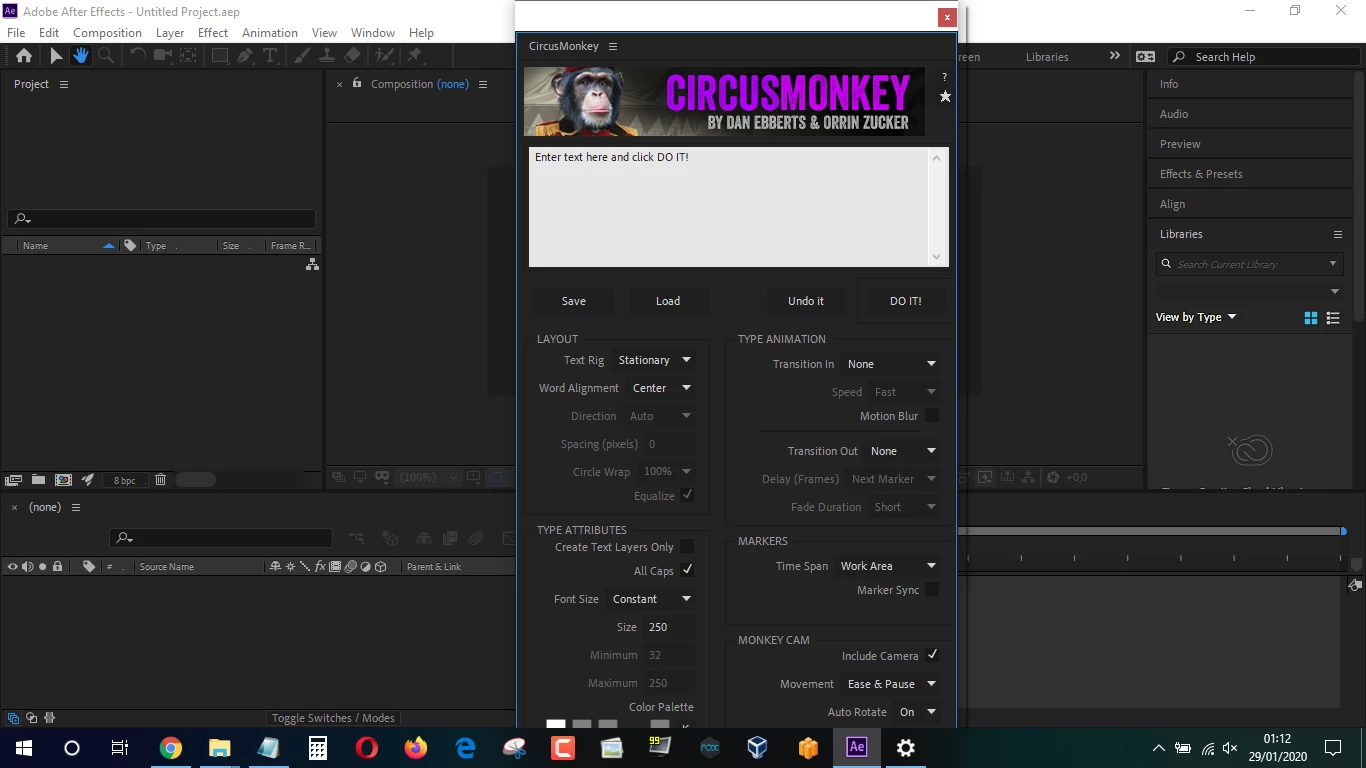


Thanks!!

This topic has been closed for replies.

2 replies

Participant
November 26, 2021

Hey! thanks a lot! had the same problem and you solved it! tytyty

Mylenium
Legend
January 29, 2020

https://helpx.adobe.com/after-effects/system-requirements.html


This is nothing you can fix yourself and in fact you'll run into trouble with other functions where panels get clipped off as well or buttons appear off-screen. You know, there's a reason why it's called "requirements", no offense. Of course script and plug-in developers will design their stuff to work within these predefined parameters. You might be able to contact the developers via AEScripts to see if they can provide an alternate version, but to be honest, it would probably make more sense and see if you can forcibly increase the screen resolution or at least create a suitably sized virtual desktop, even if reading tiny aliased text may be a pain.


Mylenium

Participant
January 29, 2020

Ok, I figured it out.

If you go on "Panel Group Settings" and select "Stacked Panel Group" and then drag the inner panel down a scrollbar appears.


But anyway, thanks for the help!

Participant
November 24, 2020

Hi, I facing the same problem can plz tell me where is the "Panel Group Settings"?Thanks in Advance