
Answered
How do I make a clip exactly 2x speed?
I want to make a clip that I have exatly 2x speed.

I want to make a clip that I have exatly 2x speed.
The most efficient way is to select the footage in the Project Panel and then use the File/Interpret Footage/Main menu (Alt/Option + Ctrl/Cmnd + G) and multiply the existing frame rate by 2.
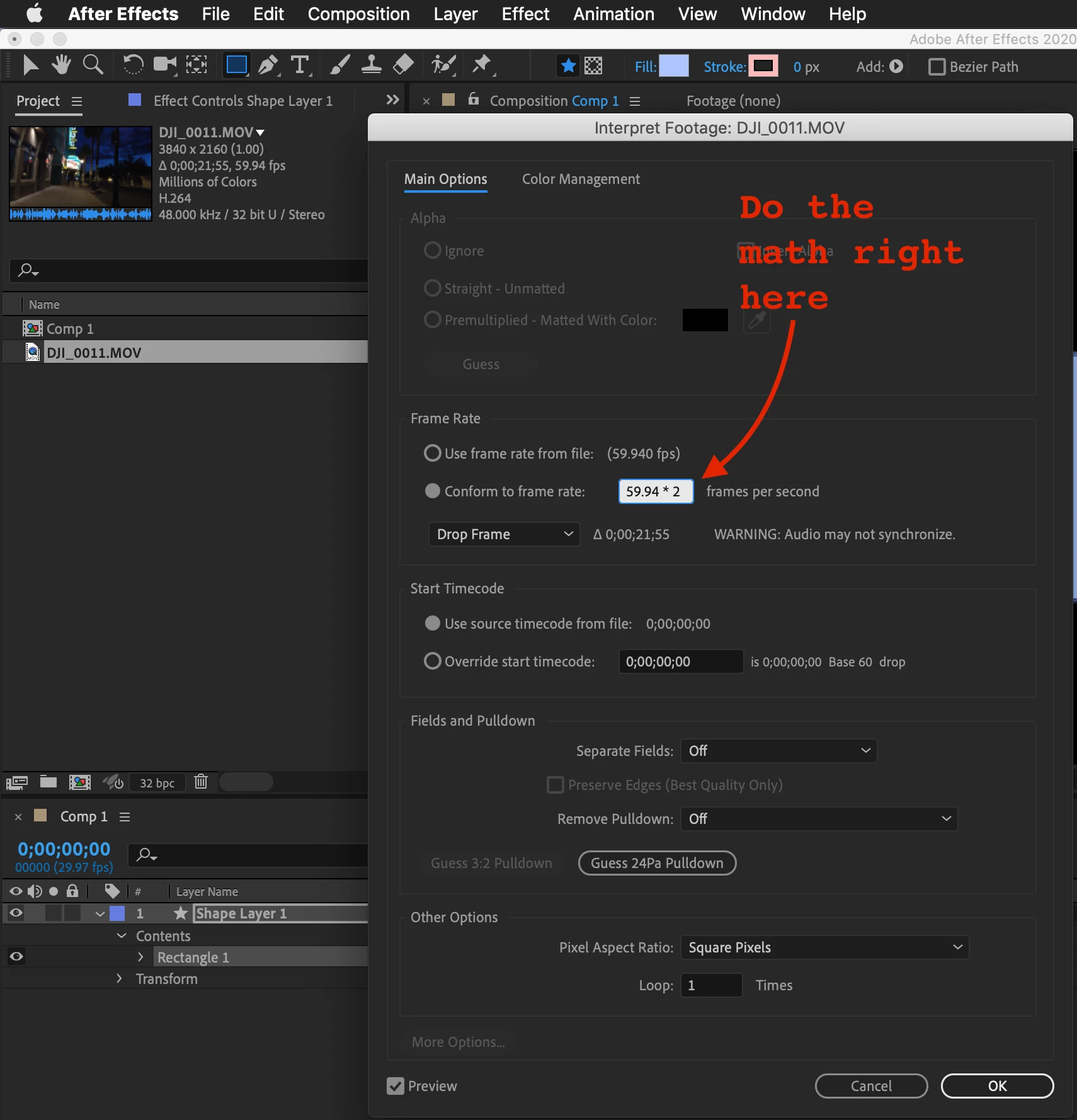
This will make a 10-second shot playback in 5 seconds. If you want a 10 second shot to last 20 seconds, divide by 2.
There are two other ways that are easy. One is to open up the In/Out /Stretch/Duration pane by selecting the {} icon in the bottom left corner of the timeline panel and choosing 50% for stretch. The other is to select the layer, use the Layer/Time/Enable Time Remapping menu (Alt/Option + Ctrl/CMnd + T), then drag the last time remapping keyframe to the middle of the layer. Time remapping sets keyframes at the start and end of a layer so if you have trimmed the clip by adding in and out points you will need to set new keyframs at the in point and out point then drag the out point keyframe to the middle of the layer.
Already have an account? Login
Enter your E-mail address. We'll send you an e-mail with instructions to reset your password.
 AdChoices