robertd43652856
Known Participant
September 3, 2020
Answered

How do I make this moving shapes background?

  • September 3, 2020
  • 2 replies
  • 650 views

https://www.storyblocks.com/video/stock/motion-green-triangles-abstract-background-bwoirx8ghjxiqth0c


Does someone know the best way to make something like this - I don't need those changes in gradient/lightness on the triangles I just want to make a BG with that kind of movement without manually making every shape and keyframing the movement.

thanks

This topic has been closed for replies.
Correct answer Rick Gerard

MIR can give you some interesting shapes but they are all made from points. It is possible to create a bunch of triangular paths, attach nulls to the corners, and then use expressions as simple as wiggle() to distort the triangles. Shift + Parenting can tie two points from different triangles together. I created this project to test a couple of workflows. Feel free to download it and monkey with the settings.


Here's the workflow:


  • Create a bunch of triangles as shape layers (bezier Paths) or in Illustrator and then convert the vector files to shape layers - one triangle per layer
  • Make sure the triangles are named so you can keep track of things
  • Add a solid + Fractal Noise + Colorama and make adjustments to get an animated colored background layer
  • Select the path for each triangle one at a time and use the Create Nulls from Paths script/Points Follow nulls to add 3 nulls to each triangle
  • Figure out which nulls on which triangles share a common position (easier to do if you start changing the colors of the nulls) then Shift + parent the nulls to one of the common nulls, lock the child layers, and start moving the parents to the top of the layer stack
  • When you can drag a null at the corner of each triangle and move all the right points parenting is complete and it's time to play with some expressions
  • You can use sampleImage() to sample the colors of the Fractal noise to generate a random pattern, or you can take the easy way out and just add a wiggle() expression to the position of the first parent null
  • I like this one using sampleImage():


target = thisComp.layer("Fractal Noise");
v = target.sampleImage(transform.position, [width, height]/2, true, time);
t1 = (v[0] - v[1] + v[2]) / 3;
t2 = (v[0] + v[1] - v[2]) / 3;
moveX = linear(t1, 0, 1, -100, 100);
moveY = linear(t2, 0, 1, -100, 100);
pos = [moveX, moveY];
pos + position


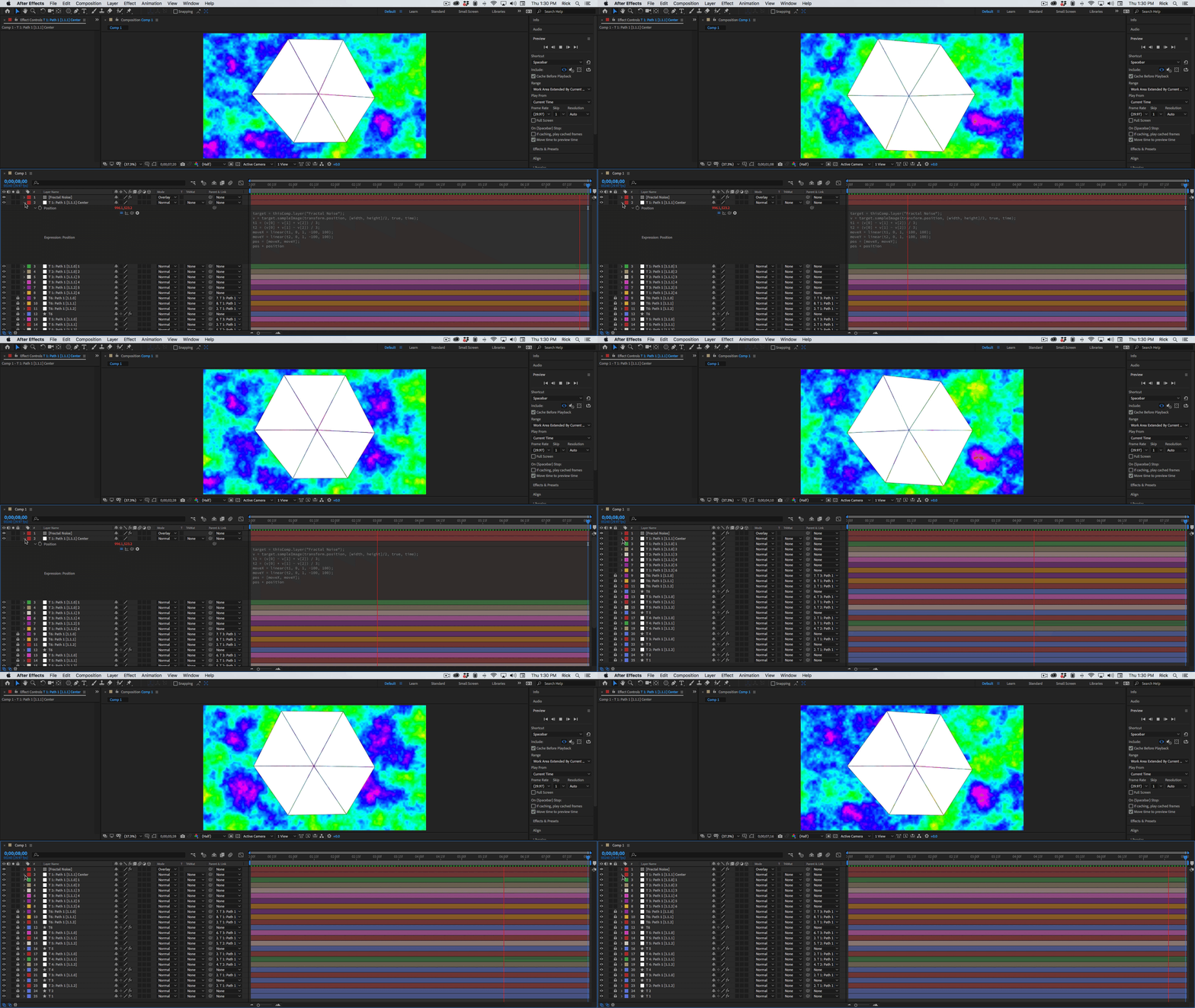
This expression averages the RGB values of the Fractal Noise/Colorama layer a little differently for X and Y and then uses a linear expression to move the X and Y position of the null up to 100 pixels in any direction. Select the position property, copy expression only, then select all of the other master nulls and paste. You'll get something like this:

2 replies

Rick GerardCommunity ExpertCorrect answer
Community Expert
September 3, 2020

MIR can give you some interesting shapes but they are all made from points. It is possible to create a bunch of triangular paths, attach nulls to the corners, and then use expressions as simple as wiggle() to distort the triangles. Shift + Parenting can tie two points from different triangles together. I created this project to test a couple of workflows. Feel free to download it and monkey with the settings.


Here's the workflow:


  • Create a bunch of triangles as shape layers (bezier Paths) or in Illustrator and then convert the vector files to shape layers - one triangle per layer
  • Make sure the triangles are named so you can keep track of things
  • Add a solid + Fractal Noise + Colorama and make adjustments to get an animated colored background layer
  • Select the path for each triangle one at a time and use the Create Nulls from Paths script/Points Follow nulls to add 3 nulls to each triangle
  • Figure out which nulls on which triangles share a common position (easier to do if you start changing the colors of the nulls) then Shift + parent the nulls to one of the common nulls, lock the child layers, and start moving the parents to the top of the layer stack
  • When you can drag a null at the corner of each triangle and move all the right points parenting is complete and it's time to play with some expressions
  • You can use sampleImage() to sample the colors of the Fractal noise to generate a random pattern, or you can take the easy way out and just add a wiggle() expression to the position of the first parent null
  • I like this one using sampleImage():


target = thisComp.layer("Fractal Noise");
v = target.sampleImage(transform.position, [width, height]/2, true, time);
t1 = (v[0] - v[1] + v[2]) / 3;
t2 = (v[0] + v[1] - v[2]) / 3;
moveX = linear(t1, 0, 1, -100, 100);
moveY = linear(t2, 0, 1, -100, 100);
pos = [moveX, moveY];
pos + position


This expression averages the RGB values of the Fractal Noise/Colorama layer a little differently for X and Y and then uses a linear expression to move the X and Y position of the null up to 100 pixels in any direction. Select the position property, copy expression only, then select all of the other master nulls and paste. You'll get something like this:

robertd43652856
Known Participant
September 5, 2020

I got trapcode working, it has enough functionallity for my purpose:

Making each shape then mapping the nulls like your project is a bit too much time given the number of triangles I need for this, but your project helped me understand how to use fractoral noise to generate random colours and X/Y movement as well as maaping points from a bezier shape which I didn't know you could do; Thanks.


Community Expert
September 3, 2020

Creating the distortion is going to be a lot easier than creating the reflections that you see in the 3D shapes. I could do something like this in Blender in about 10 minutes. It would be a real pain in AE without 3rd party plug-ins that support distortion on 3D shapes and reflective surface textures. 


You might be able to get something close, but duplicating the look exactly is going to take some time in AE. I'll have to think about a possible solution.


robertd43652856
Known Participant
September 3, 2020

Hey Rick thanks for this,

The reflections/gradients on the shapes is not what I'm looking to recreate - Only the triangles and their movement in variuos colour shades (each triangle can be a flat colour with no dynamic colour response to the surrounding shapes). 

I've just downloaded a trial of Trapcode MIR in order to follow this tutorial
Hoping that will work but... I actually have blender though I'm a complete novice at it... so might get back to you if I can't get trapcode working