Aytze
Known Participant
November 19, 2017
Answered

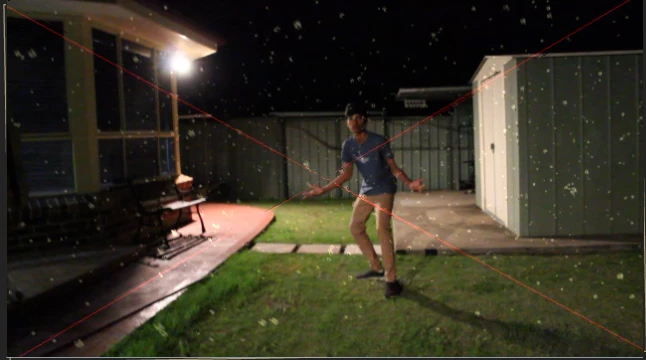
How do i remove the red guide lines in the video?
  • November 19, 2017
  • 3 replies
  • 21165 views

The red lines were in the video when i exported it, so im wondering how i can get rid of these? Thanks

    This topic has been closed for replies.
    Correct answer dj.summitt

    This indicates that you used a third party plugin or effect that is in trial mode. License the plugin or remove it and the X will disappear.

    3 replies

    dj.summitt
    Inspiring
    November 19, 2017

    Again, you are getting the red X because one of your plugins is not licensed. License the plugin and the red X will go away.

    Aytze
    AytzeAuthor
    Known Participant
    November 19, 2017

    I Just licenced everything, and now for some reason, form is now missing. WTFFFF, and here it says i already have it installed.... I tried uninstalling and reinstalling but it didnt work.

    Mylenium
    Legend
    November 19, 2017

    You will have to contact Red Giant. In the mess with every recent version of AE requiring updated plug-ins you may simply need to install a different version. The CS6 version would be a completely different thing from the latest CC and you may simply require to follow specific procedures to be able to use the plug-ins in both programs at any given time.

    Mylenium

    P.M.B
    Legend
    November 19, 2017

    Looks like an unlicensed installation of Trapcode Particular

    ~Gutterfish
    Aytze
    AytzeAuthor
    Known Participant
    November 19, 2017

    Thanks, it partially solved my issue. Now that i installed trapcode particular (because i just had form) , the red X's now flash in a small period of time before going away for the rest of the clip. And in that scene, its a mix between form and default adobe after effects stuff.I am pretty sure i only used form though. There is an X present on this, is there anything else you think i should install to remove the red cross?

    dj.summitt
    dj.summittCorrect answer
    Inspiring
    November 19, 2017

    This indicates that you used a third party plugin or effect that is in trial mode. License the plugin or remove it and the X will disappear.