
Deaf_Guy
Inspiring
February 9, 2017
Answered

How do you dock the comp panel again?

  • February 9, 2017
  • 3 replies
  • 23754 views

i know this has probably been mentioned a million times here, but one of the more aggravating things for me in AE is unlike PSD, when you undock and dock panels with ease, it just seems extremely difficult to do in AE.  See image below:
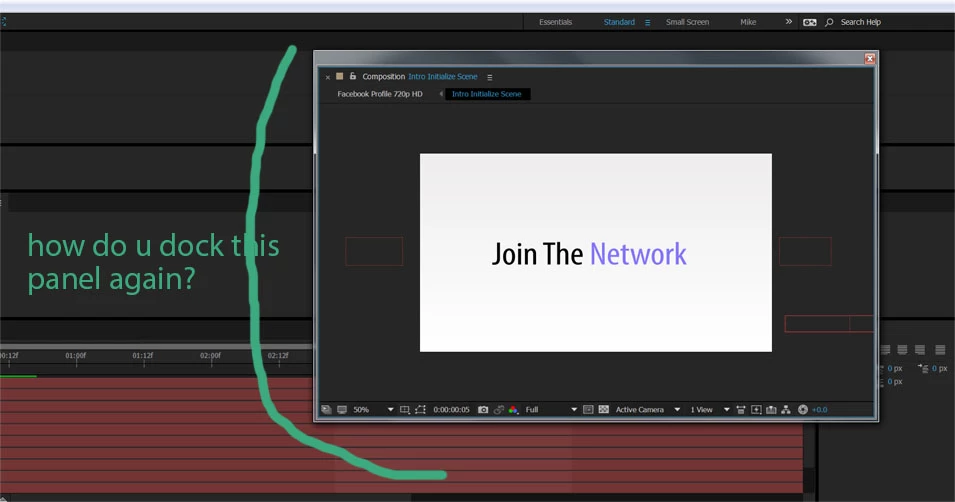
the comp panel is undocked and i've looked everywhere to learn how to dock it again but have just not been able to figure it out.  i just basically want it to be docked again vs floating as seen above.

can someone tell me how to do this?  thanks.

    This topic has been closed for replies.
    Correct answer Szalam

    You can grab it by the name and move it to where you want it docked.

    3 replies

    Community Expert
    February 7, 2021

    The original screenshot shows that the Standard workspace is selected. All you have to do to put things back where they should be is to double-click Standard and select Yes you want to reset the workspace. It takes about 2 seconds. I do it all the time. 


    I have even edited my workspaces so that the workspaces that I use, Default, Color, Motion Tracking, Paint, Essential Graphics, and Animation are all visible just to the right of the toolbar. 

    Inspiring
    May 7, 2020

    That's correct, but it's a mystery why there is an Undock Panel but not a Dock Panel or Re-Dock Panel option in the menu. Think about that from a beginner's perspective. The natural, intuitive way to re-dock would be to go right back to the dropdown and click Dock Panel. The omission is very frustrating, considering what a simple maneuver it is. AE has baskets of these non-intuitive features that absolutely require forums like this. I love the Support Community, but I hate the fact that I have to go deep-diving to uncover the mystery of how to do such simple things like re-dock a panel. You HAVE to grab it by the name? Who would ever guess that? No one, and that is the whole point of my rant. Sorry. Thanks for the tip.

    thepixelsmith
    Community Expert
    Community Expert
    April 23, 2024

    Where would it re-dock the panel? It wouldn't know where you want to put it so it makes you do it manually or reset it.


    Szalam
    Community Expert
    SzalamCommunity ExpertCorrect answer
    Community Expert
    February 9, 2017

    You can grab it by the name and move it to where you want it docked.

    stefan_gru
    Inspiring
    February 9, 2017
    Deaf_Guy
    Deaf_GuyAuthor
    Inspiring
    February 9, 2017

    Thank you!  One more question.  Is there some way I can revert the entire layout of AE to its basic layout that comes out of the box when it's first installed?