Sara123456789
Participant
February 12, 2017
Answered

How to change target bitrate in After Effects CC 2015?

  • February 12, 2017
  • 1 reply
  • 23384 views

Hi,

I need to change the target bitrate and maximum bitrate in AE cc 2015, since my files are extremely large when I export them (10 min video 129 GB)

I have been looking at tutorials and it seems the option is available in other versions of After effects..

any suggestions?

This topic has been closed for replies.
Correct answer jasontcox

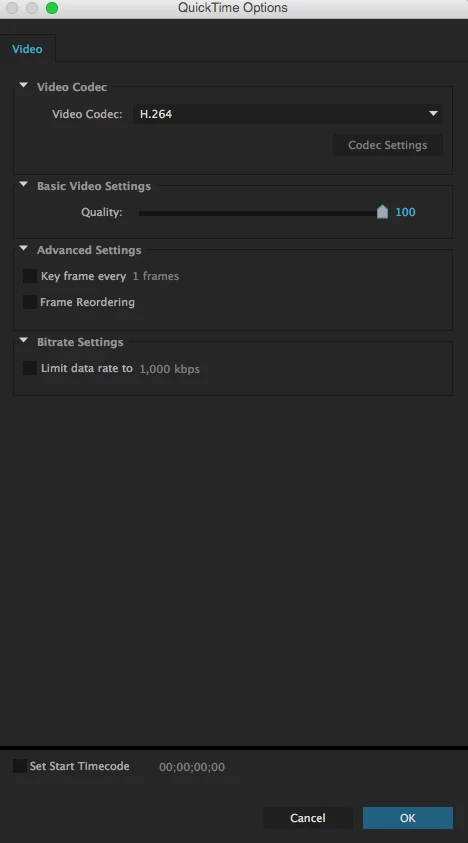
Unfortunately, you cannot set a target or max bit rate for H.264 in a Quicktime Container in AE's Render Queue. Well, you can set a "limit," but it get a bit confusing. Your best bet is to send the composition to Media Encoder by the Add to Media Encoder Render Queue command under the Composition menu. Then choose H.264 from the Format list. It'll give you an H.264 codec in an MP4 wrapper ( more compatible than MOV files anyway) and the ability to set your Target/Max Bitrate.

Also, a 10 minute timeline from AE is kinda nuts! What sort of video are you building? It couldnt be broken down or have parts of it done in Premiere? I mean, sometimes, it's necessary to have a comp that long, just curious what your project is!

1 reply

jasontcox
jasontcoxCorrect answer
Inspiring
February 12, 2017

Unfortunately, you cannot set a target or max bit rate for H.264 in a Quicktime Container in AE's Render Queue. Well, you can set a "limit," but it get a bit confusing. Your best bet is to send the composition to Media Encoder by the Add to Media Encoder Render Queue command under the Composition menu. Then choose H.264 from the Format list. It'll give you an H.264 codec in an MP4 wrapper ( more compatible than MOV files anyway) and the ability to set your Target/Max Bitrate.

Also, a 10 minute timeline from AE is kinda nuts! What sort of video are you building? It couldnt be broken down or have parts of it done in Premiere? I mean, sometimes, it's necessary to have a comp that long, just curious what your project is!
Sara123456789
Participant
February 13, 2017

Thank you for the answer,

I was making a background animation for a show, I am just starting to use after effects.

People usually dont edit entire animation in AE?

I am doing an animation right now that will be about 4 min, but I'm doing it in varios sessions and saving every scene apart, to later put it all in premiere,

I dont have the media encoder, Is setting the limit data rate a good option for a smaller archive, or do I loose a lot of quality? I will use the video for Youtube .

jasontcox
Inspiring
February 15, 2017

Is the background animation just mean to be something repetitive that can loop? Then you don't have to make it 4 or 10 minutes long... you can make it short and loop it over and over in Premiere. Normally Premiere is used for longer form video editing and After Effects is usually used for creating shorter animations and motion graphics that you integrate into your video project in Premiere. There are ALWAYS exceptions to the rule and yes, sometimes people make longer form projects in AE, but it's not really the norm.