
Inspiring
December 29, 2020
Question

How to copy and paste correctly in the timeline ?

  • December 29, 2020
  • 1 reply
  • 431 views

Hello everybody, and have nice christmas.

I come here because I have a problem when copying and pasting an event (for instance a "position", or a "scale" event) in the timeline. It seems as it was creating some kind of extrapolation between these keyframes.

And the result is that the space between these 2 keyframes is not stable at all ! (I want to precise that I don't use any interpolation, before or after these copy-and-paste !)


I join a picture to explain the problem...
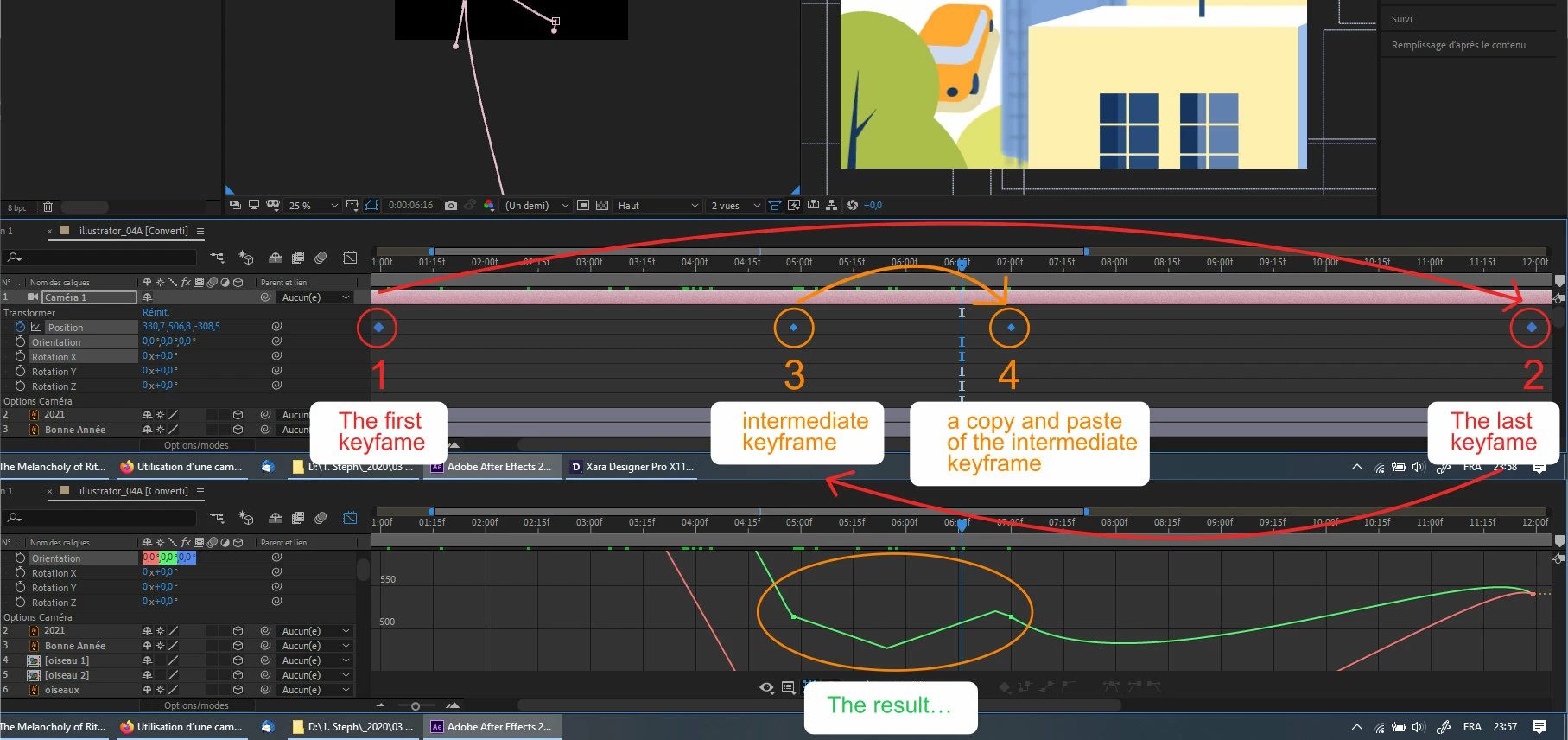


Thank you for your help !


This topic has been closed for replies.

1 reply

Mylenium
Legend
December 30, 2020

Nothing wrong. You need to read up in the online help how AE's interpolation methods work and what the differences are between a linear keyframe and a regular Bèzier keyframe.


Mylenium

Inspiring
December 30, 2020

Hello and thank you for your answer.

My question is : why is there interpolation here, as I didn't choose to put any ?

(Or : how to cancel interpolation between these 2 points ?)

Inspiring
December 30, 2020

Right click your keyframes - key frame interpolation - and set Spatial Interpolation to linear...


Also in edit - preferences find the keyframe interpolation default setting checkbox put it on linear also


I thank you for your idea to change the default settings : I think that was the source of these problems... 🙂