
Participating Frequently
December 10, 2020
Answered

How to create a solar flare

  • December 10, 2020
  • 2 replies
  • 1363 views

I've searched high and low on google to find a tutorial on how to create a solar flare but none exists. I'm now at a deadend and need guidance on how to create it. There are plenty of tutorials on flames, but they look like fire rather than a flare. Firstly the flames have a central point from which they burn, secondly they have layers of flames and thirdly the edges of flames are nice and smooth. Solar flares have a loop effect on them (look at the real sun pictures to see this), the flares have suttle shades of differences within each layer and finally the flares are diffused at the edges and sharp as well (both effects need to be present but random and heading in the same direction as the flare loop is headed - so the side of the loop has flares emanating from the side while the top of the loop has flares emanating to the top). As a beginner I'm struglling to piece together different small learnings together to create the effect, can anyone help with this? 
This topic has been closed for replies.
Correct answer Rick Gerard

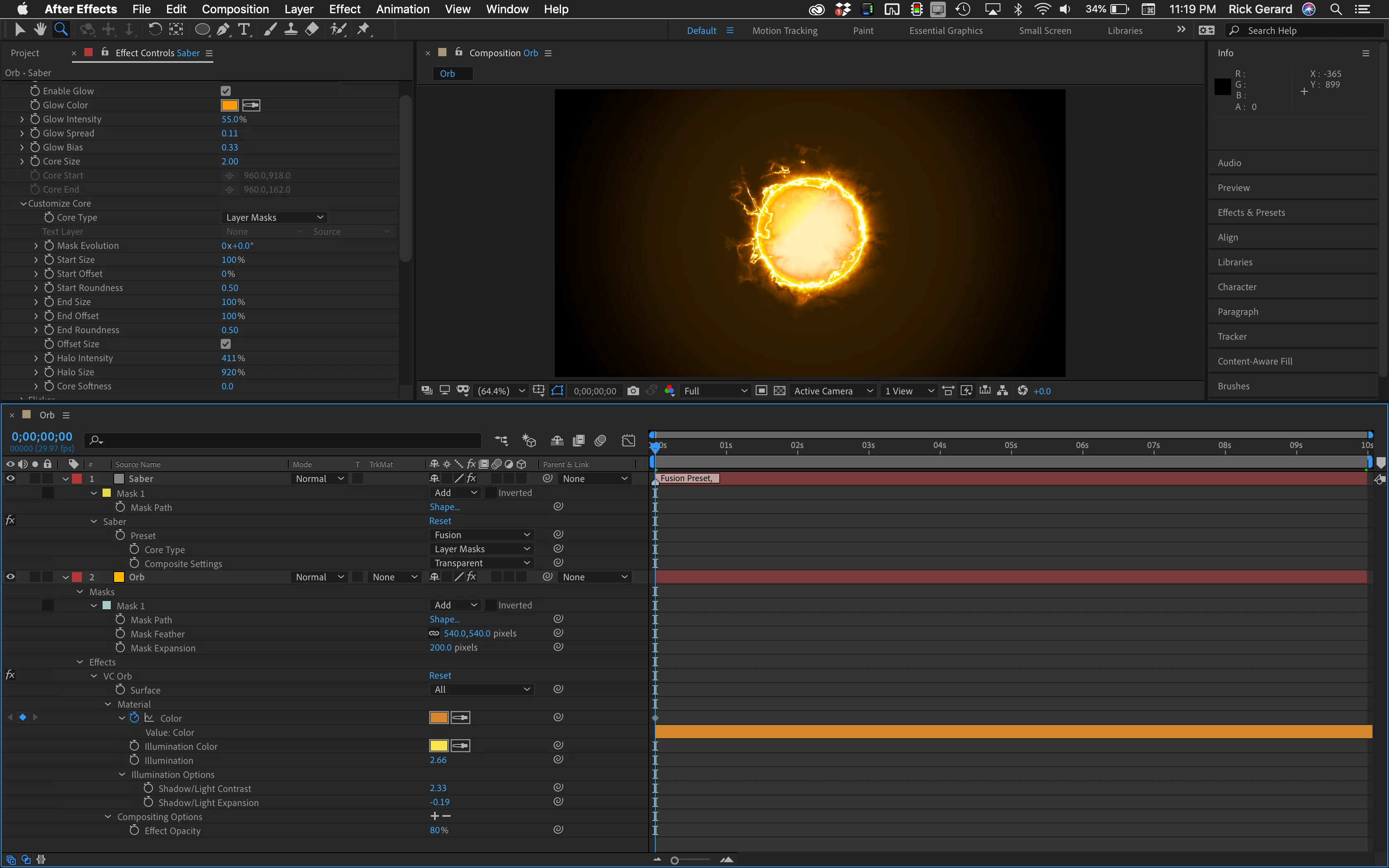
It is pretty hard to get that kind of look with the effects package that comes with After Effects. Fortunately, Video Copilot has 2 free plugins that will do the job. Orb and Saber. The tutorials that come with these amazing free plugins will get you started. This took about 5 minutes. Two layers, you are seeing everything I modified. Set the Preset for Saber to Fusion, set the Core Type to Layer Masks and the Compositing Options to Transparent. Then I added Orb to the bottom layer, a deep orange solid, and modified the properties you see in the timeline. That's all there was to it. 

2 replies

Rick GerardCommunity ExpertCorrect answer
Community Expert
December 11, 2020

It is pretty hard to get that kind of look with the effects package that comes with After Effects. Fortunately, Video Copilot has 2 free plugins that will do the job. Orb and Saber. The tutorials that come with these amazing free plugins will get you started. This took about 5 minutes. Two layers, you are seeing everything I modified. Set the Preset for Saber to Fusion, set the Core Type to Layer Masks and the Compositing Options to Transparent. Then I added Orb to the bottom layer, a deep orange solid, and modified the properties you see in the timeline. That's all there was to it. 

Participating Frequently
December 13, 2020

Thanks for this. I was afraid that the answer might include a plugin as I wanted to really use native after effects for the effort. Guess I'm not close to that level yet. Plugin it is then.

Participating Frequently
December 10, 2020