
Exit
  • Global community
    • Language:
      • Deutsch
      • English
      • Español
      • Français
      • Português
  • 日本語コミュニティ
  • 한국 커뮤니티
0

How To Disable Particular Overlay??? Plz Help
Guest
Nov 10, 2017 Nov 10, 2017

Capture.PNG

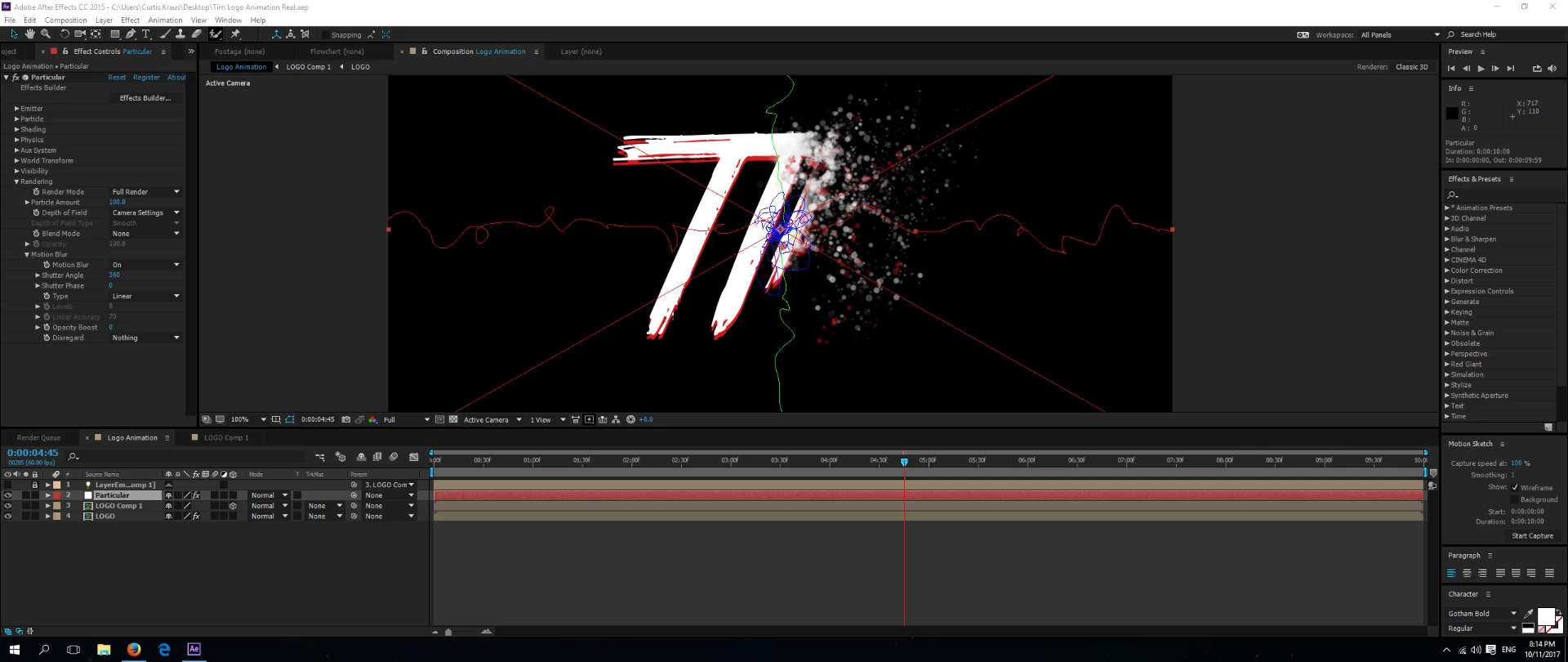
Im working on an intro for a short film im working on and when using particular i cant disable the overlay as seen above, its the swirly lines for the physics. How do i remove that overlay because it even shows in the export of the video?

Thanks in advance

2.5K
Translate
Report
Community guidelines
Be kind and respectful, give credit to the original source of content, and search for duplicates before posting. Learn more
community guidelines

correct answers 1 Correct answer

Community Expert , Nov 10, 2017 Nov 10, 2017

I see a red X, which means that the plugin is not licensed. You have to purchase it and license it to make that go away. to see if there are any other switches thrown that should not be select the layer, press the U key two reveal all modified properties and check the timeline for anything obvious. There are no "path" switches in Particular.

Translate
Community Expert ,
Nov 10, 2017 Nov 10, 2017

I see a red X, which means that the plugin is not licensed. You have to purchase it and license it to make that go away. to see if there are any other switches thrown that should not be select the layer, press the U key two reveal all modified properties and check the timeline for anything obvious. There are no "path" switches in Particular.

Translate
Report
Community guidelines
Be kind and respectful, give credit to the original source of content, and search for duplicates before posting. Learn more
community guidelines
People's Champ ,
Nov 10, 2017 Nov 10, 2017

It's under Physics>Air>Visualization Fields to turn off the squigglies.   Then , like Rick said you're going to have to activate a license for the plug-in to get rid of the x.

~Gutterfish
Translate
Report
Community guidelines
Be kind and respectful, give credit to the original source of content, and search for duplicates before posting. Learn more
community guidelines
Community Expert ,
Nov 10, 2017 Nov 10, 2017

Gutter-Fish is right. I forgot about that, but I was correct that pressing the U key twice would bring the switch up in the timeline panel:

Screen Shot 2017-11-10 at 10.32.10 PM.png

Translate
Report
Community guidelines
Be kind and respectful, give credit to the original source of content, and search for duplicates before posting. Learn more
community guidelines
People's Champ ,
Nov 10, 2017 Nov 10, 2017

I always forget about that "reveal modified properties"  shortcut.

~Gutterfish
Translate
Report
Community guidelines
Be kind and respectful, give credit to the original source of content, and search for duplicates before posting. Learn more
community guidelines
Community Expert ,
Nov 11, 2017 Nov 11, 2017
LATEST

I use it every time I animate anything. It's the fastest way around a comp.

Translate
Report
Community guidelines
Be kind and respectful, give credit to the original source of content, and search for duplicates before posting. Learn more
community guidelines