
Participating Frequently
January 10, 2025
Answered

How to Extract the Largest Value - Automation Blocks - After Effects

  • January 10, 2025
  • 1 reply
  • 774 views

I am getting multiple values from a layer property and saving them in a CSV file. However, I want to extract only the largest number (e.g., 7.1). You can see the attached image for reference.


How can I retrieve only the largest value, either using a CSV file or without saving to a CSV?


What blocks or logic can I use to apply this functionality in different scripts?

Thank you in advance for your help!
Correct answer Mathias Moehl

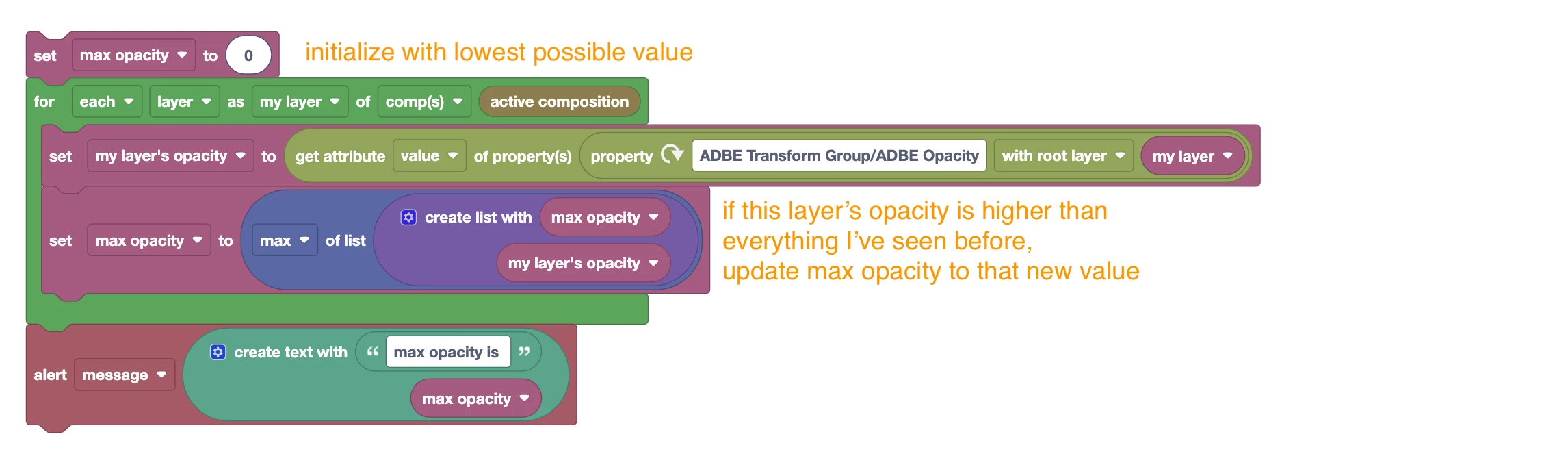
Save the values in a list, then get the max of that list.

If you obtain the values by looping over layer properties, you can also compute the maximum on the fly while looping over the values Here is an example that uses this approach to compute the max opacity of all layers in the active comp:


1 reply

Mathias Moehl
Community Expert
Mathias MoehlCommunity ExpertCorrect answer
Community Expert
January 10, 2025

Save the values in a list, then get the max of that list.

If you obtain the values by looping over layer properties, you can also compute the maximum on the fly while looping over the values Here is an example that uses this approach to compute the max opacity of all layers in the active comp:


Mathias Möhl - Developer of tools like BeatEdit and Automation Blocks for Premiere Pro and After Effects
Participating Frequently
January 10, 2025

I am using so many great plugins and scripts, but Automation Blocks has truly been a life-changing tool. Thank you for your fast reply! I now understand how to save the values and use the List Block effectively. With this knowledge, I was able to create my own script using Automation Blocks.

Thank you so much—Automation Blocks is incredibly powerful!