it seems you want to pan around your video in 2D motion control moves. also called "Ken Burns Moves" or "Ken Burns Effect": Ken Burns effect - Wikipedia
your layers are 3D and that means they share a 3D space. when you zoom using 3D layers, then as soon as the layers share the same Z position - they will overlap. this means that the layer order in the timeline is not what counts but the actual 3D position. more about it here: Use 3D layers in After Effects
you can either:
1. not use 3D, most users use scale and position to pan around a video or still, but if there is more then a few movements, you better use anchor point and scale (not animate position) so your anchor point will always be centered (like a virtual camera!). if you are a Lynda subscriber you can find the demonstration of this technique here
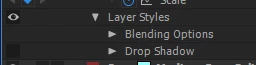
2. use 3D, but disable the 3D interaction by a render order trick: add a layer style to your 3D layer: right click->layer styles-> drop shadow. then toggle the drop shadow visibility off, but leave the "layer styles" visibility on. this will prevent 3D layers on either side from intersecting or casting shadows on one another. this will not have any visual impact on your footage (the layer styles are really off)



 AdChoices