
Exuberant_world5D46
Participant
September 24, 2017
Answered

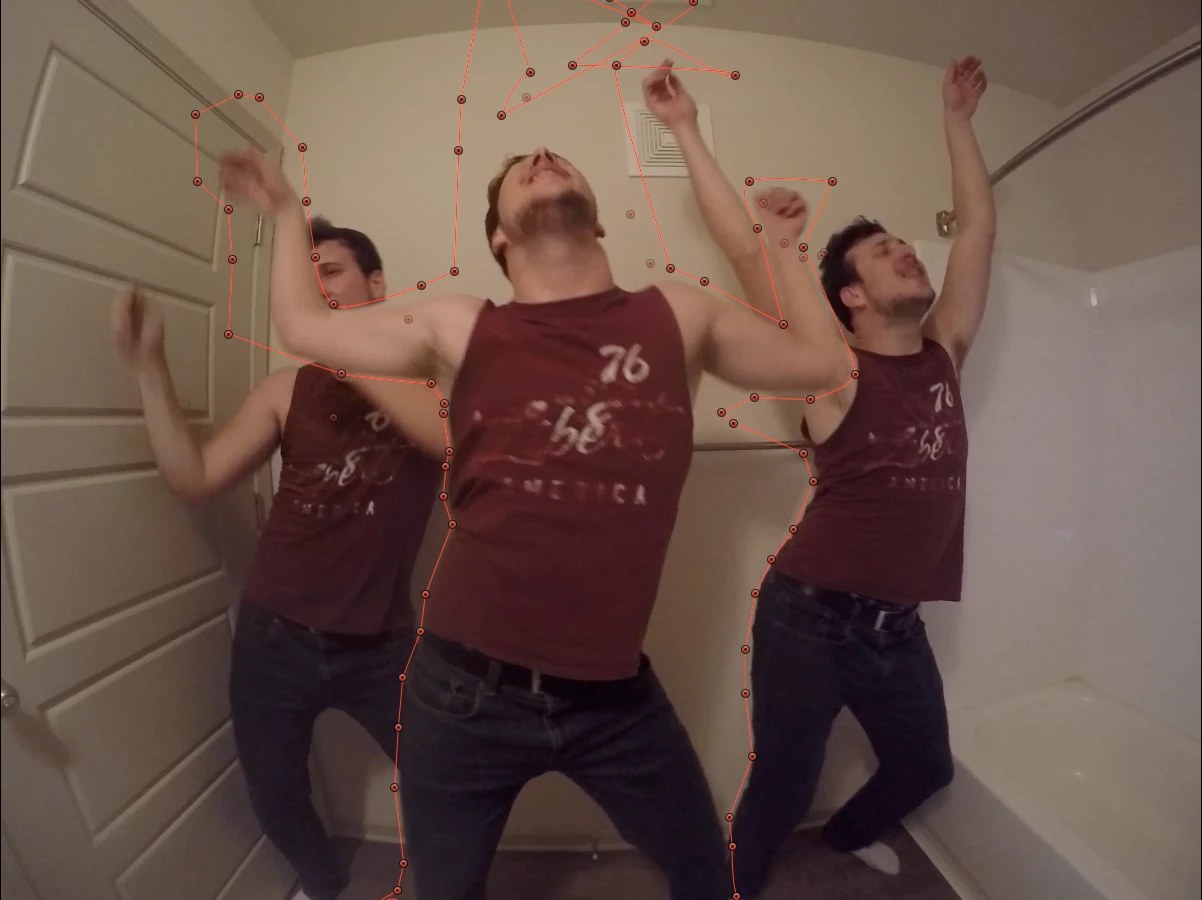
How to include three individuals(me) overlapping each other and masking/moving without moving the points after every frame?
  • September 24, 2017
  • 2 replies
  • 807 views

Hello! I was wondering if there was a way to make a dance video of three of me, without using the masking tool after every frame? Is there a way adobe after effects can track the motion of myself and the shadow behind me individually and then put all three individuals in one picture? Thanks! I am using final cut pro, but adobe after effects is more advanced but can it do it or will I have to do this for 245 hours (i calculated) to complete the video? I have a picture of the empty background as well by the way if that helps.

This topic has been closed for replies.
Correct answer Rick Gerard

First option - rotobrush. If that does not work here's how you rotoscope:

Simply put you never draw one mask for everything and you never go one frame at a time. Every action has a starting and ending point and the motion is usually pretty linear between frames. If you are doing hand roto of somebody dancing start with the body and use as few keyframes and mask points as you can, then animate the mask for one upper arm, then the other and keep going until you are done.

I'm with the others, if you have not yet shot the footage then shoot it against a plain solid color that contrasts with skin. Green is good, blue would work. If you have no access to that then black or even a plain white wall. Then you can key, create a procedural matte, or rotobrush. 

2 replies

Roei Tzoref
Legend
September 24, 2017
I was wondering if there was a way to make a dance video of three of me, without using the masking tool after every frame? Is there a way adobe after effects can track the motion of myself and the shadow behind me individually and then put all three individuals in one picture?

taking into consideration you only have about 10 days for the whole thing, shooting on a green screen is a good option if it serves your creative vision (it will look different and the composite will take work to seem really authentic). provided that you shoot it with a properly lit, professional as you can find conditions, and camera with the least amount of compression (at least 4:2:2 if not 4:4:4).  shot your self 3 times, key yourself out in FCP or Ae, and composite the whole thing on a proper background.

frame by frame will never work because you could never be consistent with your mask in a decent frame rate and movement, you could still use masks and keyframing but this will be tedious process and require some skiils to keyframe it properly. to save some time make sure you are precise in your roto where objects actually overlap, and not when they're not...

difference matte rarely works since you would need a flawless video without compression or change in exposure. it only works on specific conditions: locked off shot, no changes in the background (includes exposure, shadows, and compression artifacts and basically anything that is not exactly the same). it also has limited controls so it will takes various procedures to deal with edges afterwards.

Rick GerardCommunity ExpertCorrect answer
Community Expert
September 25, 2017

First option - rotobrush. If that does not work here's how you rotoscope:

Simply put you never draw one mask for everything and you never go one frame at a time. Every action has a starting and ending point and the motion is usually pretty linear between frames. If you are doing hand roto of somebody dancing start with the body and use as few keyframes and mask points as you can, then animate the mask for one upper arm, then the other and keep going until you are done.

I'm with the others, if you have not yet shot the footage then shoot it against a plain solid color that contrasts with skin. Green is good, blue would work. If you have no access to that then black or even a plain white wall. Then you can key, create a procedural matte, or rotobrush. 

Exuberant_world5D46
Participant
September 25, 2017

i have already shot the video. The above photo is a screenshot of what I had been working on. but I shall try your method

Legend
September 24, 2017

If you danced in a bigger location it would be a lot easier since you could have 3 of you in the frame with less overlap, so less keyframing of masks. You could also dance 3 times in front of a green screen and replace the the green screen (keeping shadows would be harder with that. Though you could add digital shadows).

My guess is maybe something using differencing (Keying->Difference Matte and making the frame with no one in it (just the background) the length of the comp). If the camera is stationary maybe you can separate yourself from the background by taking the difference between the video and the frame without anyone in it. Perhaps using the difference matte in some way you can do that (or similar procedure in some other program eg. for each pixel, if the absolute difference between empty frame (no one in it) and current frame's pixels rgb value > some threshold, make it (the video pixel with the person in it) not transparent, otherwise transparent. And/or the more different it is, the less transparent it (the pixel from the video with the person in it) is).

Check tutorials of Difference Matte with After Effects on YouTube - I think that is likely what can do it.