Inspiring
March 20, 2021
Answered

How to mask out lower layers?

  • March 20, 2021
  • 2 replies
  • 821 views

Hi there,

I'm having a very basic problem. I have 3 shape layers (circles) in the same spot with three different sizes. All have 60% transparency to show the base layer. The middle and top circle are losing transparency because of the circles underneath.

How can I make the big circles look like they're cut out in the middle? Sorry for the awkward wording, I can't think today.


This topic has been closed for replies.
Correct answer Rick Gerard

You need a copy of each of your animated circles with 100% transparency. I would add matte to the layer names and tie to the size of each of the disks to their original using a simple pickwhip expression from the Layers and Links column. Turn off the matte copies and move them to the bottom of the stack. Add Set matte to the five-mile disk, set it to use the one mile matte layer as the source and invert the matte. Duplicate Set Matt and set the copy to use the three-mile matte layer as the source. Add set matte to the two-mile layer and set it to use the one mile matte as the source. Set the one, three and five-mile layer transparency to 60%, tie all the layers to a null with parenting, and animate the size of each disk. The three and five-mile layers will now be doughnut-shaped as they grow and you won't have overlapping transparency. The comp would look like this:
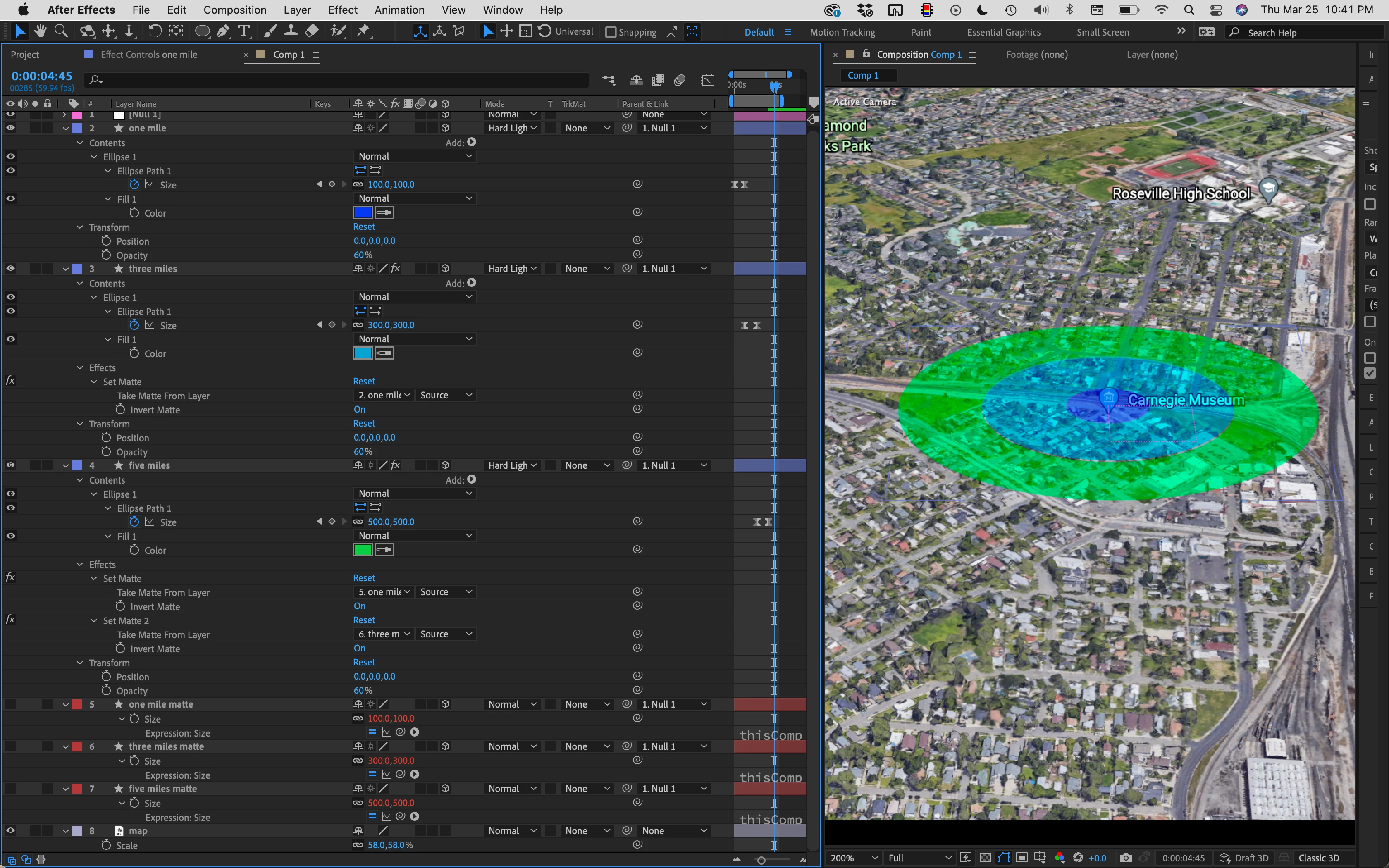
You are seeing all the modified properties of the layers. 


Another option would be to use strokes instead of fills and animate the width of the stroke so each layer was a doughnut. You could also use copies of the disks on the shape layers and merge paths to create your doughnut shapes. You just can't do it without creating doughnuts. 
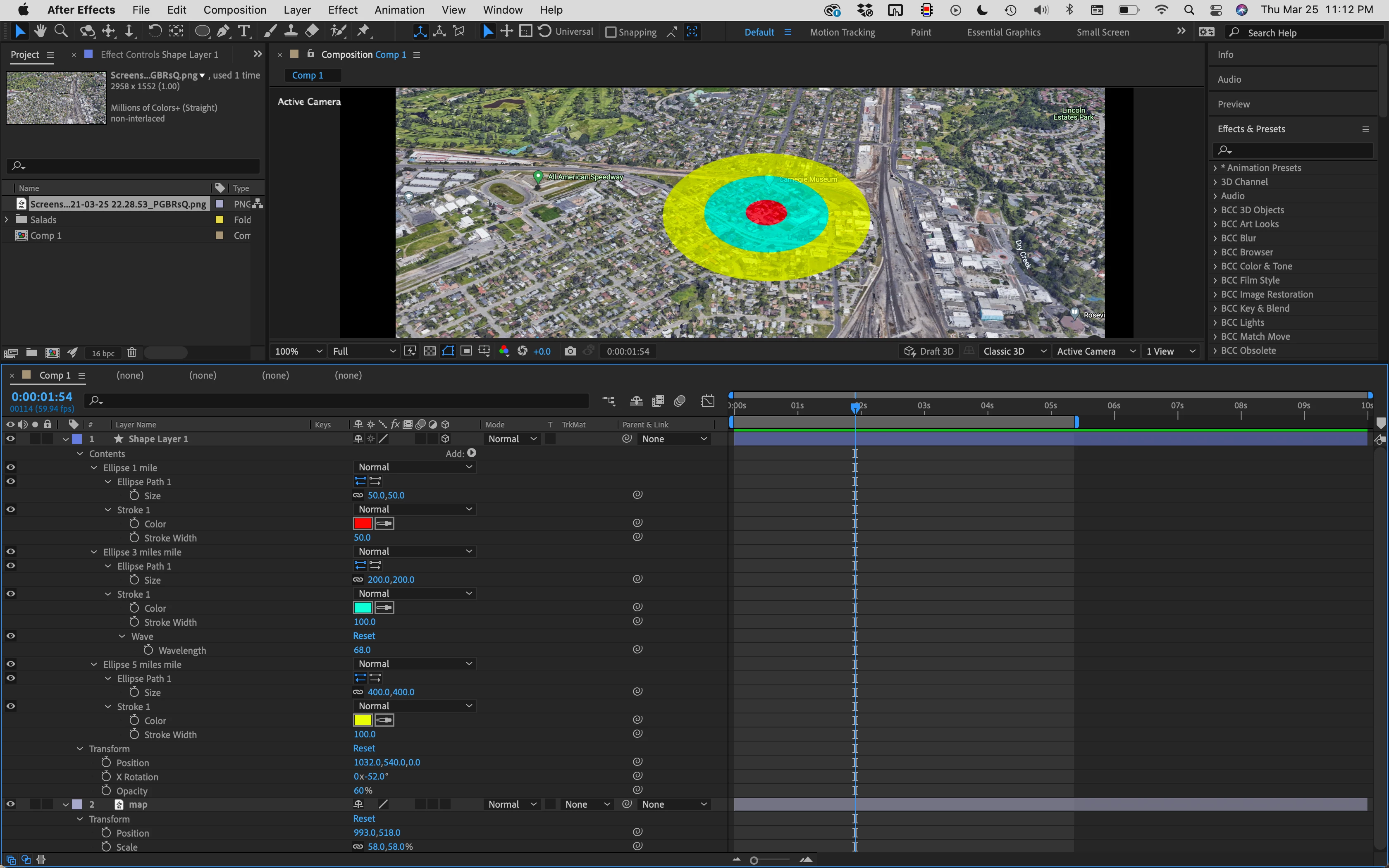
I have not animated anything here. You'll have to animate both the size and the stroke width. 


That should get you started.

2 replies

Rick GerardCommunity ExpertCorrect answer
Community Expert
March 26, 2021

You need a copy of each of your animated circles with 100% transparency. I would add matte to the layer names and tie to the size of each of the disks to their original using a simple pickwhip expression from the Layers and Links column. Turn off the matte copies and move them to the bottom of the stack. Add Set matte to the five-mile disk, set it to use the one mile matte layer as the source and invert the matte. Duplicate Set Matt and set the copy to use the three-mile matte layer as the source. Add set matte to the two-mile layer and set it to use the one mile matte as the source. Set the one, three and five-mile layer transparency to 60%, tie all the layers to a null with parenting, and animate the size of each disk. The three and five-mile layers will now be doughnut-shaped as they grow and you won't have overlapping transparency. The comp would look like this:

You are seeing all the modified properties of the layers. 


Another option would be to use strokes instead of fills and animate the width of the stroke so each layer was a doughnut. You could also use copies of the disks on the shape layers and merge paths to create your doughnut shapes. You just can't do it without creating doughnuts. 

I have not animated anything here. You'll have to animate both the size and the stroke width. 


That should get you started.
Roland Kahlenberg
Legend
March 20, 2021

Select the Layer that you want to have the Cutout Effect applied. Apply Effects>Channel>Set Matte to this layer. Change the Set Matte's "Take Matte from Layer" seelction to the appropriate Shape Layer. To the immediate right of this Menu, select the appropriate Option for Source|Masks|Effects&Masks. You will most likely want to disable the Visibility Icon (eyeball) for the Shape Layer that you've used as a matte. HTH

Very Advanced After Effects Training | Adaptive & Responsive Toolkits | Intelligent Design Assets (IDAs) | MoGraph Design System DEV
Inspiring
March 21, 2021

Roland, thank you so much for your answer.


That doesn't seem to work the way I intended. I attached a video to show you what I mean.

I want these 3 circles to expand without the first and second circle to darken due to the underlaying 2 circles expanding.

Hope this makes sense.

Roland Kahlenberg
Legend
March 22, 2021

Sorry for not explaining it properly.


All I want is for each circle to maintain its color and transparency.

As soon as the second circle opens up, the small one becomes darker and less transparent. This increases even more when the third circle opens which also affects the transparency of the second one. I don't want that.


I'm open to all kinds of suggestions. If I can mask out the inner part of the second and third circle and only show the outer ring that goes beyond the smaller ones, that's fine.

If I can completely cut out the inner parts of circle 2 and 3 to only show the outer ring, that's fine as well.

Just don't know how to get there as I'm new to AE.


Using the previous circle as a Matte/Track Matte is what you should be looking for. Your issue is with the opacity values adding up with each subsequent circle that animates on. What you want is for each subsequent circle to be transparent where the previous circle exists and this is where the previous circle's Alpha Channel is to be used as a Matte (as a transparent area) for the subsequent circle that animates on.

You can use the Track Matte, Timeline Feature or the Set Matte Effect - which to use depends on the way you've set up the Circles - is each circle on an independent layer or are you using a single Shape Layer with multiple Contents? For such an effect, it's best to have each circle on its own layer.

FWIW, you're doing an effect which is akin to Visual Effects/Compositing and for such effects, having your elements as independent layers provides for more leeway when you require absolute coordination/control over Alpha Channels. HTH

Very Advanced After Effects Training | Adaptive & Responsive Toolkits | Intelligent Design Assets (IDAs) | MoGraph Design System DEV