


Participant
December 28, 2016
Answered

How to move an entire animation?

  • December 28, 2016
  • 1 reply
  • 2030 views

Hi, I'm really new using After Effects, I'm currently working with a template, and I would like to move the composition from where it was originally created, how can I do this without affecting the entire animation?

I know is asking too much but if any of you guys could give me an step by step with visual aid I would greatly appreciated.
This topic has been closed for replies.
Correct answer Roei Tzoref

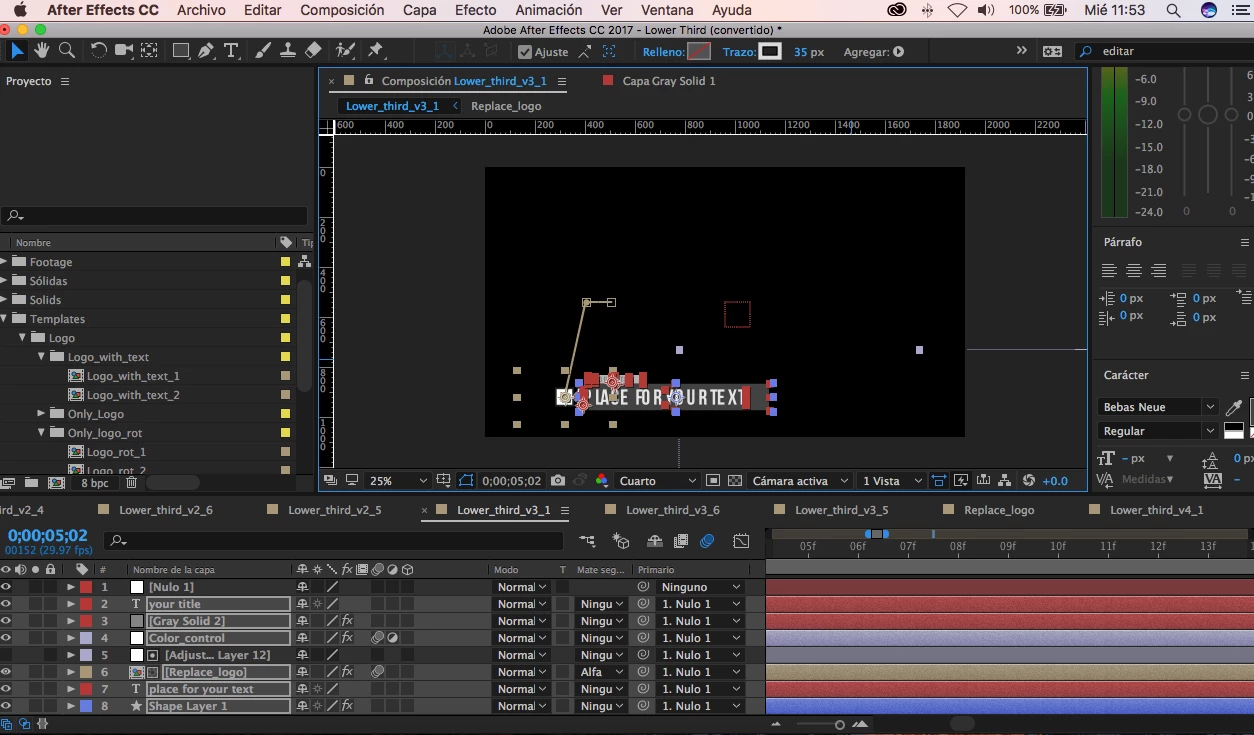
   It didn't work 100%...can you help me?


   It didn't work 100%...can you help me?

you will need to be specific. what did you do? how did it not work? there's only so much one can figure out from a screenshot of a setup he never seen before

I see you have more than one layer you want to move and you choose option 2. did you move the layers? you are supposed to move the null.

click UU on all the layers so we can see everything and try to explain better

1 reply

Roei Tzoref
Legend
December 28, 2016
I'm currently working with a template, and I would like to move the composition from where it was originally created, how can I do this without affecting the entire animation?

this question can be a few things. what exactly do you want to move? keyframes? entire layer?  how exactly? show us so we can better assist you.

lucylucrAuthor
Participant
December 28, 2016

Sure, this what I'm working with

The composition is in the middle, and I need it to be place lower, how can I do that without affecting the keyframes.

Thanks

Roei Tzoref
Legend
December 28, 2016

1. select all the keyframes so they are highlighted

2. make sure your CTI is on one of them

3. move the layer in the composition window or scrub the values

this way you are offsetting the keyframes

OR

1. create a null: layer->new->null

2. connect the composition/layer to the null

3. move the null

4. delete the null