warpigs666
Inspiring
January 5, 2018
Answered

How to paint under stroke?

  • January 5, 2018
  • 2 replies
  • 674 views

Hi. I can't figure out how to paint under the previous stroke with the brush tool. I want in be able to color in a drawing.

    This topic has been closed for replies.
    Correct answer Roei Tzoref

    painting in Ae creates brush stroke layers above the previous one.
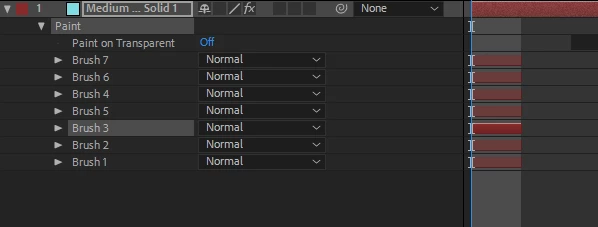
    you can reorder them manually if you want by highlighting it and dragging. make sure you deselect the brush when you are done or you will overwrite it when you paint again. a shortcut for going up and down the brush stack would be nice but there is none unfortunately.

    2 replies

    warpigs666
    Inspiring
    January 7, 2018

    Ok thanks. If anyone else has any interesting workflows I'd be interested to hear them. Otherwise I'll experiment more and report back.

    Roei Tzoref
    Roei TzorefCorrect answer
    Legend
    January 5, 2018

    painting in Ae creates brush stroke layers above the previous one.

    you can reorder them manually if you want by highlighting it and dragging. make sure you deselect the brush when you are done or you will overwrite it when you paint again. a shortcut for going up and down the brush stack would be nice but there is none unfortunately.

    warpigs666
    Inspiring
    January 5, 2018

    Thanks. This program always seems crippled in such weird ways. So would there be no other way of making a shape and then painting under it while seeing it so that the orignal stoke stays on top? Does no one else do it? It seems like it would be a common practice.

    Roei Tzoref
    Legend
    January 5, 2018

    not exactly sure what your setup is. if it's a stroke you are painting inside, you can place it in a different layer and let it be on top, and paint on the layer below (a new layer) and use a 2 window setup to see how it goes. one view is composition view to see the stroke and the color, and the layer view for the paint process to see just the paint strokes. maybe use the stroke too in that layer as a reference.

    Ae's brush/paint tools are far from being it's strength. you are animating them right? (just making sure you are not trying to do something you should do in photoshop which has the "behind" blend mode for brush strokes which is what you are looking for)

    BTW, one gotcha of animating the strokes is unfortunately it embeds in the keyframes the exact timing you painted them in. this means you can only stretch or squeeze the original timing you used when painting. you might want to try and paint exactly as you wish it to paint and not change the keyframes, or otherwise paint in constant pace and later use the keyframes to change it. it will be more clear if it bites you.