
Inspiring
July 18, 2018
Answered

How to scale paths along their direction properly?

  • July 18, 2018
  • 1 reply
  • 2434 views

So I made a logo in illustrator and imported it into AE, with each path on its own shape layer. I'm going to animate the paths so Im extending them all the way out.
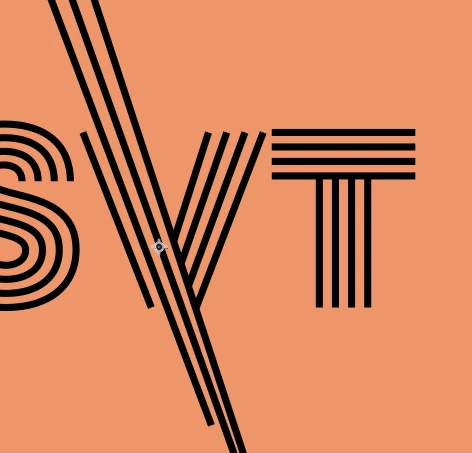
When I scaled up my diagonal paths though they become non-parallel - so my anchor point must be off right? Would that be the anchor point of the shape layer or the anchor point of the Transform: Group 1 of the path? How would I recentre it so they scale parallel? What's going wrong here?  Here's what my layer looks like.
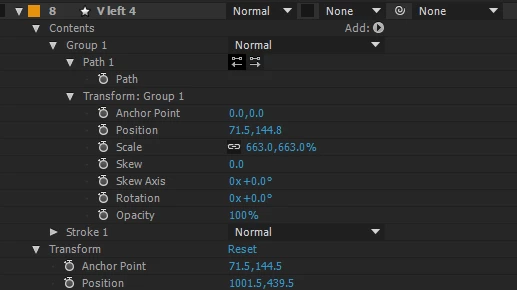
Thanks for your help.

This topic has been closed for replies.
Correct answer Kyle Hamrick

I was going to suggest Trim Paths. Just recreate those lines with strokes.

1 reply

Omar.Fathy
Community Expert
Community Expert
July 18, 2018

You can select the anchor points of the lines and drag all of it.
Or you can scale the all layer.
Can you clarify more what you need to do exactly..?!

everfaeAuthor
Inspiring
July 19, 2018

I just need to extend the line and make it longer, that's really all but I can't find a straight-forward way and the scale is not working to well for me as I don't know what's up with my anchor points.

Later on i'll use trim paths or something to animate it.

Kyle Hamrick
Community Expert
Kyle HamrickCommunity ExpertCorrect answer
Community Expert
July 19, 2018

I was going to suggest Trim Paths. Just recreate those lines with strokes.