
Inspiring
May 14, 2023
Answered

How to select the end of a clip in the end of the timeline

  • May 14, 2023
  • 2 replies
  • 1098 views

Hi forum.


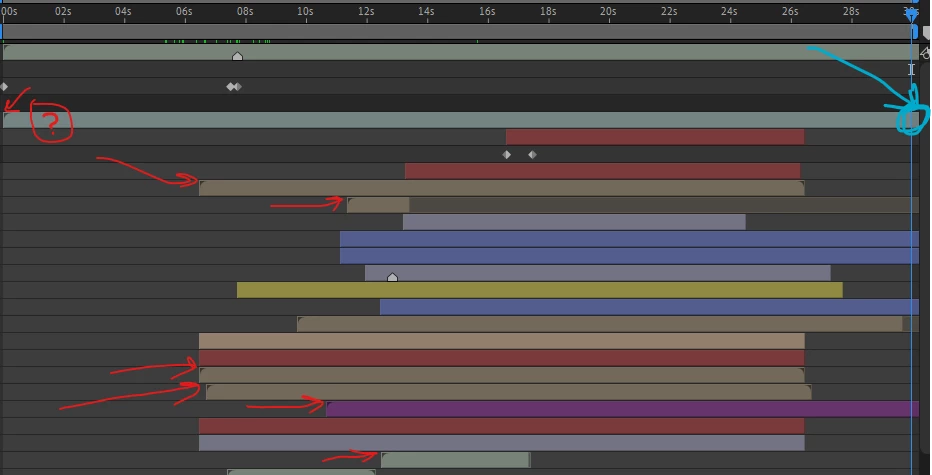
Since I have been using AE, I split the layer of a clip, so I can be able to select the end of it. As I have indicated the layer with the circle and question mark, is there a method I can shorten the clip by selecting the ends of it (shown in CYAN colour arrow), rather than splitting the layer(s) as I usually do?


PS: as seen in the screen shot with the arrows, I have clips which I have split the layers.


Thank you.


This topic has been closed for replies.
Correct answer Rick Gerard

Move the time indicator to the spot you want to set an out point for a layer, select the layer, press Alt/Option ] and a new out point is created. 


The layer in your screenshot extends beyond the end of the comp timeline. If you press Alt/Option + ] the layer's endpoint will be set to what looks to be 25 seconds. 

2 replies

Rick GerardCommunity ExpertCorrect answer
Community Expert
May 14, 2023

Move the time indicator to the spot you want to set an out point for a layer, select the layer, press Alt/Option ] and a new out point is created. 


The layer in your screenshot extends beyond the end of the comp timeline. If you press Alt/Option + ] the layer's endpoint will be set to what looks to be 25 seconds. 

Mylenium
Legend
May 14, 2023

Double-click to open the layer view, set the out point there.


Mylenium