
zhenminl9312629
Participant
December 5, 2018
Answered

how to space out key-frames evenly?

  • December 5, 2018
  • 12 replies
  • 61702 views

My question is fairly simple but haven't found a good solution yet.

The image below shows all key-frames have been placed on a layer

I am wondering is there any ways that can quickly space out those dots evenly. like this image below:

I use photoshop / illustrator as well. they have a series of buttons like this:
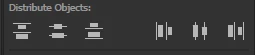
Does After Effect has something similar tools like that as well? if not, how can i quickly achieve the evenly space out dots.

Thanks, Appreciated

    Correct answer Aryan244766988iej

    Hi there, Use this Script.

    function adjustKeyframeSpace() {
        var selectedLayers = app.project.activeItem.selectedLayers;
        if (selectedLayers.length == 0) {
            alert("Please select a layer with keyframes to run this script");
            return;
        }
        var selectedProperties = selectedLayers[0].selectedProperties;
        if (selectedProperties.length == 0) {
            alert("Please select a property with keyframes to run this script");
            return;
        }
        var selectedKeyframes = selectedProperties[0].selectedKeys;
        if (selectedKeyframes.length == 0) {
            alert("Please select some keyframes to run this script");
            return;
        }
    
        var keyframeDuration = selectedProperties[0].keyTime(selectedKeyframes[selectedKeyframes.length - 1]) - selectedProperties[0].keyTime(selectedKeyframes[0]);
        var keyframeInterval = keyframeDuration / (selectedKeyframes.length - 1);
    
        for (var i = 0; i < selectedKeyframes.length; i++) {
            var newKeyframeTime = selectedProperties[0].keyTime(selectedKeyframes[0]) + (keyframeInterval * i);
            var easeIn = selectedProperties[0].keyInTemporalEase(selectedKeyframes[i])[0];
            var easeOut = selectedProperties[0].keyOutTemporalEase(selectedKeyframes[i])[0];
            var value = selectedProperties[0].valueAtTime(selectedProperties[0].keyTime(selectedKeyframes[i]), true);
            selectedProperties[0].removeKey(selectedKeyframes[i]);
            selectedProperties[0].setValueAtTime(newKeyframeTime,value);
            selectedProperties[0].setTemporalEaseAtKey(1, [easeIn], [easeOut]);
        }
    }
    adjustKeyframeSpace();
     

    12 replies

    lyokonrado
    Participant
    June 19, 2019

    I also had this doubt before, you just need to select all the keyframes that you want to space, then press Alt+left button ​and drag  the last keyframe ultil you reach the point you want. Hope this helps!

    rachelcenter
    Legend
    July 22, 2021

    This did not evenly space my keyframes. All it did was shift all of them to the left by a frame


    Rene Andritsch
    Community Expert
    Community Expert
    March 31, 2023

    @rachelcenter Not the left arrow key on the keyboard. The left mouse button.

    Dave_LaRonde
    Inspiring
    December 5, 2018

    By altering the positions of the keyframes on the timeline, you'll also alter the speed at which the property in question animates.

    Do you want to do that?

    zhenminl9312629
    Participant
    December 5, 2018

    yes.. i don't mind the speed. i just want to make the space between each dot the same, so i don't have to eyeball it every time.

    Thanks

    Dave_LaRonde
    Inspiring
    December 5, 2018

    I think this may be the first time no one has cared about the speed of an animation!

    First, make all your keyframes.  Then you can use the Rove Across Time command.  I haven't used it in a LONG time, I'd have to look up how to use it, but it's the closest thing AE has to what you want to do in any kind of automated way.

    And even then they probably won't be evenly spaced.  For that you have to rely on good 'ol arithmetic.  Chances are pretty good you won't be able to use arithmetic, either -- when you divide the number of keyframes by the number of frames they span you'll probably come up with fractions of frames -- and you can't move the timeline cursor in fractions of frames.  So you're stuck.

    Now, Rove Across Time will put keyframes in between actual frames.  But again, they won't be evenly spaced.

    I'm not really sure what your goal is in doing this other than to make the spacing of your keyframes look nice and tidy, which isn't the goal of animating in After Effects.