
Participant
March 18, 2017
Answered

How to stretch an object

  • March 18, 2017
  • 2 replies
  • 5936 views

Hello,

is there a way how to stretch a vector object? I'm trying to kind of straighten this image:
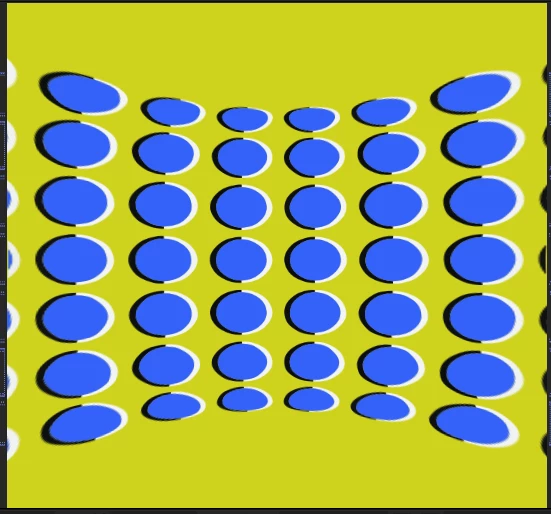
to make it look approximately like this .
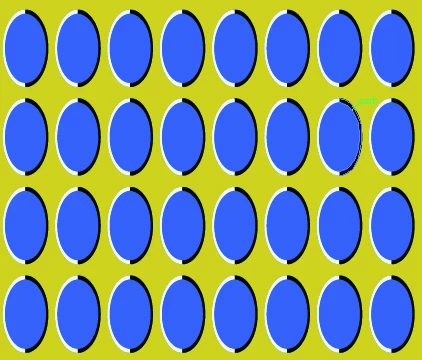
I tried some stretching effects but none of them does the job (or I'm not using them right).

Do you have any suggestions?

Thanks.

This topic has been closed for replies.
Correct answer P.M.B

I'm assuming you are trying to animate this transition?  You're going about it wrong whatever.

Do it backwards.  Start with the un-stretched image and use the mesh warp effect to squash it.  Then reverse the key frames.

If you're not trying to animate and are just trying to straighten it then stop.  Just recreate the image.

It's a beveled oval, no big deal.  You create one,  duplicate it 31 times.  Use the align tools to spread the

layers into a grid then put a solid behind it. You gotta learn to pick your battles.

2 replies

P.M.B
P.M.BCorrect answer
Legend
March 19, 2017

I'm assuming you are trying to animate this transition?  You're going about it wrong whatever.

Do it backwards.  Start with the un-stretched image and use the mesh warp effect to squash it.  Then reverse the key frames.

If you're not trying to animate and are just trying to straighten it then stop.  Just recreate the image.

It's a beveled oval, no big deal.  You create one,  duplicate it 31 times.  Use the align tools to spread the

layers into a grid then put a solid behind it. You gotta learn to pick your battles.

~Gutterfish
Dave_LaRonde
Inspiring
March 19, 2017

You could try the Mesh Warp effect, which relies on your skill moving handles.  You're not just scaling the vertical dimension but also warping the center of the image more than the edges.