Participant
September 21, 2021
Answered

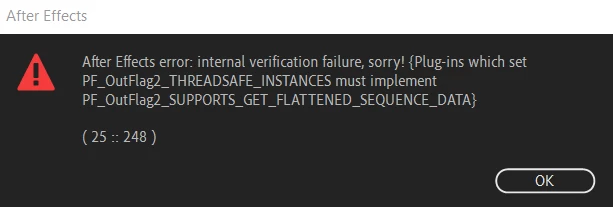
I am unable to load after effects 2020 error (25::248)
  • September 21, 2021
  • 7 replies
  • 24987 views

I tried even after reinstalling it but it shows the same problem. Iam Freaking out please help me asap.

Correct answer eduardo31139837prl1

I solved the problem by deleting the C:\Program Files\Adobe\Common\Plug-ins\7.0\MediaCore\MotionFactory100.aex file.
I bought this plugin on Envato.

7 replies

Participant
February 27, 2023

Pra mim está vindo o mesmo erro, e o engraçado é que no layout de abertura do programa o erro aparece no momento da leitura do Camera Raw, sendo que nem tem o plugin do Raw no After Effects, ou tem e eu não tô encontrando?

Participant
December 21, 2022

hi, i get literaly the same error, but my ae works perfectly, even the plugins work that it downloaded, but i still get that same error everytime i start after effects and adding the plugin

Participant
February 12, 2023

ye i have the same issue. I can still work in after effect after closing all the error boxes but its still annoying

JulienTheAlien
Participant
February 13, 2022

Hi! I would like to ask if you have already solved this issue, if yes, mind if i ask how? Thanks!


Participant
February 10, 2022

i had the same problem

plug-ins which set PF_OutFlag2_THREADSAFE_INSTANCE must implement PF_OutFlag2_SUPPORTS_GET_FLATTENED_SEQUENCE+DATA 

ERROR 25::248

but solved it after deleting these trapcode plug ins

ECHOSPACE.aex
HORIZON.aex
MIR.aex
TAO.aex

Participant
April 21, 2022

I deleted ECHOSPACE.aex and it finally let me start up

eduardo31139837prl1Correct answer
Participant
July 18, 2023

I solved the problem by deleting the C:\Program Files\Adobe\Common\Plug-ins\7.0\MediaCore\MotionFactory100.aex file.
I bought this plugin on Envato.

Willian Kalebe
Participant
December 4, 2021

Oi, eu fiquei com o mesmo problema ao instalar um plugin de terceiros, após procurando a data dos arquivos modificados (eu ja tinha outro plugin com o mesmo nome instalado), os deletei, os arquivos que causavam erro estavam em:   C:\Program Files\Adobe\Common\Plug-ins\7.0\MediaCore


Dentro do MediaCore tava os que recém tinha instalado, deletei e pronto, resolvido o problema

Participant
April 19, 2022

Thank you so much problem solved

Participant
September 24, 2021

same problem

nishu_kush
Community Manager
Community Manager
September 22, 2021

Hi GamerScience,


Sorry for your issue. Could you share the following details so that we can understand the issue properly:

  • What happens if you click OK? Do you get any crash report?
  • What are your system specifications (CPU, GPU, RAM, OS)?
  • Are you using any third-party plug-in? What happens if you remove it?

Let us know, we're here to help.


Thanks,

Nishu

Participant
September 22, 2021
After I click okay the same dialogue box appeara continously, ans I have to
end task to close it.
Mine device is Laptop Acer Preadtor Helios 300
16 GB RAM i7 9th generation Windows 10.
I tried to install a saber glow effect plugin and this crashed my after
effect into the error.
And I have already deleted that everything from my Laptop but still it
isn't working at all.
Participant
December 25, 2021

Hi there!

Sorry about that. Can you try resetting preference and see if that helps? https://community.adobe.com/t5/after-effects-discussions/faq-how-to-reset-trash-preferences-in-after-effects/td-p/10634342


Thanks,

Kartika


 Buenas tardes,


 Tengo el mismo error (25::248), se ha generado al instalar el plugging  VCOrb_1.03 (VCOrb_1.0.3_Installer_x64), he reseteado preferencias he eliminado archivos de  Common, y sigo teniendo el mismo error, AF funciona perfectamente,,pero cada vez que arranca o abro un archivo aparece el molesto error,

pueden indicarme pasos para poder eliminar este error,


 Gracias
Ivan