Participant
September 21, 2021
Answered

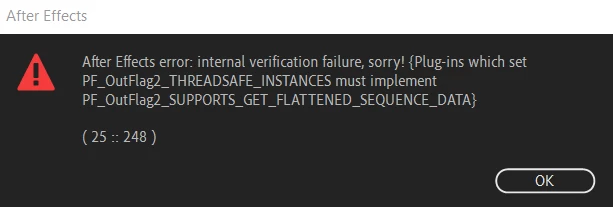
I am unable to load after effects 2020 error (25::248)
  • September 21, 2021
  • 7 replies
  • 24984 views

I tried even after reinstalling it but it shows the same problem. Iam Freaking out please help me asap.

Correct answer eduardo31139837prl1

I solved the problem by deleting the C:\Program Files\Adobe\Common\Plug-ins\7.0\MediaCore\MotionFactory100.aex file.
I bought this plugin on Envato.

7 replies

Participant
February 27, 2023

Pra mim está vindo o mesmo erro, e o engraçado é que no layout de abertura do programa o erro aparece no momento da leitura do Camera Raw, sendo que nem tem o plugin do Raw no After Effects, ou tem e eu não tô encontrando?

Participant
December 21, 2022

hi, i get literaly the same error, but my ae works perfectly, even the plugins work that it downloaded, but i still get that same error everytime i start after effects and adding the plugin

Participant
February 12, 2023

ye i have the same issue. I can still work in after effect after closing all the error boxes but its still annoying

JulienTheAlien
Participant
February 13, 2022

Hi! I would like to ask if you have already solved this issue, if yes, mind if i ask how? Thanks!


Participant
February 10, 2022

i had the same problem

plug-ins which set PF_OutFlag2_THREADSAFE_INSTANCE must implement PF_OutFlag2_SUPPORTS_GET_FLATTENED_SEQUENCE+DATA 

ERROR 25::248

but solved it after deleting these trapcode plug ins

ECHOSPACE.aex
HORIZON.aex
MIR.aex
TAO.aex

Participant
April 21, 2022

I deleted ECHOSPACE.aex and it finally let me start up

eduardo31139837prl1Correct answer
Participant
July 18, 2023

I solved the problem by deleting the C:\Program Files\Adobe\Common\Plug-ins\7.0\MediaCore\MotionFactory100.aex file.
I bought this plugin on Envato.

Willian Kalebe
Participant
December 4, 2021

Oi, eu fiquei com o mesmo problema ao instalar um plugin de terceiros, após procurando a data dos arquivos modificados (eu ja tinha outro plugin com o mesmo nome instalado), os deletei, os arquivos que causavam erro estavam em:   C:\Program Files\Adobe\Common\Plug-ins\7.0\MediaCore


Dentro do MediaCore tava os que recém tinha instalado, deletei e pronto, resolvido o problema

Participant
April 19, 2022

Thank you so much problem solved

Participant
September 24, 2021

same problem

nishu_kush
Community Manager
Community Manager
September 22, 2021

Hi GamerScience,


Sorry for your issue. Could you share the following details so that we can understand the issue properly:

  • What happens if you click OK? Do you get any crash report?
  • What are your system specifications (CPU, GPU, RAM, OS)?
  • Are you using any third-party plug-in? What happens if you remove it?

Let us know, we're here to help.


Thanks,

Nishu

Participant
September 22, 2021
After I click okay the same dialogue box appeara continously, ans I have to
end task to close it.
Mine device is Laptop Acer Preadtor Helios 300
16 GB RAM i7 9th generation Windows 10.
I tried to install a saber glow effect plugin and this crashed my after
effect into the error.
And I have already deleted that everything from my Laptop but still it
isn't working at all.
Participant
May 16, 2022

hello friend, were you able to solve this problem? i have the same and dont know what to do, if you solve it, please let me know how