Answered
I can't see the shape layer in ae?
Everytime I make a shape mask, the blue outline always appears but the shape never does. I can change the stroke and fill of the shape but it never appears when i look at it.

Everytime I make a shape mask, the blue outline always appears but the shape never does. I can change the stroke and fill of the shape but it never appears when i look at it.
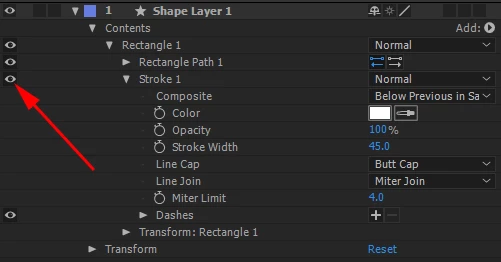
I think Roei hit the nail on the head. You are creating a mask or you have the stroke and fill turned off. Select your layer, press uu to reveal all modified properties, PrintScreen and paste to show us a screenshot. Don't bother posting the image on another site and trying to share. Just drag screenshots to the reply field or paste a PrintScreen.
I dunno, he's definitely got a stroke on the shape. A huge one at that. What I can't see is whether it's actually turned on.
@briannab94194384: look to the left of the Stroke properties. Is the eyeball on?
Already have an account? Login
Enter your E-mail address. We'll send you an e-mail with instructions to reset your password.
 AdChoices