Participating Frequently
December 26, 2018
Answered

I DON’T HAVE H.264

  • December 26, 2018
  • 1 reply
  • 38631 views

So Im trying to render my 53 second video from after effects, but H.264 is not there. Are there any other alternatives?

    This topic has been closed for replies.
    Correct answer Warren Heaton

    I’ve tried adding to AME QUEUE from AE but when I click literally nothing happens


    Adobe Dynamic Link is how After Effects and Media Encoder talk to each other.  It sounds like something went wrong.

    Have you tried to restart?  That usually takes care it.

    You can also try adding your Composition to the Media Encoder Queue from the Media Encoder side by opening Media Encoder and then choosing File > Add After Effects Composition....
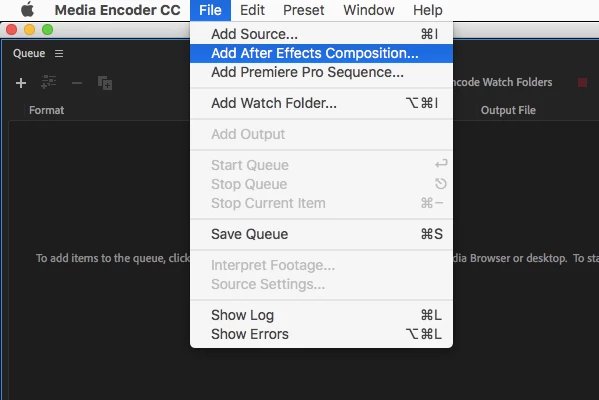
    But again, restarting usually takes care of Dynamic Link issues.

    1 reply

    imeilfx
    Inspiring
    December 26, 2018

    What version of AE are you using? And how do you try to render:
    - by Render Queue
    - or by AME Render Queue
    If you try to render by Render queue - you will not find h264 there and that is normal- if you use AME for rendering you should have h264 and if you don't - there is something wrong.
    So which option do you use?
    More on how to render from AE and which option of rendering to chose you will find here: Basics of rendering and exporting in After Effects CC 

    Participating Frequently
    December 26, 2018

    After realizing I couldn’t render through the Render Queue I opted for AME. I went to ‘file’ and then ‘add after effects composition’. After that, I located my composition and clicked on it, but I would only get a message on the bottom of the window saying ‘connected to Dynamic Link server’. However, it would not give me the option ‘Ok’ to actually link the composition to AME, therefore nothing will load. Then, I went back to ‘file’ and chose ‘add source...’ and selected the composition through there. After pressing ’open’ I would get two windows. One was an “Import from after effects composition” window, but nothing was on the actual window to select. And then another window showed “Add items to queue”. The bar would be full for that window but wouldn’t actually load. Both Windows gave the ‘cancel’ option  without loading anything. I noticed AME DOES HAVE H.264, but It doesn’t even load the videos. Any thoughts? And thank you for the link!

    imeilfx
    Inspiring
    December 26, 2018

    Ok so first if you have any issues with Dynamic Link before doing any more compicated try to reset AE and AME or even reset your computer.
    Then easiest and most officient (in most cases) way of using AME for renderer would be going to (in AE) Composition>Add to Adobe Media Encoder Queue ...

    that should star AME and add your composition to AME render queue - from there you will be able to chose what container, what codec and with what settings you need your final render to make. There will be much longer list of codecs than from AE render queue