Participating Frequently
September 8, 2018
Answered

I want to recreate the ICarly Intro.

  • September 8, 2018
  • 4 replies
  • 17249 views

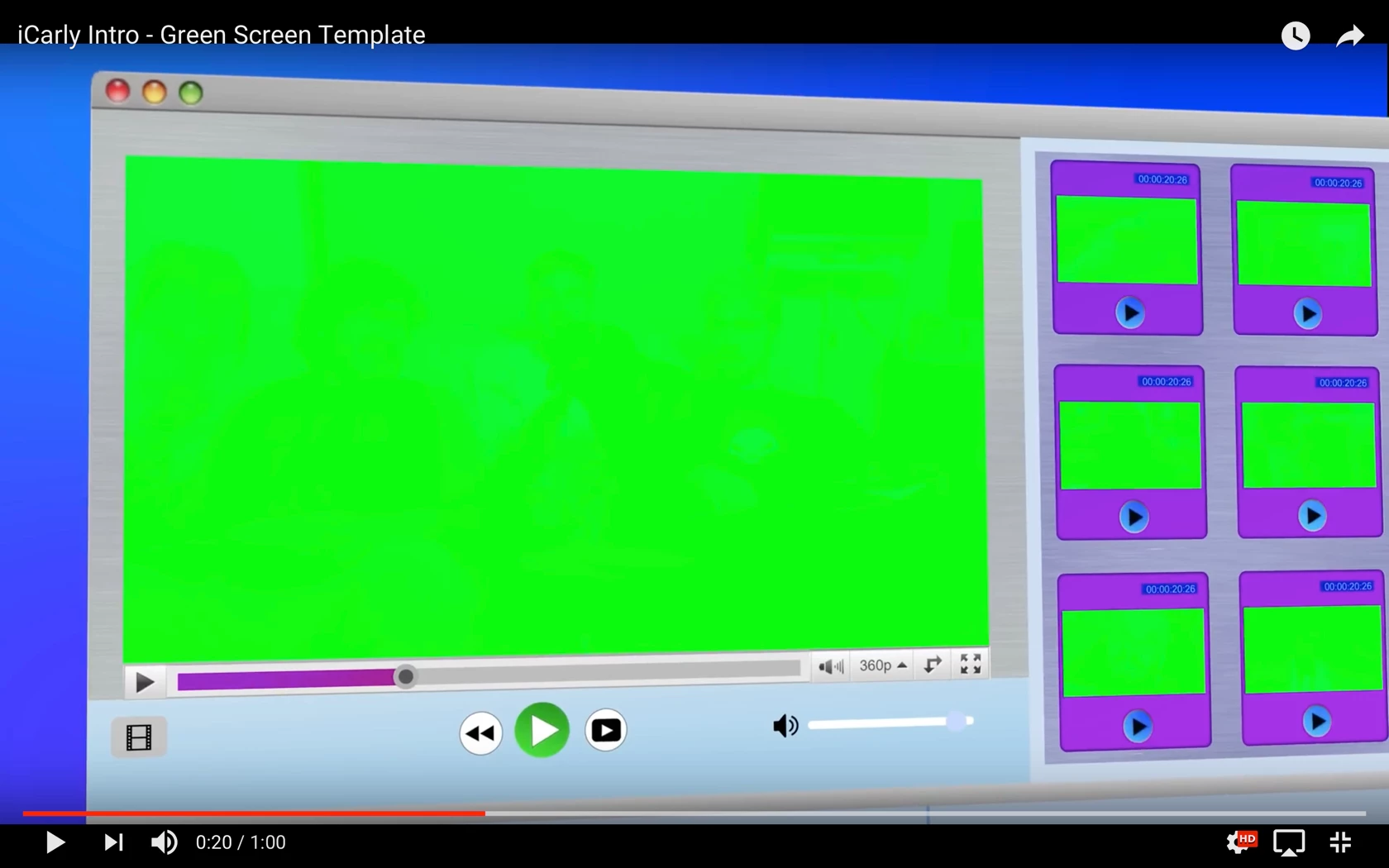
This is the video that I want to be able to use:

iCarly Intro - Green Screen Template - YouTube

I'm not sure how to motion track this. Any help or links to guides would be extremely appreciated!

    Correct answer Rick Gerard

    That specific slip was probably made from a template. While it is possible to track most of the green screens and replace them with video or images you are going to need to break the clip up into about 50 separate comps and do 50 or more tracking jobs. It would take me about a week to complete the project using tracking. Many of the shots would have to be positioned by hand. Trying to do the project using motion tracking would be an incredibly inefficient way to approach the project. The green is something that was added by the person creating this video that they mistakenly thought would make it easier to replace the screens but it actually makes it harder to work with the project. If I had created that project each screen that needed tracking would have a checkerboard pattern. That would make it extremely easy for Mocha or about any other screen tracking software, to track the camera moves. There is no reason to use color keying for any of the screen replacement. It's just a total waste of time. This is a perfect example of a project offered up by an amateur that doesn't really understand production workflows.

    On the other hand, recreating the main graphic in illustrator with each element (screen) on a separate layer, importing as a comp, then arranging the entire thing in 3D space adding the 50 or so video source layers and animating the entire project by hand would probably take a little less than a full production day. The project would be extremely complex and frustrating for someone just starting out. It would require a really decent understanding of animating a camera and AE's 3D space. The timing and camera moves also require a good understanding of the basic principals of animation as explained in "The Illusion of Life" by Ollie Johnson and Frank Thomas, that anyone wanting to create motion graphics should buy and study.

    I have no idea what level of experience you have so I'm not sure what to suggest but I would start by importing a frame like this one into illustrator to use as a guide to recreate the artwork used in the video, use the video as a timing and camera move guide and build the entire thing from scratch. It will take you about 1/10 the time it would take to do all that tracking.
    4 replies

    Community Expert
    September 9, 2018

    It could easily have been just rotoscoping

    Rick GerardCommunity ExpertCorrect answer
    Community Expert
    September 9, 2018

    That specific slip was probably made from a template. While it is possible to track most of the green screens and replace them with video or images you are going to need to break the clip up into about 50 separate comps and do 50 or more tracking jobs. It would take me about a week to complete the project using tracking. Many of the shots would have to be positioned by hand. Trying to do the project using motion tracking would be an incredibly inefficient way to approach the project. The green is something that was added by the person creating this video that they mistakenly thought would make it easier to replace the screens but it actually makes it harder to work with the project. If I had created that project each screen that needed tracking would have a checkerboard pattern. That would make it extremely easy for Mocha or about any other screen tracking software, to track the camera moves. There is no reason to use color keying for any of the screen replacement. It's just a total waste of time. This is a perfect example of a project offered up by an amateur that doesn't really understand production workflows.

    On the other hand, recreating the main graphic in illustrator with each element (screen) on a separate layer, importing as a comp, then arranging the entire thing in 3D space adding the 50 or so video source layers and animating the entire project by hand would probably take a little less than a full production day. The project would be extremely complex and frustrating for someone just starting out. It would require a really decent understanding of animating a camera and AE's 3D space. The timing and camera moves also require a good understanding of the basic principals of animation as explained in "The Illusion of Life" by Ollie Johnson and Frank Thomas, that anyone wanting to create motion graphics should buy and study.

    I have no idea what level of experience you have so I'm not sure what to suggest but I would start by importing a frame like this one into illustrator to use as a guide to recreate the artwork used in the video, use the video as a timing and camera move guide and build the entire thing from scratch. It will take you about 1/10 the time it would take to do all that tracking.

    Participating Frequently
    September 9, 2018

    Unfortunately I do not currently have the skill set to be able to do this. At first glance it really looked simple, copy and pasting your videos into the green screen. I did however, learn quite a bit and will definitely attempt your recommendation. Thank you, hopefully it works out!

    edit: as for how the green screen was made I don't believe a template was used. While looking through the video frame by frame I noticed the actual content behind the green screen in some cases, not noticeable when normally played. I assume the creator of this had motion tracked a green screen on top of the original content to create this.

    Dave_LaRonde
    Inspiring
    September 8, 2018

    Whoever made that thing didn't do their intended users any favors.  That's a pain in the neck to work with.

    Participating Frequently
    September 8, 2018

    Something like mocha pro screen replacement wouldn't work with this? I'm fairly new to motion tracking and have been searching for hours on how to have a series of videos move across the screen.

    P.M.B
    Legend
    September 9, 2018

    youngp44030720  wrote

    Something like mocha pro screen replacement wouldn't work with this?

    What is Mocha Pro screen replacement?  You can certainly use Mocha to replace the screens but as far as I know there's no magic button or feature called "screen replacement".   You have to track the screens and attach your video.  

    youngp44030720  wrote

    I'm not sure how to motion track this.

    What do you need help with exactly?   What have you tried?   Where are you running into a problem?

    ~Gutterfish
    OussK
    Community Expert
    Community Expert
    September 8, 2018

    Really tracking something like this take lot of time also will be difficult depending to this still where the screen flip on 360 degree and so, so my suggestion is to try to find some ready made after effects template can suite your needs, and there are a lot of AE templates in the market