
Participant
May 12, 2017
Answered

Import strokes with pattern brush applied, into After Effects –

  • May 12, 2017
  • 2 replies
  • 7584 views

I have strokes in a Ai. file with a bespoke pattern brush applied. When dropped into AE, and hitting Convert to Vector Shapes, it's expands into individual shapes rather than keeping the stroke (as it would if I was using a standard stroke)

Anyway around this? I have a series of ladders all crossing and winding around each other, if I could keep them as strokes (I've specified endings & corners in the pattern brush settings in Ai) it would be much easier.

Cheers –
This topic has been closed for replies.
Correct answer Roei Tzoref

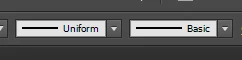
the only way to get a stroke path instead of a fill is to set your brush in Ai to a uniform width and basic brush before you convert it to vector (or copy paste)

if you have that, you will get a stroke and not a fill outline.

a workaround to have both worlds could be:

1. bring your layer once as pixels with the fancy brush, and a second time as a uniform-basic. then you convert only the uniform-basic to vector shape and use it to reveal the fancy brush layer by using it as an Alpha Matte.

OR

2. you could also copy paste the path from Ai to Ae (after you set it to uniform-basic) and use the stroke effect to reveal the fancy brush.

2 replies

Roei Tzoref
Roei TzorefCorrect answer
Legend
May 12, 2017

the only way to get a stroke path instead of a fill is to set your brush in Ai to a uniform width and basic brush before you convert it to vector (or copy paste)

if you have that, you will get a stroke and not a fill outline.

a workaround to have both worlds could be:

1. bring your layer once as pixels with the fancy brush, and a second time as a uniform-basic. then you convert only the uniform-basic to vector shape and use it to reveal the fancy brush layer by using it as an Alpha Matte.

OR

2. you could also copy paste the path from Ai to Ae (after you set it to uniform-basic) and use the stroke effect to reveal the fancy brush.

Mylenium
Legend
May 12, 2017

No. You get what you ask for. A pattern brush is nothing more than that. You would see the same results when using the Expand command in AI, which the conversion function essentially boils down to.

Mylenium