Inspiring
June 19, 2019
Answered

importing an illustrator file to after effects

  • June 19, 2019
  • 4 replies
  • 4760 views

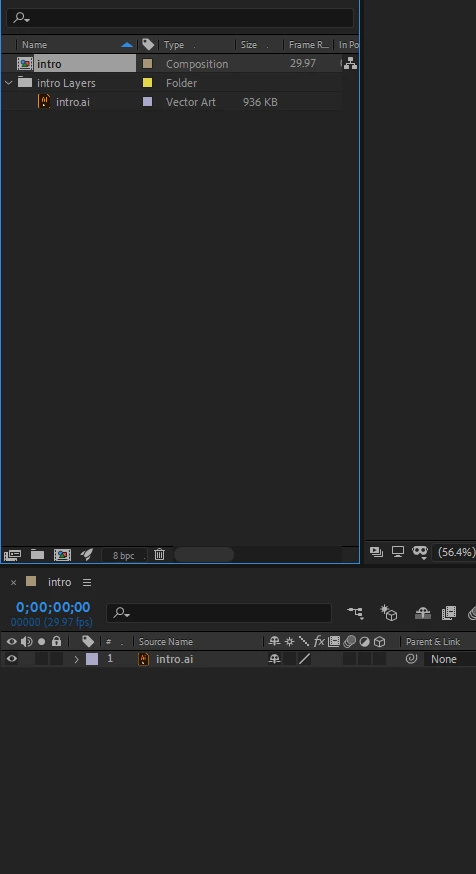
ok so im trying to animate my illustrator file in after effects but when i import the file i just get this and no layers. the layer folder only has the illustrator file.

    This topic has been closed for replies.
    Correct answer Phylen

    ok ive figured it out i just had to fix it by click on the layers panel menu and click release to layers (sequence) in illustrator and importing as regular

    4 replies

    Rizatgraphics
    Participant
    October 28, 2023

    To import your Illustrator file with layers into After Effects, choose "Composition - Retain Layer Sizes" in the import options. Ensure your Illustrator file is properly organized with elements on separate layers. For more guidance, check out riztagar.com for top tutorials on this topic.

    riztagar
    PhylenAuthorCorrect answer
    Inspiring
    June 20, 2019

    ok ive figured it out i just had to fix it by click on the layers panel menu and click release to layers (sequence) in illustrator and importing as regular

    Dave_LaRonde
    Inspiring
    June 20, 2019

    Your problem assumes that you actually created layers in Illustrator, which you may not have done.

    Very few regular Illustrator users do this.

    PhylenAuthor
    Inspiring
    June 20, 2019

    what do you mean by that? these are the layers i have in illustrator

    Justin Taylor-Hyper Brew
    Community Expert
    Community Expert
    June 19, 2019

    There are several ways to do this:

    Convert: Right Click Layer > Create > Create Shapes from Vector Layer

    Copy Paths: Select shape in Illustrator > Copy > Paste onto new After Effects Solid to create Path

    Better methods use Paid 3rd party tools:

    Overlord: https://www.battleaxe.co/overlord

    - Does a fantastic job of maintaining shapes, position, colors, and layout when exporting from Illustrator to AE.

    Explode Shape Layers 3: https://aescripts.com/explode-shape-layers/

    - Great tool for exploding shape layers after converted in AE and merging layers do you don't have hundreds of unnecessary layers in dense projects, and you don't have to manually copy/paste solo shapes in each duplicate layer.