
Known Participant
January 12, 2022
Question

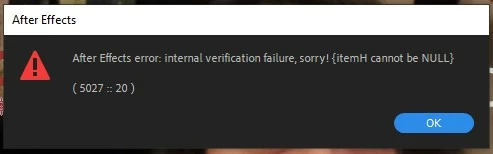
Internal verification error when using text

  • January 12, 2022
  • 4 replies
  • 296 views

Yesterday I discovered a new bug in the latest AE. I cannot type more than one letter with the attached error showing up. I have to resort to typing what I want in another program, then copy/pasting into AE, then making the text layer a subcomp. Only then does the error go away.


This needs to be fixed today.
 

This topic has been closed for replies.

4 replies

nishu_kush
Legend
January 19, 2022

Hi TL Westgate,


Sorry for your issue.

I saw a few other users reporting the same issue. We'd need more details so that we can try to reproduce the issue at our end:

  • What are the rest of your system specifications (CPU, RAM, OS version)?
  • What's the exact version of After Effects you're using?
  • Did you make any changes to your computer recently? For example: installing OS updates or installing a new program/font?

Please try the following and see if it brings any change.

  1. Reset the preferences of After Effects: https://community.adobe.com/t5/after-effects-discussions/faq-how-to-reset-trash-preferences-in-after-effects/td-p/10634342 
  2. Change permissions as instructed in the following article: https://helpx.adobe.com/in/x-productkb/multi/preferences-folder-read-only-error.html 
  3. Try running After Effects as administrator. Right-click After Effects icon > Run as administrator.
  4. Create a new user account (with admin rights) and test After Effects in it.

We're here to help, just need more info.


Thanks,

Nishu

Known Participant
January 19, 2022

How about today?

Known Participant
January 17, 2022

Any progress on this issue?

Mylenium
Legend
January 12, 2022

Without any system information and critical info like what language and font are being used this is not much use. If it was as prevalent as you say, the forum would be flooded with such posts and since it isn't, the conditions must be specific. Since the error code clearly indicates an issue with the hardware accelerated render pipeline, start by turning off that stuff and update your graphics driver. Everything else will require more info.


Mylenium

Known Participant
January 15, 2022

I have a new Alienware with a 3080Ti video card. This occurs with any font, whether I type in new text or load a template from Digital Juice. It's not font specific. It's ANY text.