
Dr ZeroThrE
Participant
March 8, 2023
Question

Is there a shortcut to align beginning of pre comp to playhead in AE?

  • March 8, 2023
  • 1 reply
  • 1702 views

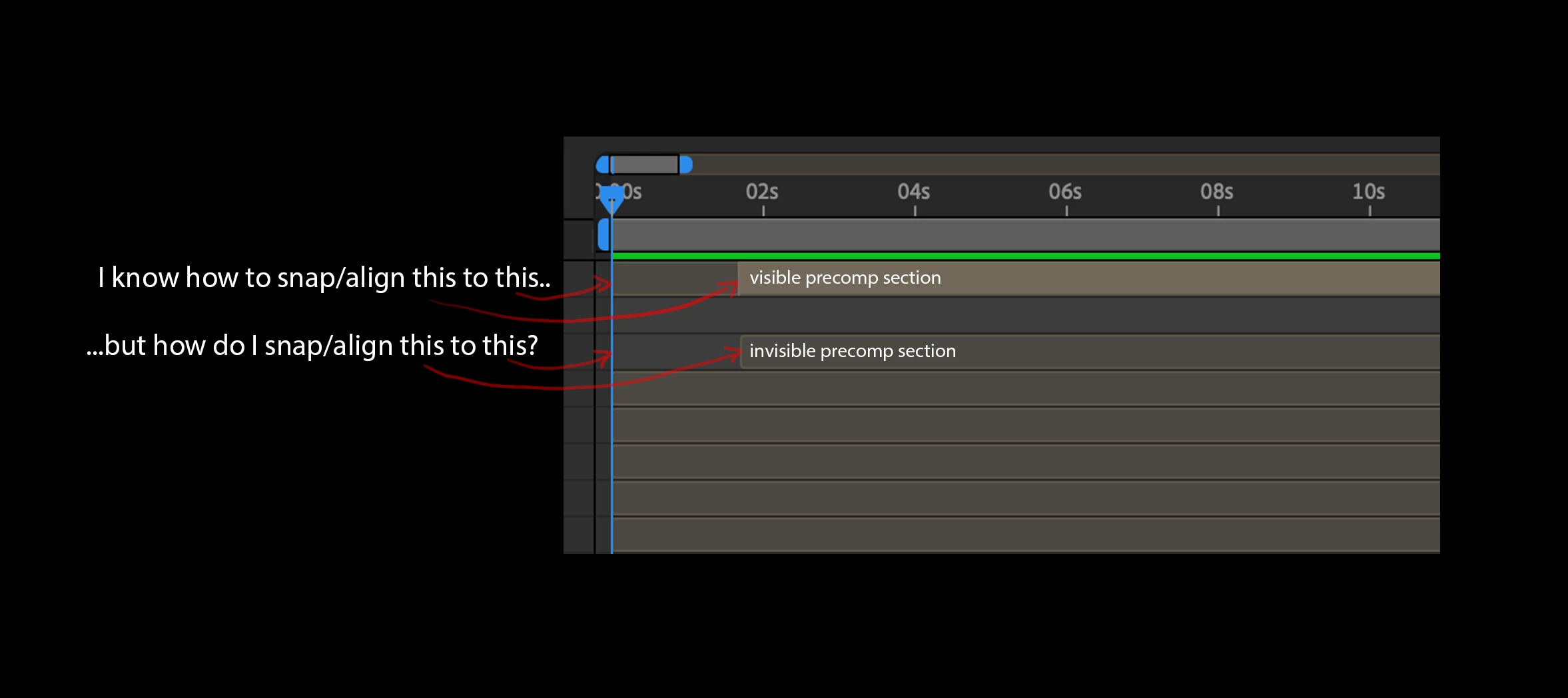
Hey folks, wondering if anyone can tell me the shortcut to align the beginning of a precomp to the playhead in AE, or even just to the exact beginning of the comp?  I know how to align and snap the active, visible section of a precomp to the playhead using “[“ or “]” but can’t figure out how to align the actual beginning of the pre comp to the playhead or even the comp beginning.  Thanks for any info!
1 reply

Community Expert
March 9, 2023

Try using the left and right square bracket key [ or ] to snap the start or end of a layer to the CTI (Current Time Indicator).

Dr ZeroThrE
Participant
March 9, 2023

Thanks for responding - using the bracket keys only aligns the active section of a precomp to the CTI, but doesn’t align the ACTUAL beginning of a pre comp layer to the CTI (if that makes sense).  

Dr ZeroThrE
Participant
March 9, 2023

I can honestly say I have never had a 25-minute AE comp. I would be looking for ways to cut the comp up into shots or short sequences. Never had a project that had one shot that needed to last for 25 minutes. My longest comps are one phrase or one idea. A 20-second comp is very unusual because a sentence or phrase of music, or even an idea can usually be delivered in less than 10 seconds. 


The only thing I can suggest is that you select all of the nested comps that need to be re-aligned and pre-compose them again, trimming the pre-comp to the length of the layers, then sliding the group into the right position, so timing is restored. If the layers are randomly out of sync, you're kind of stuck.


You might be able to write a script that puts a layer marker at the current in-point, then reset the in-point to the start of the layer, then moves the layers to the CTI, then resets the in-point of every layer to the layer marker. 


Yeah, I'll give that a try - thanks for the info, appreciate it!