

Robot Bubble
Participant
October 10, 2022
Question

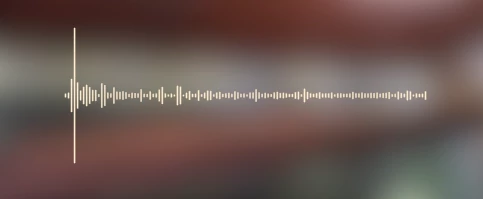
Is there a way to center the audiowave spectrum?

  • October 10, 2022
  • 3 replies
  • 1617 views

Hello there, I'm not sure if this is possible but I'm trying to see if I can make the audio spectrum "start" in the center of the wave? In the image below you'll see the audio "starts" or is most sginificant on the left. Is there a way to make it so that is actually the center of the wave?


Thank you in advance!
This topic has been closed for replies.

3 replies

Participating Frequently
December 6, 2024

Hi! To center the audio spectrum, you can try adjusting the keyframes or use time remapping to shift the wave's starting point. You may need to adjust the anchor point or layer position to align the spectrum’s start with the center. Let me know if you need further help!

Community Expert
December 6, 2024

Audio Spectrum uses frequency. To create a symmetrical pattern, start by watching the waveform and finding the average loudest frequencies. Then adjust the Start Frequency (easy if you hold down the Ctrl/Cmnd key and drag the value) until you find a good starting frequency for the middle of your display.


The next stop is to reveal the Start point in the timeline (setting a keyframe and pressing U will do it) and the Anchor Point property. Drag a pickwhip from the start point to the anchor point to set the frequency display's anchor point and start point in the same spot.


Next, duplicate the layer, reveal the scale of the duplicate, and set the scale to -100, 100


That's all there is to it. If you tie the start frequencies of the layers together with an expression, you can easily fine-tune the look of your symmetrical display. It took me about 2 minutes to set this one up:

That should get you what you describe.

Mylenium
Legend
October 10, 2022

I think Jose misunderstood your question. Anyway, to simply offset the effect you can use Motion Tile applied after the spectrum and simply shift its Tile Center. Just make sure you use a solid that doesn't cover the entire comp and place the start and end points at the edges so there are no gaps.


Mylenium

Participant
December 3, 2024

Thank you very much! But, is there a way i can connect them? I tried mirroring, but thats looked ugly.


Robot Bubble
Participant
December 3, 2024

I mirrored them and then adjusted the frequencies to be different, and I think it looks decent that way.


I set the left spectrum to frequencies 10 - 2500 and the right frequencies to 250 - 1500. It's worth playing around with them to see what fits exactly what you're looking for, but I found this method to look the cleanest.

Jose Panadero
Community Expert
Community Expert
October 10, 2022

There are a couple of ways to do it. The first one is to use the Start Point parameter to set the new start location. The second way is to add a custom mask where you want the audio spectrum to be placed and then use the Path parameter to set the position of your audio spectrum over the mask path.

Robot Bubble
Participant
October 10, 2022

Where do I find the Start Point Parameter settings?

All I can find for the Audio Spectrum is the Start Frequency.

Robot Bubble
Participant
October 10, 2022

Check the attached image.


Thank you for sharing. Unfortunately, that doesn't achieve what I'm trying to do. Adjusting the starting point changes the length of the spectrum and its location.


I'm trying to change so the center of the audiowave is the most prominent part of it. At the moment the wave seems to read left to right rather than moving outward from the center. The position of the audio spectrum is perfect.