Participant
July 15, 2018
Answered

Is there a way to link a composition twice? (Premiere Pro)

  • July 15, 2018
  • 1 reply
  • 849 views

Hey there

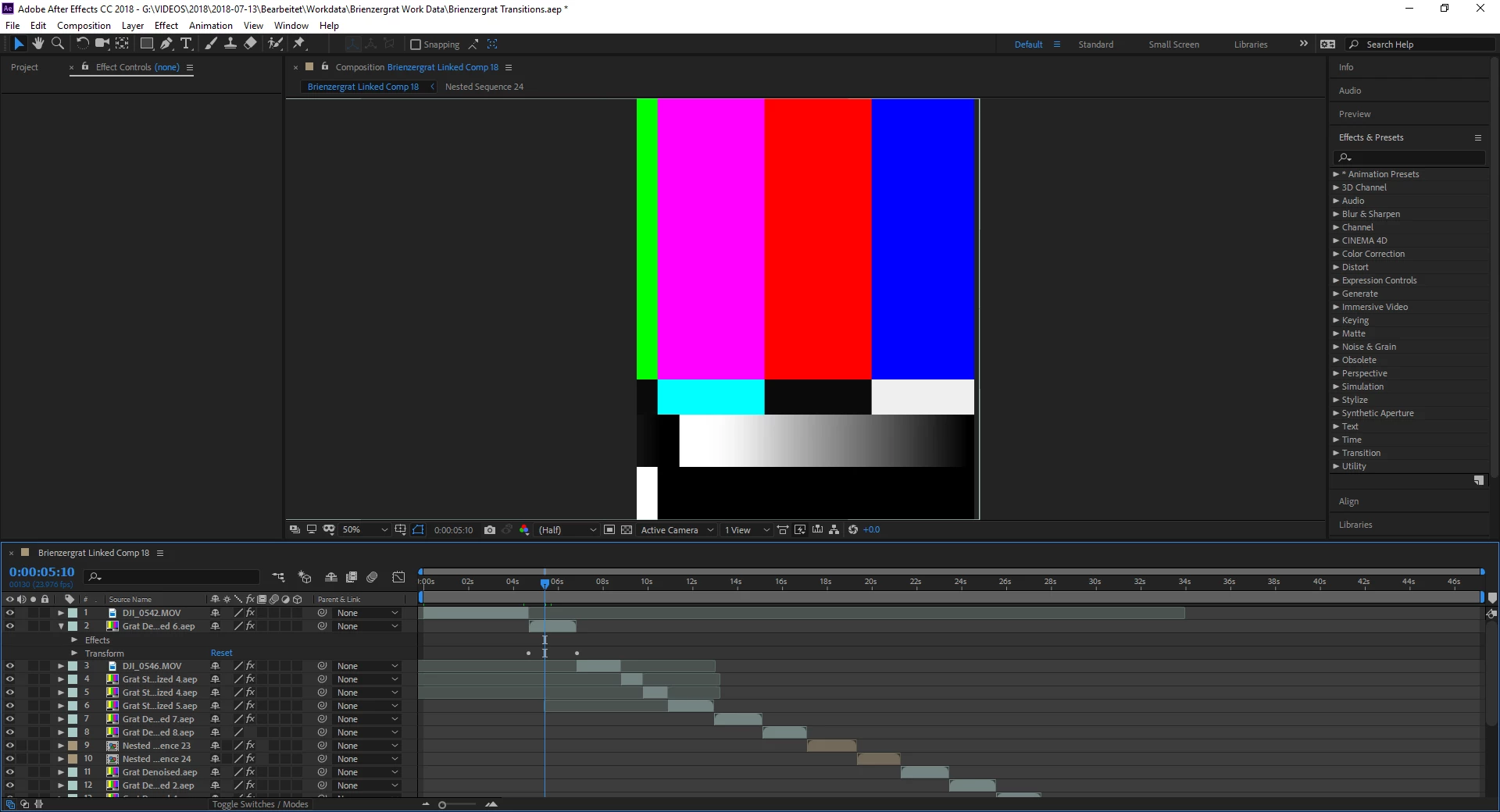
I found a problem with my linking workflow. I startet to link different videos in premiere pro with after effects to stabilize them. Now I want to link my whole sequence with normal videos and linked after effects compositions with after effects. It opens it in after effects, but the previously linked after effects compositions aren't working properly. There is a strange layer, but no video (see attachment).

Does anybody know a possible solution for my workflow? I just want the previously linked after effects videos to appear as real video, not as this weird layer.

Sincerely,

Nicolas

This topic has been closed for replies.
Correct answer Rick Gerard

What you are seeing is missing footage. I take it that the AE project file and the Brienzergrat Linked Comp 18 was created by selecting more than a dozen shots in a Premiere Pro timeline and choosing "Replace with After Effects Composition."

Sorry, that won't work at all the way you are doing it. I see at least seven different AEP files in your timeline and none of the names match the name of the current project. I don't know if this would work if all of the dynamically linked comps were in the same AEP file, but even if it did it would be a pretty terrible idea. Dynamic Link was never designed to do this kind of multi-pass processing.

Warp stabilizing is a resource-eating task that produces dynamic results that probably will not end up exactly the same every time you run the process on the same clip. These shots also take a very long time to render inside AE and even longer when AE is running in the background using Adobe's Dynamic Link. Generally, unless the shot or effect is extremely simple and short I will render my AE comps and replace the original shot with the FX shots in the Premiere Pro sequence they came from. I'll use Dynamic link to get the comp started, then immediately go back to PPro, undo the "Replace with After Effects Composition" step and mark the clip for replacement. You'll spend less time finishing your project if you work this way than you would if you try to keep everything linked up in an After Effects project.

I know I didn't help much but you are going to have to at a minimum get all of those linked AEP files into one file, then replace all of the linked shots in the PPro sequence and then try and see if it works or just render and replace all of the linked comps with rendered footage.

1 reply

Rick GerardCommunity ExpertCorrect answer
Community Expert
July 16, 2018

What you are seeing is missing footage. I take it that the AE project file and the Brienzergrat Linked Comp 18 was created by selecting more than a dozen shots in a Premiere Pro timeline and choosing "Replace with After Effects Composition."

Sorry, that won't work at all the way you are doing it. I see at least seven different AEP files in your timeline and none of the names match the name of the current project. I don't know if this would work if all of the dynamically linked comps were in the same AEP file, but even if it did it would be a pretty terrible idea. Dynamic Link was never designed to do this kind of multi-pass processing.

Warp stabilizing is a resource-eating task that produces dynamic results that probably will not end up exactly the same every time you run the process on the same clip. These shots also take a very long time to render inside AE and even longer when AE is running in the background using Adobe's Dynamic Link. Generally, unless the shot or effect is extremely simple and short I will render my AE comps and replace the original shot with the FX shots in the Premiere Pro sequence they came from. I'll use Dynamic link to get the comp started, then immediately go back to PPro, undo the "Replace with After Effects Composition" step and mark the clip for replacement. You'll spend less time finishing your project if you work this way than you would if you try to keep everything linked up in an After Effects project.

I know I didn't help much but you are going to have to at a minimum get all of those linked AEP files into one file, then replace all of the linked shots in the PPro sequence and then try and see if it works or just render and replace all of the linked comps with rendered footage.

Participant
July 16, 2018

Okay, actually that helps me a lot! Knowing that, I will start linking videos with After Effects Composition and then export them out of After Effects after I‘m done and import them back into Premiere Pro and replace them.

Thank you very much!