
Participating Frequently
September 15, 2022
Answered

Issue - Can not turn text stroke completely off in character panel.

  • September 15, 2022
  • 1 reply
  • 523 views

Hello,


I've noticed this issue for awhile now, but honestly have ignored it for a while. I'm on the latest version of after effects (22.6.0) on a macbook pro M1 chip running Monterey, but I noticed it well before I updated to the latest AE version.


I cannot make the stroke on my text layers EXACTLY 0. It always changes it back to .01. When I try to delete the 1, it literally re-writes it. Effectively, when I have a text layer that is the same color as my background solid, you can always see a very faint stroke around the text, unless I change the stroke color to match. Is this how it's always been, and I just never noticed? Am I taking crazy pills? Why can't I turn the stroke OFF or set it to exactly 0? Is the Pope Catholic? Are we really alone in the universe?


If you can answer any of my above questions, I'd be grateful. I know there are several workarounds, but I don't feel like this should require a workaround for such a simple functionality. 


Thanks.
This topic has been closed for replies.
Correct answer Roland Kahlenberg

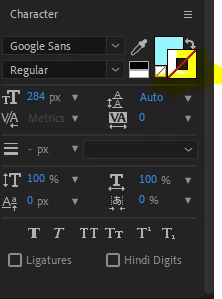
You can disable the Stroke feature and when disabled, the stroke value becomes redundant. To disable Stroke, click on the Stroke Color Swatch and then click on the Disable Color swatch (this is the little swatch with the diagonal line). The Disable Color Swatch works when either the Fill or Stroke Color Swatches are selected. HTH


1 reply

Roland Kahlenberg
Roland KahlenbergCorrect answer
Legend
September 15, 2022

You can disable the Stroke feature and when disabled, the stroke value becomes redundant. To disable Stroke, click on the Stroke Color Swatch and then click on the Disable Color swatch (this is the little swatch with the diagonal line). The Disable Color Swatch works when either the Fill or Stroke Color Swatches are selected. HTH


Very Advanced After Effects Training | Adaptive & Responsive Toolkits | Intelligent Design Assets (IDAs) | MoGraph Design System DEV
Participating Frequently
September 15, 2022

Thanks so much! Sometimes I think I know this software well...and then small easy things like that pop up...Haha. Appreciate the help!

Roland Kahlenberg
Legend
September 15, 2022

So much to learn. All the time. For All.
And You are most welcome.
Have a great day ahead.

Very Advanced After Effects Training | Adaptive & Responsive Toolkits | Intelligent Design Assets (IDAs) | MoGraph Design System DEV