
Issue with perspective corner pin tracking
I'm trying to do a perspective corner pin (or parallel corner pin) track of a video.
If you look at a tutorial video it shows that to do perspective corner pin track you select the layer, go to "track motion" and then in Track Type you select "perspective corner pin". In the demo video it will then shown something like:
Track Point 1 ----- Track Point 2
Track Point 3 ----- Track Point 4
(so basically a square with the 4 corner points ready for positioning).
But when I do the above (selecting "Perspective corner pin") the track points get created like below:
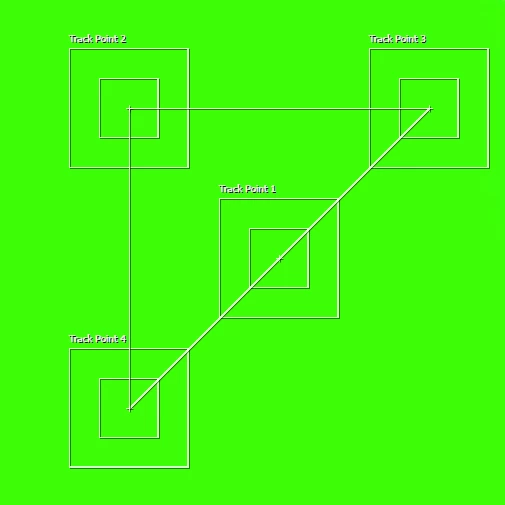
The initially created points for "perspective corner pin" aren't in a square but are in the above shape. It is also hard to move the points because I assume it's doing some validation. What is wrong and how can I fix it so it always defaults the track points the the correct "square" shape with point 2 to the right of point 1 etc?
This is using AECC2017. Also the video I'm using it on says the pixel aspect ratio is "non-square 1.00:1" (what AE interpreted it as) - in case that has anything to do with it.
 AdChoices