fakelawn
Participant
April 15, 2018
Answered

Issues with 3D Camera Tracker Since Most Recent Update

  • April 15, 2018
  • 27 replies
  • 18538 views

First off, I have searched and searched for someone else experiencing this issue and have been unable to find anything online. Adobe's phone support also proved fruitless.

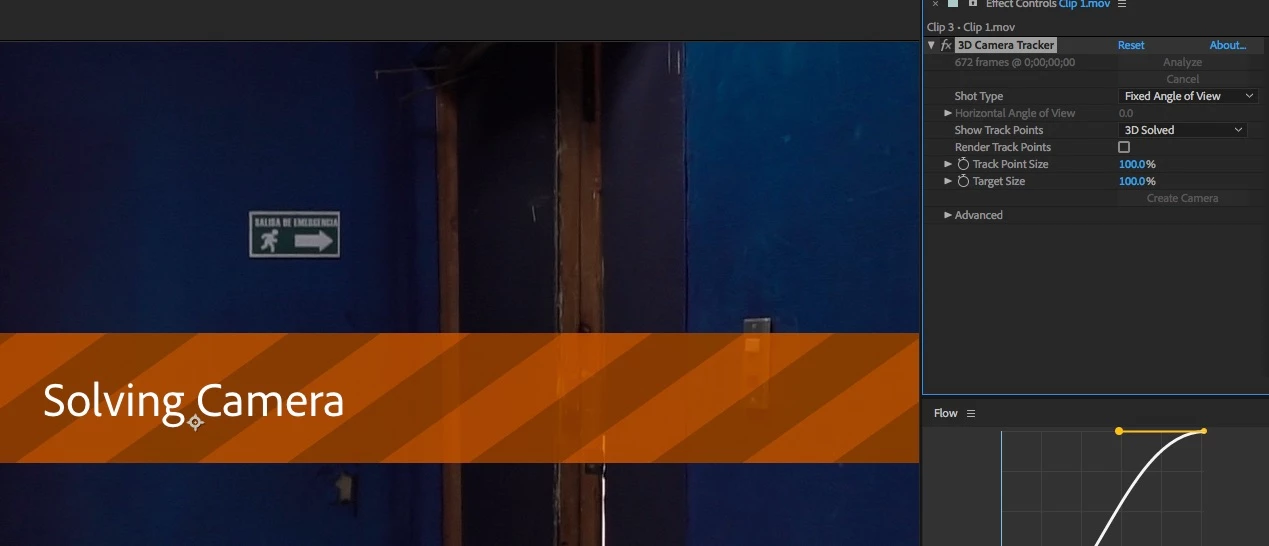
Since updating to the latest version of After Effects CC (version 15.1.0 - build 166), I have been having issues with the 3D Camera Tracker. When dragging the effect onto my footage, the usual initializing process begins and I get the blue "Analyzing in background step 1 of 2" banner across my footage. But under "Effects Controls" it no longer shows the percent complete or the number of frames it is working through, that area (just to the left of the stacked "Analyze" and "Cancel" buttons) is just blank. In addition, under the "Advanced" section, the "Average Error" lines are not returning actual values. Instead of numbers, I see this:  "Average Error: -" and below that "Average Error: %.2f pixels." The analysis phase then would eventually complete and move into the solving phase, and then nothing would happen. Often AE would totally lock up at this stage and I would be forced to end the process through Task Manager. Warp Stabilizer also seems to have stopped working, although I am having no problems using Warp Stabilizer in the latest version of Premiere CC. Originally I was using MOV files recorded off a GH5. These worked perfectly in the previous version of After Effects. And when I attempted to roll back to that previous version, they continue to work exactly as I would expect them to. Searching around online, I discovered that the latest version of AE no longer fully supports Quicktime files, so I suspected that might be the cause of my problems.

I immediately imported an mp4 file and tried that instead. Interestingly, this managed to successfully make it through the 3D Camera tracking process, but it still refuses to display the frames and overall progress at any point, and the "Average Error" sections continue to display:  "Average Error: -" and "Average Error: %.2f pixels."

All of these clips have been quite short and basic and had absolute no issues in previous versions of After Effects.

My computer is also more than beefy enough to handle these sorts of effects. I am running an Intel 8700k with 64gb of RAM. My video card is an EVGA GTX 1080 Ti SC2 with 11gb of video RAM. My work drive is a 1TB Samsung m.2 960 Pro. This a fully updated Windows 10 64bit system, and all of the other drivers are also up to date.

Adobe's phone support claimed to have not heard of anyone else having this issue. And basically refused to help unless I granted their out-of-country support team remote access to my computer. (Um, yeah, that's NOT gonna happen.)

I sincerely hope somebody is able to help me solve this problem. Or at least that others are able to confirm that they too are experiencing a similar bug.

Thank you.

This topic has been closed for replies.
Correct answer noec51612407

Finally WORK! but,  three months for ONE FIX update

Ok, thanks for remove BETA version Adobe After Effects CC 2018

Thank you very much!

27 replies

Participant
May 22, 2018

Same. My most used feature. So glad I just built a dedicated machine for after effects. Guess I'll move back to my beater machine for a while. Are there any special perks to being a beta tester?

Participant
May 22, 2018

Yeh the perks include a free coffee and a muffin if you can tell them to fix it!

It's part of software development, iI get that but when I pay £50 a month for a professional service, thats what i expect.

Im now re installing and having to put all my Video copilot plugins in Pain.....

I reinstalled AE CC 2018 15.0 and the tracker work's as expected now. Lesson learned leave the old version installed till I've

tested the new one .... Dhowwwww!

Participant
May 19, 2018

+1 here. Changing solve method or detailed analysis does nothing. Warp stabilizer seems to be working, albeit without any progress messages.

How many more times will we get broken updates before Adobe decides to pivot and do something differently? After two years of constant fear of updating (which can be difficult when working with third party plugins and multiple editors with different systems and preferences), I'm wondering how long before I can jump ship to a solid alternative. Come on Adobe!

Participant
May 18, 2018

I have the same problem here.
I tried 4k 10 bit footage (30 second clip) the first bit took over 1 hour before I gave up (16 core, 1080ti machine).  I transcoded it down to 1080p (annoying, but just trying to solve the problem now!), and the blue stage went quick... still sitting forever on "solving camera".
Basically... doesn't work.

Argh.

jamieB86
Participant
May 10, 2018

Same problem here. Still waiting to hear something on this...

Participating Frequently
May 5, 2018

Here's something that ended up working for me: try using detailed analysis. Still don't know what happened to showing the progress but the tracking ended up working.

fakelawn
fakelawnAuthor
Participant
May 5, 2018

I always use detailed analysis. You can see that the box is checked in the photo I attached to my original post.

(BTW, it‘s interesting that no Adobe admin has bothered to venture into this thread despite all the customers who are having the same problem. Thanks Adobe!)

Known Participant
May 8, 2018

Same problem here on osx high sierra mac pro 2013. The tracker does nothing!

Participant
May 5, 2018

Okay just downgraded to version 15.0.1 and its working again.

RS Components
Participant
May 14, 2018

+1 Same issue,  when downgraded to version 15.0.1 it works but...if you use premiere...need to downgrade Premiere to version 12.0.1 otherwise Dynamic links does not works...

Participating Frequently
May 14, 2018

.... but the Plugins works when downgrade?

Participant
May 5, 2018

I have the same issue here. Trying to revert back to an older version to see if it fixes it. Quite annoying

Participant
May 4, 2018

Same issue here.

Participating Frequently
May 3, 2018

+1 - Unfortunately we're all permanent beta testers now.

Participant
April 26, 2018

Same thing happened on PC

Participating Frequently
May 2, 2018

is there a fix coming? This is very annoying!