
Exit
  • Global community
    • Language:
      • Deutsch
      • English
      • Español
      • Français
      • Português
  • 日本語コミュニティ
  • 한국 커뮤니티
0

Issues with After Effects Composition Preview

New Here ,
Jan 28, 2020 Jan 28, 2020

When previewing video in the composition window it showed distorted. I realized that After Effects wasn't  updated. When I updated After Effects, problem solved! Now when I apply an animation preset to the video, I get a preview of the same distorted video as I did when the software wasnt up to date, but only where the effect is! Is there something I'm suppsoe to do? Please see Picture.
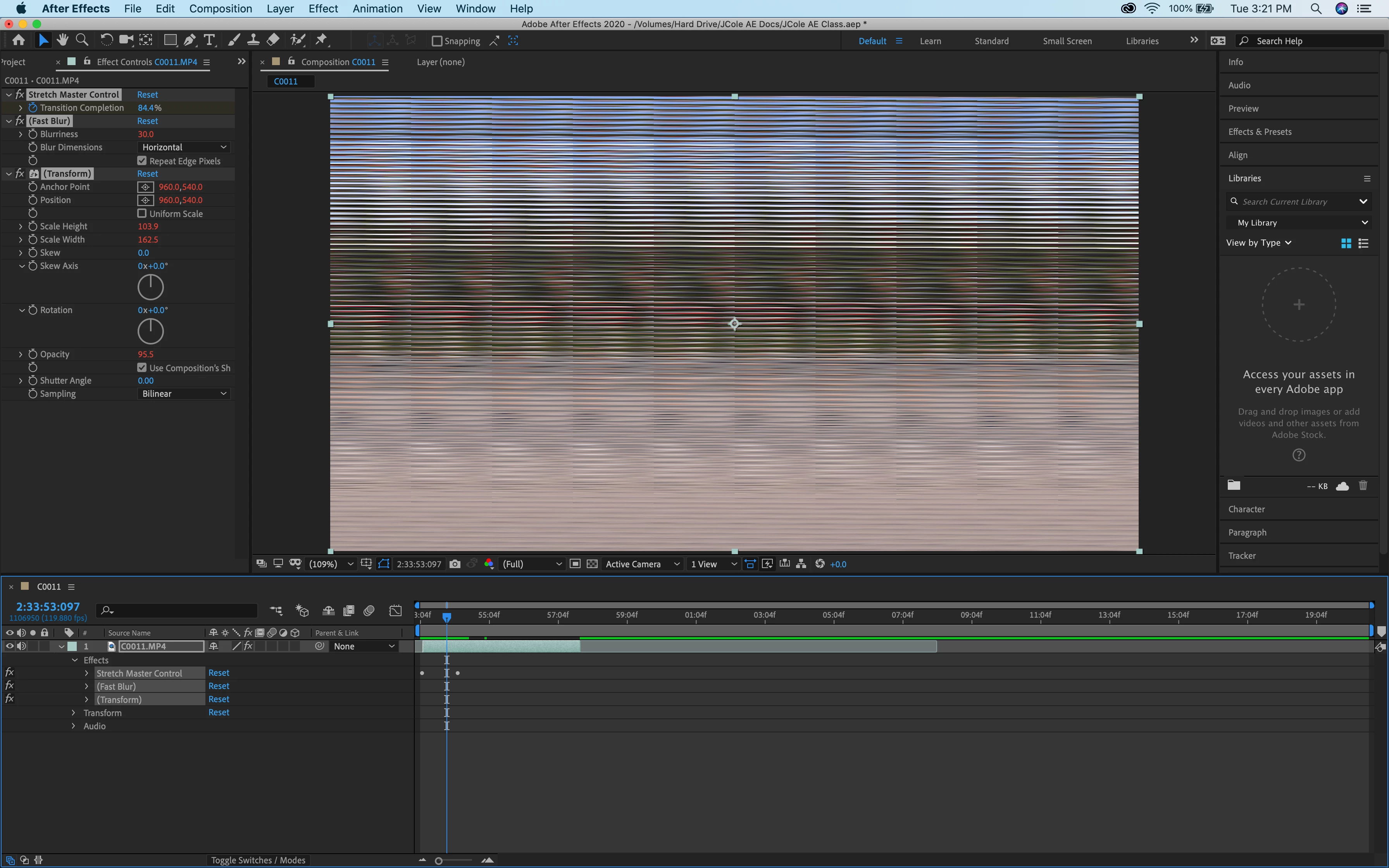
Screen Shot 2020-01-28 at 3.21.53 PM.png 

937
Translate
Report
Community guidelines
Be kind and respectful, give credit to the original source of content, and search for duplicates before posting. Learn more
community guidelines
Valorous Hero ,
Jan 28, 2020 Jan 28, 2020

Disable all hardware acceleration options in the Project Settings and Preference Settings. Then provide your system specs (especially your GPU) and AE version.

Very Advanced After Effects Training | Adaptive & Responsive Toolkits | Intelligent Design Assets (IDAs) | MoGraph Design System DEV
Translate
Report
Community guidelines
Be kind and respectful, give credit to the original source of content, and search for duplicates before posting. Learn more
community guidelines
New Here ,
Jan 29, 2020 Jan 29, 2020

I can really use the help. I appreciate your time. Here are all the specs.


AE Version: 17.0.2 (Build26)


IMG_8784.JPG


Translate
Report
Community guidelines
Be kind and respectful, give credit to the original source of content, and search for duplicates before posting. Learn more
community guidelines
Valorous Hero ,
Jan 29, 2020 Jan 29, 2020

You have TWO GPUs, one is an onboard GPU. Let's ascertain which one is being used by AE. To do this, go to AE's Preferences to open the Previews Section. In the Previews Section, click on the GPU Information button to display your GPU info.


AE_Prefs_Previews_01.PNGAE_Prefs_Previews_GPU_Info_01.PNG

Very Advanced After Effects Training | Adaptive & Responsive Toolkits | Intelligent Design Assets (IDAs) | MoGraph Design System DEV
Translate
Report
Community guidelines
Be kind and respectful, give credit to the original source of content, and search for duplicates before posting. Learn more
community guidelines
New Here ,
Feb 02, 2020 Feb 02, 2020
LATEST

I also have the same macbook pro and I am also having this issue. Also an issue where I am getting blue flashes with ProRes4444 footage. Seems to be ok with 422HQ but transcoding it isnt a workable solution. This seems like a serious bug and it is present on AE 17.0, 17.01 and 17.02


Screenshot 2020-02-02 at 22.10.47.jpg

Translate
Report
Community guidelines
Be kind and respectful, give credit to the original source of content, and search for duplicates before posting. Learn more
community guidelines