
Participating Frequently
December 5, 2023
Answered

Issues with animating wiggle speed

  • December 5, 2023
  • 1 reply
  • 1887 views

Hi.

I am trying to animate circles using the wiggle expression. I need the wiggle speed (frequency) to start at a certain speed and then speed up through the animation, then stay at the same speed for a second at the end. This is part of a larger shot that has other circles with a wiggle speed value that is HIGHER than the end speed of the circles that speed up. 


However, when the wiggle speed is supposed to level out, the circles speed up very fast (even faster or just as fast as the ones with a higher speed value) and THEN they slow back down to where they should be.

I have the speed values linked to slider controls and have based their expressions on this article:
https://www.motionscript.com/articles/speed-control.html


Can somebody please explain how to speed up the wiggle speed and just have it level off at a constant value instead of the spike where they go REALLY fast and then settle down into the speed they should have been since the keyframe? This is driving me crazy. I have lost hours trouble shooting this. (I even tried keeping the wiggle speed constant and animating time remapping)


Here is the base expression I am using (based on the above link):

freq = (thisComp.layer("wiggle_control").effect("wiggleSpeed")("Slider"));
amp = (thisComp.layer("wiggle_control").effect("wiggleSize")("Slider"));
n = freq.numKeys;
if (n > 0 && freq.key(1).time < time){
accum = freq.key(1).value*(freq.key(1).time - inPoint);
for (i = 2; i <= n; i++){
if (freq.key(i).time > time) break;
k1 = freq.key(i-1);
k2 = freq.key(i);
accum += (k1.value + k2.value)*(k2.time - k1.time)/2;
}
accum += (freq.value + freq.key(i-1).value)*(time - freq.key(i-1).time)/2;
}else{
accum = freq.value*(time - inPoint);
}
seedRandom(thisComp.layer("wiggle_control").effect("seedAdd")("Slider") + index);
wiggle(1,amp,1,.5,accum)


Here is a screenshot of my keyframes on the control:
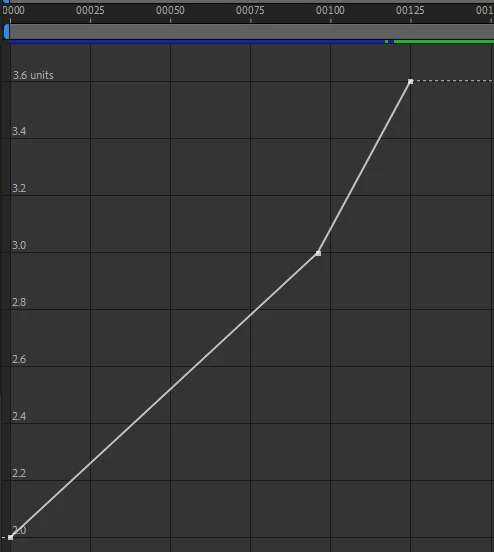
 

Any help would be greatly appreciated. Thank you!

This topic has been closed for replies.
Correct answer Dan Ebberts

Ok, Cool.

Well, either way I'll definitely be interested to hear your conclusions after looking into it.


For what it's worth, this has seemed to work well with slower wiggle speeds.


I was thinking there might be some sort of "speed limit" where the time goes fast enough that enough frames are skipped that the "wiggle" just becomes a series of jumps. So in that case after this speed limit is reached, faster speeds are indistinguishable from slower speeds (assuming the "slower speeds" are past this speed limit) because they all just appear to be a series of random jumps. We are limited by framerate, after all. This would be a larger problem (or at least there would essentially be a slower speed limit) with a setup like mine where the wiggle size (amplitude) is limited to a small number of pixels.


That said, I discounted a "speed limit" as the issue here because the animation noticeably slows down at the end. If we were hitting that speed limit, there would be no slowdown at the end. The wiggle speed would remain perceptibly the same (as a series of quick jumps). Anyway, just thought I'd share my thoughts on that.


Look forward to hearing your thoughts in the future. Thanks again!


One thing I noticed is that you have some easing on the frequency slider keyframes, so the linear keframe integration method isn't going to work. Instead you could switch to the frame-by-frame brute force method, which would look like this:

freq = (thisComp.layer("wiggle_control").effect("wiggleSpeed")("Slider"));
amp = (thisComp.layer("wiggle_control").effect("wiggleSize")("Slider"));
accum = 0;
for (i = timeToFrames(inPoint); i <= timeToFrames(time); i++){
  accum += freq.valueAtTime(framesToTime(i));
}
seedRandom(thisComp.layer("wiggle_control").effect("seedAdd")("Slider") + index);
wiggle(1,amp,1,.5,accum*thisComp.frameDuration)

Try that and see what you think. Even with that change, once you get the frequency up to a significant fraction of the frame rate, it's going to seem very chaotic and random anyway.


1 reply

Dan Ebberts
Community Expert
Community Expert
December 5, 2023

What property are you animating? I'm not seeing the behavior you describe with the expression you're using.

Participating Frequently
December 5, 2023

Thanks so much for he quick reply!

I am animating position.

Here is an example. The "fast" wiggle happens right around the frame 100-120 mark.

Participating Frequently
December 5, 2023

I should mention this animation I posted is retimed a bit in the comp AFTER the comp that has the keys in the pic above. That moves the frames of the keyframes in that pic up a bit, hence 100-120 in the animation and not the 125 in the pic.