
Exit
  • Global community
    • Language:
      • Deutsch
      • English
      • Español
      • Français
      • Português
  • 日本語コミュニティ
  • 한국 커뮤니티
0

Keyboard shortcut doesn't work.

Engaged ,
Apr 13, 2022 Apr 13, 2022

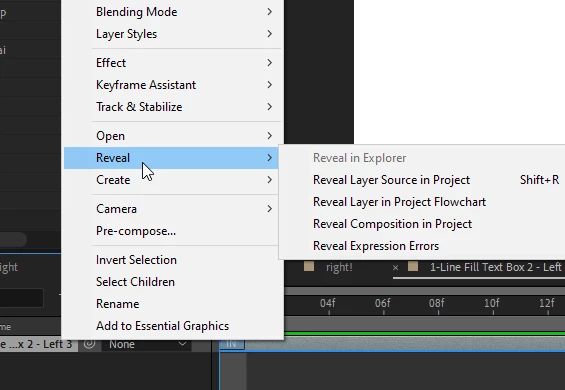
Hi. I created a shortcut for “Reveal Layer Source in Project”. As you can see from the screenshot, it looks like AE accepted it.
 

shortcut.PNG


However, the shortcut doesn’t actually work. When I press Shift+R, nothing happens. Any suggestions?


Thanks!


TOPICS
How to , User interface or workspaces
481
Translate
Report
Community guidelines
Be kind and respectful, give credit to the original source of content, and search for duplicates before posting. Learn more
community guidelines

correct answers 1 Correct answer

Adobe Employee , Apr 14, 2022 Apr 14, 2022

Hi there,


Thanks for writing in.

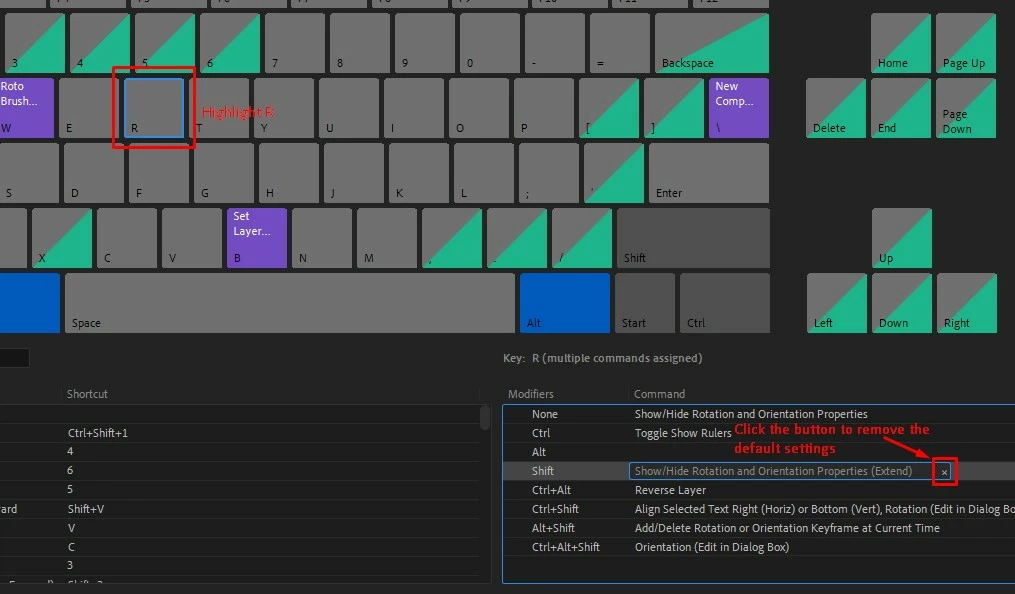
Shift+R is assigned to extend the rotation property of the layer. You can find another key combination that's free to use. If you want to assign Shift+R to Reveal Layer Source in Project, you may remove the default settings first. Check out the screenshot.

shortcut remove.jpg

Let us know if it helps.


Thanks,

Nishu

Translate
Adobe Employee ,
Apr 14, 2022 Apr 14, 2022

Hi there,


Thanks for writing in.

Shift+R is assigned to extend the rotation property of the layer. You can find another key combination that's free to use. If you want to assign Shift+R to Reveal Layer Source in Project, you may remove the default settings first. Check out the screenshot.

shortcut remove.jpg

Let us know if it helps.


Thanks,

Nishu

Translate
Report
Community guidelines
Be kind and respectful, give credit to the original source of content, and search for duplicates before posting. Learn more
community guidelines
Engaged ,
Apr 14, 2022 Apr 14, 2022
LATEST

Thank you. That worked!

So the fact that a shortcut combination is shown on a menu doesn't necessarily mean that it would work.

Translate
Report
Community guidelines
Be kind and respectful, give credit to the original source of content, and search for duplicates before posting. Learn more
community guidelines