
Participant
September 12, 2017
Answered

Liquify Brush Size Too Small

  • September 12, 2017
  • 4 replies
  • 3758 views

I'm working on a canvas that is 540 x 1080 and using the Warp brush in Liquify Tool for an effect, but for some reason, the brush remains rather small despite pushing the size to 600px.

Here's my settings:

And here's how the brush size looks.
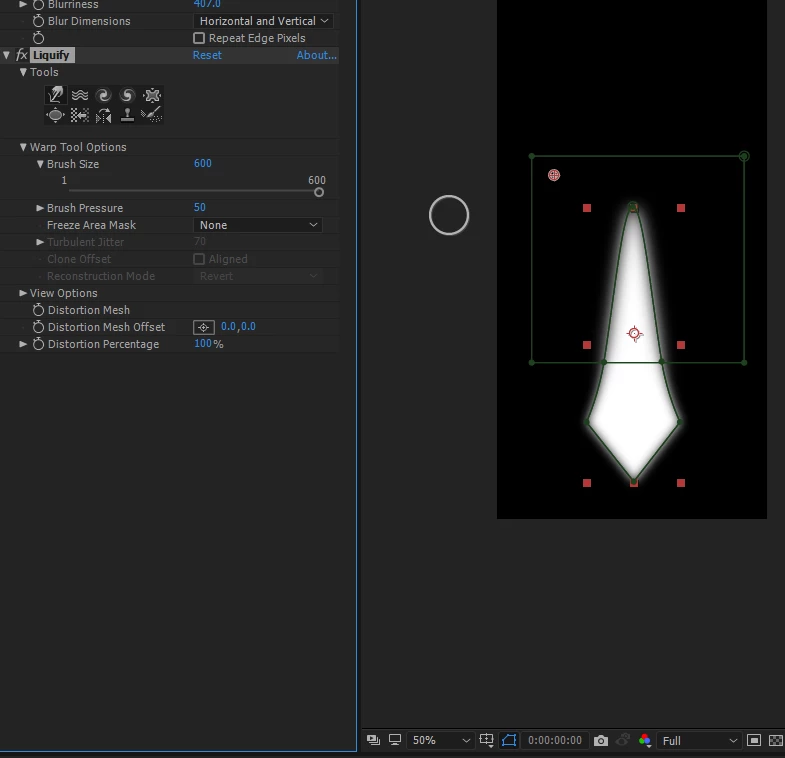
I've been watching other AE tutorials using this effect, and whenever they scale the brush up to 600 it takes up the size of nearly the entire work area. No matter how many times I apply this effect, it never gets larger than what you see above.

I'm still new to AE, so if there's a really obvious thing I'm missing please let me know. Thanks.

This topic has been closed for replies.
Correct answer Henrique -- TMMW

It looks like your layer is scaled way down and the 600px is related to your layer size.

So that is why you see it small. But it is 600px in size.

You should resize your layer to see it bigger or precompose the content you need to apply the liquify.

Does that make sense?

Cheers

Henrique

4 replies

xy0009Author
Participant
September 13, 2017

Yes, this was it. Even though I was rescaling my composition size, I wasn't modifying the layer size, and that's why I was seeing no change. Thank you so much!

Henrique -- TMMW
Henrique -- TMMWCorrect answer
Inspiring
September 13, 2017

It looks like your layer is scaled way down and the 600px is related to your layer size.

So that is why you see it small. But it is 600px in size.

You should resize your layer to see it bigger or precompose the content you need to apply the liquify.

Does that make sense?

Cheers

Henrique

Henrique \ TMMWClips Exporter | Text Replacer | Selector for Premiere Pro | Thumbs Up
Jose Panadero
Community Expert
Community Expert
September 13, 2017

Are you using a pen or a mouse??

Roei Tzoref
Legend
September 13, 2017

this should work. show a full screenshot of your whole Ae interface. highlight the layer in the timeline and press UU so we can see all the modified properties. if you can record the screen as you try to use this tool, show it also.