
robertdphilly
Participant
March 13, 2019
Answered

Looping does not work when rendered?

  • March 13, 2019
  • 3 replies
  • 3959 views

Hi All,

I was able to figure out how to have a composition loop, but when I export it to a quicktime movie

it looses the looping. I know you can choose loop in quicktime replay, but this is going into a tv show using avid.

Just want to make sure this works the way it did in After effects before I rendered it?

Any thoughts are appreciated. After effects newbie excited to learn! Thank you!
    This topic has been closed for replies.
    Correct answer Roland Kahlenberg

    If you've done your loop correctly, you can check it in AE, after the render.

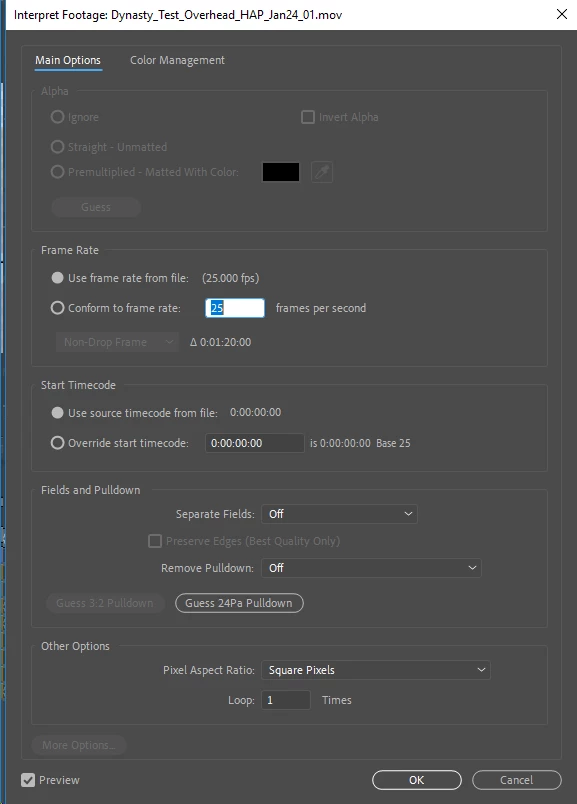
    Import the rendered movie. In the Project Panel, select the movie and go to File>Interpret>Main

    You'll notice the Loop Option at the bottom of the Interpret Footage dialog.

    3 replies

    angie_taylor
    Legend
    March 14, 2019

    Alternatively, you could apply Time Remapping to your clip, change the comp duration to whatever you need . Stretch the layer to fit and then add the “loop Out” expression to the Time Remapping property loop it.

    You can render this at whatever length you need.

    Community Expert
    March 14, 2019

    You can't embed a looping command. If you are sending the video to Avid you have to open it up there and tell it to loop the same way you would in Premiere Pro, Final Cut, Vegas or any other NLE that has a decent set of tools. It's been about 10 years since I have cut anything on an Avid so I don't remember how to do it, but it could be done a long time ago with a couple of clicks.

    Roland Kahlenberg
    Roland KahlenbergCorrect answer
    Legend
    March 13, 2019

    If you've done your loop correctly, you can check it in AE, after the render.

    Import the rendered movie. In the Project Panel, select the movie and go to File>Interpret>Main

    You'll notice the Loop Option at the bottom of the Interpret Footage dialog.

    Very Advanced After Effects Training | Adaptive & Responsive Toolkits | Intelligent Design Assets (IDAs) | MoGraph Design System DEV