
Participant
May 16, 2022
Question

<67272>GPUFoundation error message in after effects

  • May 16, 2022
  • 3 replies
  • 736 views

Hi all, 


I would like to ask how to resolve this issue, the message has pop up when i open the after effects, I have tried to unstall the after effects and also try to delete the files from following link which i saw this solution from this forum > HD/Library/Application Support/Adobe/Common/Plugins/7.0/MediaCore, any other solution i can try ? appreciate your help in advance. Thanks a lot.
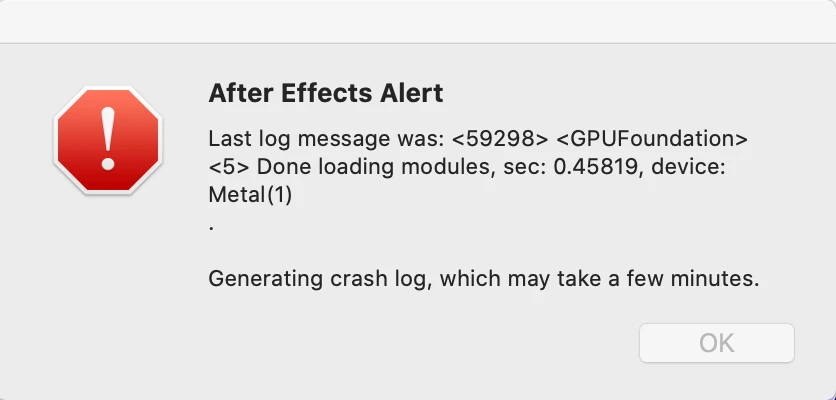
This topic has been closed for replies.

3 replies

nishu_kush
Community Manager
Community Manager
May 24, 2022

Hi Hszeronine244683978jj8,


Sorry for the issue.

Do you see any crash reports? Try removing the plug-ins manually and see if that helps. If it doesn't, use the Adobe Cleaner tool to remove After Effects and associated files and reinstall it.

Let us know how it goes.


Thanks,

Nishu

Participant
May 17, 2022

Sorry, I am I using MacBook Pro (16-inch, 2019)

Mac OS Catalina version 10.15.3

after effects version 22.4


Travis Schmidt Art
Participant
May 23, 2022

We had a similar issue with a computer where I work. We deleted the plugins from the plugins folder, deleted some GPU nVidia CUDA drivers for an external gpu we dont use anymore, reset the prefrences, uninstalled ae, reinstalled to a previous version (I think it was 22.1) and restarted the machine and it started working. Not sure if any of these steps were unessesary or if this will help you but hopefully it does!


Alert Message : 

Last Log message was: <90356> <GPUFoundation> <5> Done loading modules, sec: 0.0939345, device: Metal(1)


Mac Pro (late 2013)

Catalina (10.15.1)

CUDA Driver version 287.178

Mylenium
Legend
May 16, 2022

Without any info about what Mac you are actually using nobody can tell you much.


Mylenium