
Participant
February 28, 2020
Answered

Magnify effect double vision

  • February 28, 2020
  • 8 replies
  • 3981 views

Hi,

I'm new to after effects so I need a little troubleshooting help.


I am trying to create a magnifying glass type effect over some type. 

I've followed some online tutorials and have added an adjustment layer using magnify and bulge effects and have them tracking the magnifying glass movement all good so far.


The issue is the magnify effect seems to be duplicating the text and enlarging to over the top of the original text (double vision see attached image). 
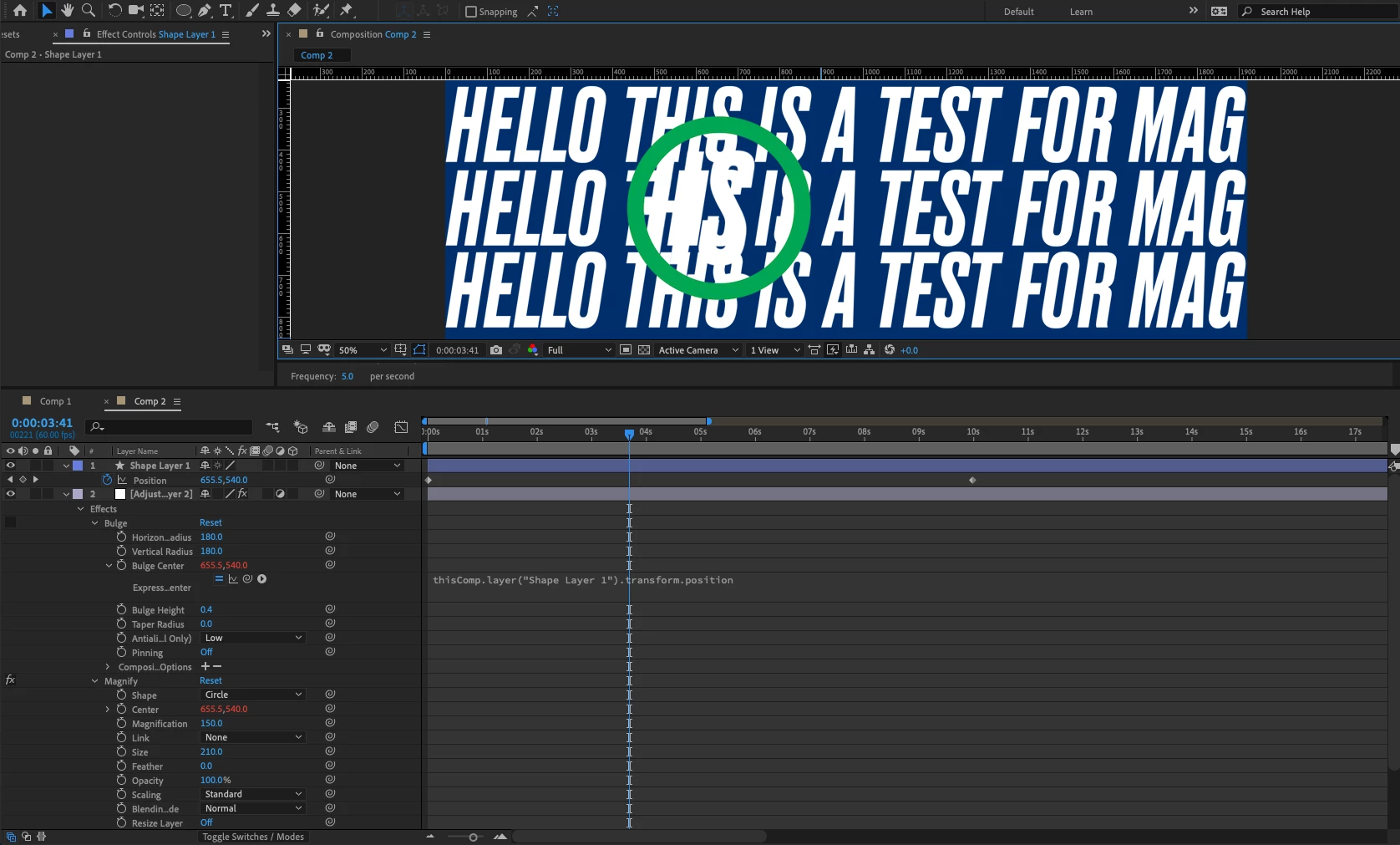
Any ideas why this might be happening?


Thanks.


Correct answer Martin_Ritter

Put the effect directly on the layer instead of adjustment layer - does this help?


*Martin

8 replies

Participant
November 9, 2024

 I found the issue! Under Blending mode in magnify I need to set it to None rather than normal.


Inspiring
May 17, 2024

Create a background solid and put this under the layers/under your text layer

August 19, 2021

Is this problem specific to one font? Maybe try a different text font?

Participant
August 19, 2021

Correct Answer is really this need solid. and adobe should be accept this bug

Participant
April 17, 2022

Ye sthis is bloody irritating. Instead of releasing countless versions Adobe should trry to fix what's not working first. 
I hate working with Premiere too, give me Avid anytime. 

Known Participant
June 18, 2021

Has this ever been solved? I have the same issue and it's absolutely annoying. It used to work.


Participant
February 4, 2022

I am still having this issue and the whole "put a solid shape layer underneath it all and precompose" does NOT work whatsoever. It still is appearing to duplicate the animation I am trying to magnify a part of.

alecAuthor
Participant
March 2, 2020

Still have the same double vision effect, but I have found a work around.

Martin_Ritter
Martin_RitterCorrect answer
Legend
February 28, 2020

Put the effect directly on the layer instead of adjustment layer - does this help?


*Martin

alecAuthor
Participant
March 2, 2020

Not really. But have found a solution by combining the 2 responses and adding something else.


Solution:

Add a solid shape behind the text, then pre-composed the 2 elements, then added the effect to the new pre-composition.

Alec

Participant
February 28, 2020

I had the same issue, I created a solid and used it as background, the magnify effect would affect the solid too and cover the original text.