
Liam.N
Participant
April 26, 2022
Question

Media replacement options under essential properties missing from some duplicated layers.

  • April 26, 2022
  • 3 replies
  • 1361 views

I have a project that makes heavy use of the essential properties feature within After Effects (not exporting them to MOGRTs for Premiere).

I have a template set up that is placed several times within a parent comp. There are a variety of properties open to modification in this template including text controls, positioning, visibility and media replacement.


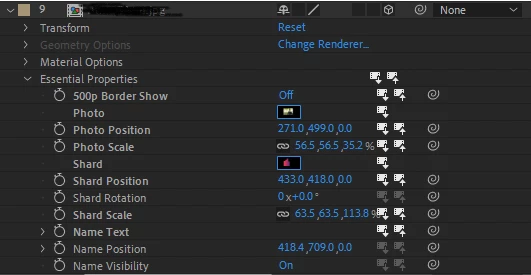
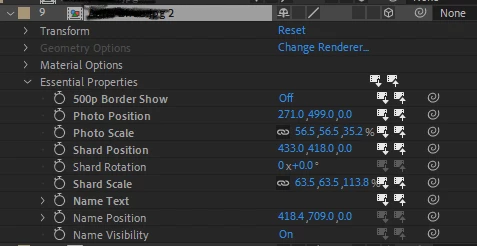
When I duplicate one of these instances, about half of the time it works fine and I can modify the duplicate to be a new instance with no problems. The other half of the time, however, the media replacement options disappear from the list of essential properties for that layer. Every other property is fine, and the layer retains the media used in the original that it was duplicated from. Just the media goes missing.


I can, of course, just drag a new instance in to the scene, which has all of the options open. However, my scene uses some intricate placement of layers that makes duplicating and shifting far easier than having to reposition a brand new layer.


Running AE 18.4.1

Original:
 

Duplicate:
This topic has been closed for replies.

3 replies

Greg von Neulich
Known Participant
August 9, 2022

I have been looking into this further as it is really bothersome in some of my project. Copy and pasting layers or comps in the project with definalty encourage this but to happen. But I also found a sollution:


If you move one of the items in the Essential Properties panel to a diferent position all of the media replacement options will reapear.

Liam.N
Liam.NAuthor
Participant
August 23, 2022

This works for me as well. While not a solution, it's at least a workaround of this annoying issue.

Greg von Neulich
Known Participant
July 6, 2023

I have moved away from working with this feature not only because of this bug but becasue it was time consuming to drag all of the clips onto the footage slots.


What I do now is expose a text field called rootName with the essential properties. And hand this as variable up to any clips that I want to change.


This in a json file I have entries for each comp name containing all of the values I would like to change in this case color:


{
"1920x1080_v1": {
"color": "red"
},
"1920x1080_v2": {
"color": "green"
},
"1920x1080_v3": {
"color": "blue"
}
}


 And check to see if the layer name matches with the json entry for teh comp name.


(thisComp.layer("color").text.sourceText.search(thisLayer.name) == -1) ? 0 : 100


Here is an an example

Greg von Neulich
Known Participant
June 20, 2022

I have noticed the same issue from AE 18 to the Current verions.


I  have also noticed that pressing Command D on the comp to duplicate it is less likely to cause the problem than copy and pasting the comp or duplicating its parent folder.


In the attached AE file there are 2 comps under Varients:


if you duplicate a comp with Commad D the footage is still available.


If you copy paste it or duplicate its parent folder it is not.


This does not always happen right away I have been able to duplicate folders and not have the footage disapeer. But once it starts its seems to always happen.


I also have not found a way to get it back other than dragging the template in again which is very time consuming and likely to cause human error when you have alot of videos.


Greg von Neulich
Known Participant
July 29, 2022

Does anyone have a sollution to this problem?

Mylenium
Legend
April 26, 2022

Without understanding the actual structure of your project and timeline, potential involvement of expressions and so on nobody can tell you much. Cropped screenshots are essentially useless. That said, it pretty clearly sounds like you created a cyclic connection somewhere so AE doesn't think it needs to recalculate the internal IDs and/ or ditches references to footage. So for what it's worth, we definitely need much more info and better explanations.


Mylenium