
Participant
January 6, 2020
Answered

Memory allocation exceeds internal limits, After Effects crash

  • January 6, 2020
  • 2 replies
  • 27433 views

Hello guys,


Do you have similar experience on encoding failure? How can you solve that?

I have tried rendering in AE and in Media Encoder; in different format like h264 and quicktime. Even tried to render with another computer. Still when it comes to that specific point, it never be able to make it. 


Here is how Media Encoder said:

- Encoding Time: 00:41:57
01/04/2020 07:42:31 PM : Encoding Failed
------------------------------------------------------------
Export Error
Error compiling movie.

Render Error

Render returned error.

Writing with exporter: H.264
Writing to file: /Users/admin/Desktop/projects/20191107_EH_Animation/AE Files/EH_animation_master_AME/EH_Animation.mp4
Writing file type: H264
Around timecode: 00:00:37:17 - 00:00:38:24
Rendering at offset: 37.680 seconds
Component: H.264 of type Exporter
Selector: 9
Error code: -1609629695


Here is how AE says when it crushed:
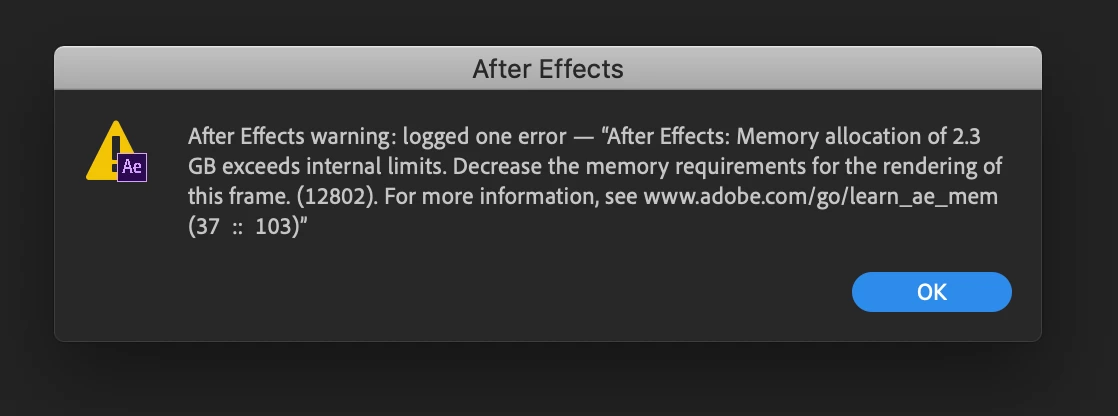
 

Grateful for any help!! Many thanks!


Paul


Title edited by Mod.
Correct answer JG Pixel Media

Same here! I've started to have this error yesterday! I have 64 Gb memory installed and AE uses 58Gb. I get the error when I import a single image 10000x13600 pixels.


Same here, I have 128 GB Memory and a M3 Max Chip - I was rendering a 4K transition  from MYFX

2 replies

Participant
February 19, 2025

It sounds like there's a corrupted frame, effect, or asset at that specific point. Try isolating the problem by rendering just that section. Clear your media cache in AE and Media Encoder, and check if any third-party plugins are causing the issue. If the problem persists, try exporting as an image sequence first, then reassemble it in Premiere or AE.

nishu_kush
Community Manager
Community Manager
January 6, 2020

Hi Paul,


Welcome to the community and sorry for your issue. I see that After Effects is crashing when you try to export your project.

It looks like you have at least one frame that requires a vast amount of RAM. Have you used any large resolution image or applied any effects at the point of time where After Effects stops exporting and crashes?

Looking forward to your reply.


Thanks,

Nishu

Inspiring
February 13, 2024

Hi there,


To avoid opening a new thread, I will just ask here even though it's been 4 years since this post.

I am busy with an explainer video and it is quite resource intensive..


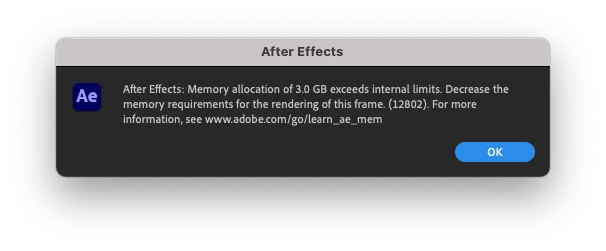
So I have already rendered the project and I am just trying to save and close. When saving, it gives this same error, but the memory allocation does not make sense:


As you can see the GB is extremely and impossibly high. I allocated the max RAM for Adobe (28GB), Enabled Multi-Frame Rendering and % CPU reserved for other applications is 10%.

I am also not sure what the 12802 is.

I need to close the project so will not save it as I didn't really do enormous changes since the last save, just fixed a typo.

But would like to fix this as I will most likely get more changes from the client.

My specs are:
After Effects v24.1.0 (build 78)


Dell G15 5515

AMD Ryzen 5 5600H with Radeon Graphics 3.30 GHz

32GB RAM

Windows 11 64-bit
NVIDIA GeForce RTX 3050 Laptop GPU


Thanks and looking forward to your help

Participant
March 27, 2024

I'am on the same boat as you