
Tafirkhoo72333735
Inspiring
September 6, 2017
Answered

Mettle Skybox plugins install error

  • September 6, 2017
  • 3 replies
  • 17435 views

Greetings,

I'm excited about the recent acquisition by Adobe of Mettle Skybox plugins for 360 video editing in After Effects and Premiere Pro.  I installed the plugins and they seem to be working for Premiere Pro, but for After Effects, I get this message when I start the program:
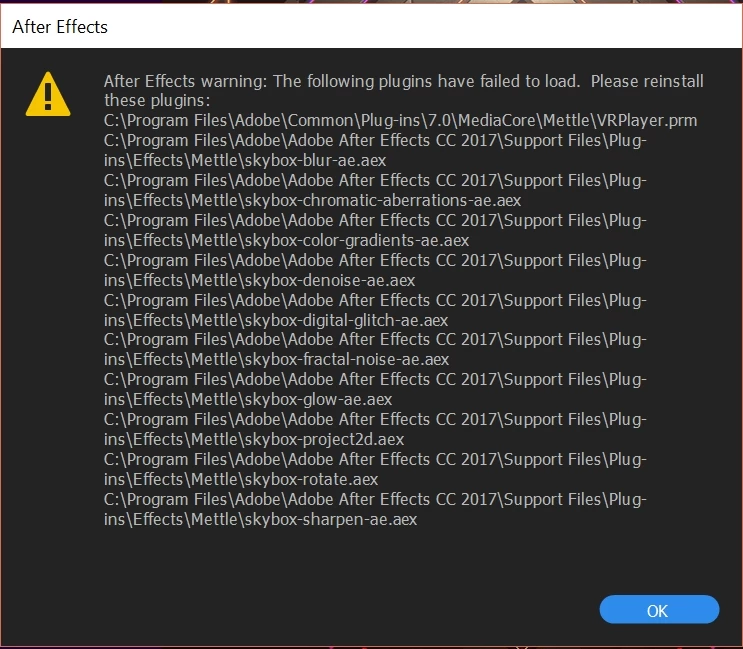
Any suggestions about how to get these plugins to load correctly?

Thanks for your help.

Stuart

    This topic has been closed for replies.
    Correct answer stefan_gru

    Does anything here help you narrow things down? https://support.mettle.com/hc/en-us/categories/202952967-360-VR-PLUGINS

    3 replies

    ConceptLabs
    Participant
    September 16, 2017

    Hi,

    I am trying to install Mettle Skybox Studio for AE 2017 and getting the following errors. The plugin was downloaded from Mettle. I have tried to use all the solutions available on their site and the issue still persists.

    Is there a support page to address the issue on Adobe's site? Any help will be appreciated.

    Thanks in advance.

    -Dave

    stefan_gru
    Inspiring
    September 19, 2017

    ConceptLabs: The Mettle Skybox integration with Adobe tools is not complete so there is no Adobe support page for Mettle apps. Try the Mettle site for now. I found this:

    https://support.mettle.com/hc/en-us/articles/222597568-Which-versions-of-the-After-Effects-do-you-support-

    Which versions of the After Effects do you support?

    After Effects CS6, CC, CC2014, CC2015

    So it looks like you cannot use it with AE 2017.

    After Effects CS6, CC, CC2014, CC2015

    ToolfarmJP
    Community Expert
    Community Expert
    September 8, 2017

    Hello,

    Where did you get the installer of Skybox? Did you find the plug-ins of Skybox in Mettle folder? If you find them, you just delete Mettle folder and try to reinstall them from scratch.

    Download a Demo: | Mettle

    ToolfarmJP
    Community Expert
    Community Expert
    September 7, 2017

    Hello,

    If you install some versions of After Effects, you may find the Skybox plug-in in the other version's folder. You just copy the Mettle folder into the same directory of After Effects CC 2017.

    In case of CC 2015.3:

    C:\Program Files\Adobe\Adobe After Effects CC 2015.3\Support Files\Plug-ins\Effects\Mettle

    to

    C:\Program Files\Adobe\Adobe After Effects CC 2017\Support Files\Plug-ins\Effects\Mettle

    Tafirkhoo72333735
    Inspiring
    September 7, 2017

    Mettle seems to have put the files here:

    C:\Program Files\Adobe\Adobe After Effects CC 2017\Support Files\Plug-ins\Effects\Mettle

    I have no other installs of AE on the system.

    Yet, I still get the error message when I start AE.

    Stuart

    stefan_gru
    stefan_gruCorrect answer
    Inspiring
    September 7, 2017

    Does anything here help you narrow things down? https://support.mettle.com/hc/en-us/categories/202952967-360-VR-PLUGINS