
Participant
August 20, 2023
Question

Missing Bezier handles for Position on value graph

  • August 20, 2023
  • 3 replies
  • 1585 views

Hello,

I've been struggling to find the bezier curves handles for the position keyframes in the graph editor.Even after reviewing existing threads, I cannot seem to find the issue.


The interpolation types are all set to Continuous Bezier (or auto Bezier), I am using Easy Ease on these points. I have read that splitting properties of the position layer might do the trick, but that option is not available (grey text) when I look for it on right click.
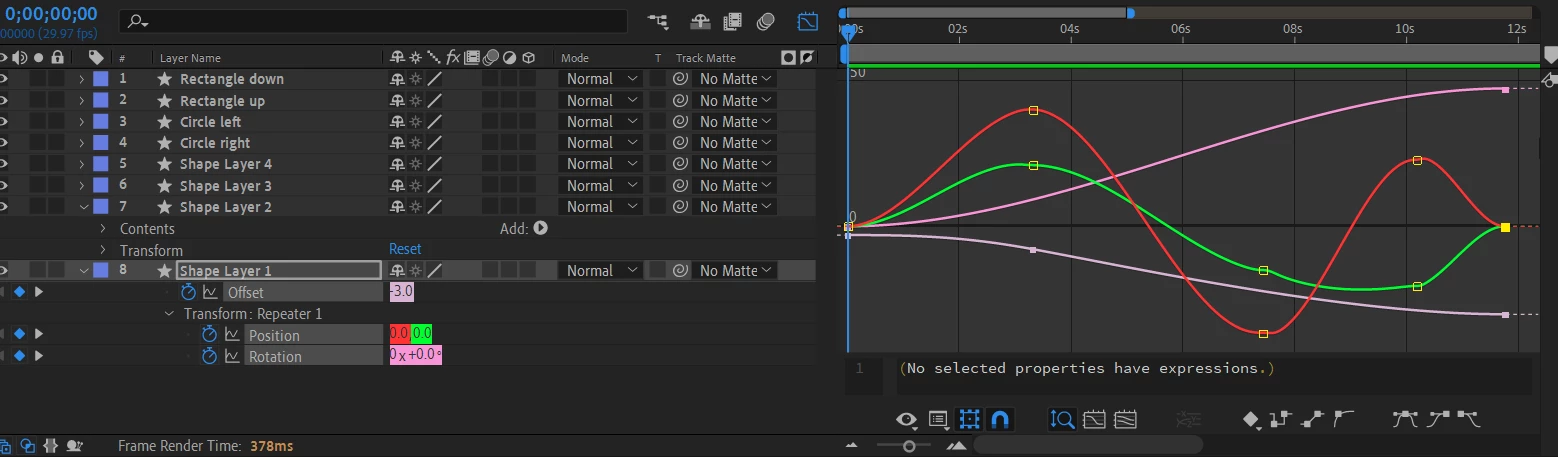
Here, my issue is for the red and green curves. As you can see, in the end the curve does awkward jumps after  keyframes, that's what I want to solve.


I am on AE 2023 on Windows10

Thanks for your help

This topic has been closed for replies.

3 replies

Community Expert
August 21, 2023

The Transform/Repeater Position property does not display bezier handles for the position path. Unfortunately, you cannot open a Shape layer in the Layer panel, or you would be able to see the position keyframe paths. 


I suggest that you edit the Speed Graph instead. It is nearly impossible to edit a position path by using the Value Graph. If you cannot smooth out the position path using the Speed Graph


You could also try working with Keyframe Interpolation and Keyframe Velocity. 


The only other option would be to use the pen tool to draw the motion path you want, add a single keyframe to that motion path, then Copy or Cut it and paste the motion path to the Repeater/Position property. Then you need to add this expression to the Repeater/Position property:

value - [thisComp.width/2, thisComp.height/2]

You will get the precise path you want and rove over time keyframes, so you can adjust the timing by just dragging the last keyframe created.

Andrew Yoole
Inspiring
August 21, 2023

Switch from "Edit Value Graph" to "Edit Speed Graph".

Participant
August 21, 2023
Okay but speed graph only will change speed! I want to smooth out the
value, so it doesn't do hiccups... My speed graph looks fine 🙂

Mikael
Community Expert
August 20, 2023

The bad news is that you're not alone and I have experienced the same problem. I hope that a solution presents itself soon.