
leo9x
Participant
August 12, 2016
Answered

Missing Gaussian Blur effect in After Effects CC 2015

  • August 12, 2016
  • 1 reply
  • 14038 views

Hi,

I'm a newbie in After Effects. When I open an AE project, I got a warning regarding a Gaussian Blur missing.

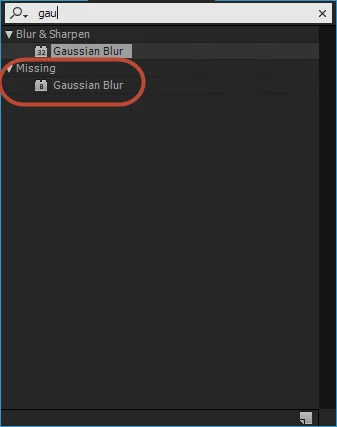
The problem here is Gaussian Blur has been installed on my computer. I have searched the effect on Effects and Presets, please refer to the image.

I wonder that is the number 8/ 32 it may cause?

How can i fix this or get it?

Many thanks.
    This topic has been closed for replies.
    Correct answer Victoria Nece

    Hi Roei,

    Thanks for the detailed guide. However the 32 bit Gaussian Blur effect doesn't have repeat edge pixel option that is needed in my project. Is there any workaround for that? Thanks!


    There is a new script that is included with CC 2017 that will enable you to "upgrade" legacy Gaussian and Fast blurs to use the new GPU-accelerated Gaussian Blur effect (which includes Repeat Edge Pixels).

    1 reply

    Mylenium
    Legend
    August 12, 2016

    Simply substitute the effect and duplicate the settings. Several effects have been rewritten over the years and the newer versions have been given new internal "match names". Visually this should make no difference or only minor, if at all.

    Mylenium

    leo9x
    leo9xAuthor
    Participant
    August 12, 2016

    Hi Mylenium,

    Thanks for your support. In this case, my project is contained many objects (which are applied the effect), if I duplicate the setting that mean I will spend numerous time for editing. Are you sure about the difference without?

    Btw, how can I get the older version like Gaussian blur (8)?

    ks66586231
    Participant
    December 11, 2016

    Two options to fix this problem the way I see it:

    1. opening the project in the version it was created in (and installing that version if necessary)

    2. doing some manual labor (not that bad)

    Now the details:

    Option #1

    when you open the project, it will probably tell you that the project will be converted from older version (because you are opening an older version project file, that had GB effect in 8bit)

    you can see the number and if you have that version - you can open it with that version and you won't have a missing effect. it seems you are opening a very old version of the project because this effect was probably re-introduced in AE 7.0 (2006): https://www.fxguide.com/featured/after_effects_7_brings_32-bit_and_new_ui/ , Adobe After Effects - Wikipedia, the free encyclopedia   - look under versions.

    so it's either having that version / installing that version... OR like M suggested - do some manual labor. option 2 coming up.

    Option #2

    2. when you get this message

    you click o.k and roll up your sleeves and make this workflow as short as you can with using the search fields in the project window and timeline window and I will show you how:

    you can click to the search field here

    type "m" or click on the arrow near the magnifying glass. you will have options so choose Missing Effects

    now Ae will refer you to all the compositions that contain that missing effects by showing you just them

    already much easier, right? now when you click on the composition you will see just the the layer with the missing effect as the effect is toggled down.

    instead of seeing all the layers like this

    (if it doesn't show you just the layer, make sure no layer is selected and choose missing effects in the Timeline search field again)

    you are in luck! Gaussian blur has only 2 parameters . you can look in the Effect Controls window of the layer when you click on it.

    (you will see fewer parameters, I am using a reverse technique just to illustrate the workflow)

    add your Gaussian blur from the effects panel and make it's parameters match the missing one

    now you're done and off to the next one.   not that bad is it?


    I have the same problem except I have the S_Glow effect. I went through the steps, and when I duplicate glow in the effects panel it only says Missing: S_Glow 2. Any suggestions?