
Phi.Def
Inspiring
August 5, 2021
Answered

Mogrt file from AE colors are red when imported into Premiere

  • August 5, 2021
  • 3 replies
  • 2164 views

Help!


I created an animated lower third in After Effects for the editing team, but when I import it into Premiere, it is entirely red.
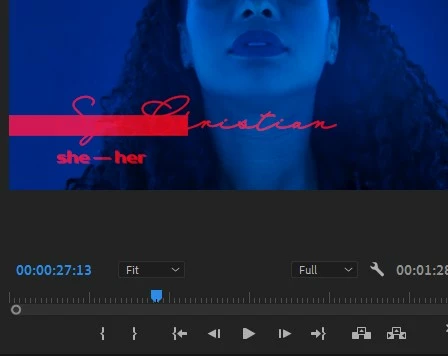
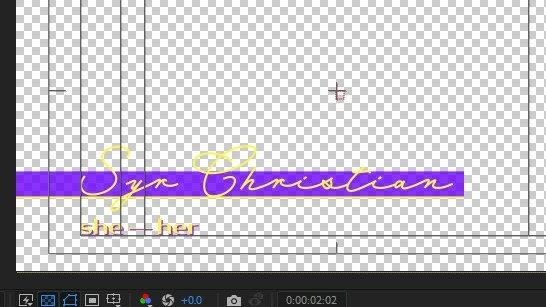

This topic has been closed for replies.
Correct answer Rick Gerard

We have no idea what is going on in the AE comp. Cropped screenshots are useless for diagnosing problems. We need to see what is going on in a comp. Select the problem layer or layers, press 'u' twice to reveal all modified properties, and take a screenshot of the entire UI and describe the workflow. This could be as simple as a color effect that isn't part of the Mogrt or as complex as a complete failure of the GPU. There is no way to know unless we understand your workflow.

3 replies

Rick GerardCommunity ExpertCorrect answer
Community Expert
August 5, 2021

We have no idea what is going on in the AE comp. Cropped screenshots are useless for diagnosing problems. We need to see what is going on in a comp. Select the problem layer or layers, press 'u' twice to reveal all modified properties, and take a screenshot of the entire UI and describe the workflow. This could be as simple as a color effect that isn't part of the Mogrt or as complex as a complete failure of the GPU. There is no way to know unless we understand your workflow.

Phi.Def
Phi.DefAuthor
Inspiring
August 6, 2021

That was it. All my elements are coloured with fill effects which are linked to brand colours in my colour palette comp.


So the lesson to be learned here is that mogrts can't have expressions that call for information from comps not contained in the mogrt comp.


Thanks!

Mylenium
Legend
August 5, 2021

Without seeing your comp structure nobody can tell you whether a simplification is necessary, but it may be be a good idea to streamline things and help AE a bit along. Sometimes it's really just trivial things that cause these weird behaviors. If you feel everything is already as optimized as you need it (or for that matter essential graphics requires it), then focus on that hardware acceleration thing. As a test perhaps you can try to import a simple static comp with only a text layer and no fancy stuff. Also, if your project uses some expressions it may be worth looking into that as well. Broken expressions that don't evaluate correctly also may cause rendering errors.


Mylenium

Mylenium
Legend
August 5, 2021

Long story short: Hardware acceleration failure. Something in that department ain't working right, either in AE or PR. You may need to spend some time figuring this out. Also since your title appears to use some write-on effect for the handwriting, restructuring the AE project by ways of pre-composing stuff may be necessary as well. Essential graphics sometimes act funny when trying to do those fancy reveals directly on layers in teh main comp.


Mylenium

Phi.Def
Phi.DefAuthor
Inspiring
August 5, 2021

So, just to be clear, I should try to simplify the AE comp?