Participating Frequently
March 11, 2025
Answered

MOGRT files are not opening in After Effects 2025

  • March 11, 2025
  • 4 replies
  • 2155 views

I downloaded the "Hand-Drawn Titles" mogrt (AdobeStock_230451463) from Adobe Stock, and I can't open it in AE. In fact, it is grayed out in Finder when I do try to import it.


I'm using the latest versions of all Adobe products AE and Premer Pro still not opeing any suggestions


Thanks. 

Correct answer Rick Gerard

You don't import a MOGRT. You open the MOGRT the same way you open an After Effects Project (AEP)  file.


Go to File/Open, browse to the MOGRT, then create a folder, and the Project will open.


Here is the workflow:
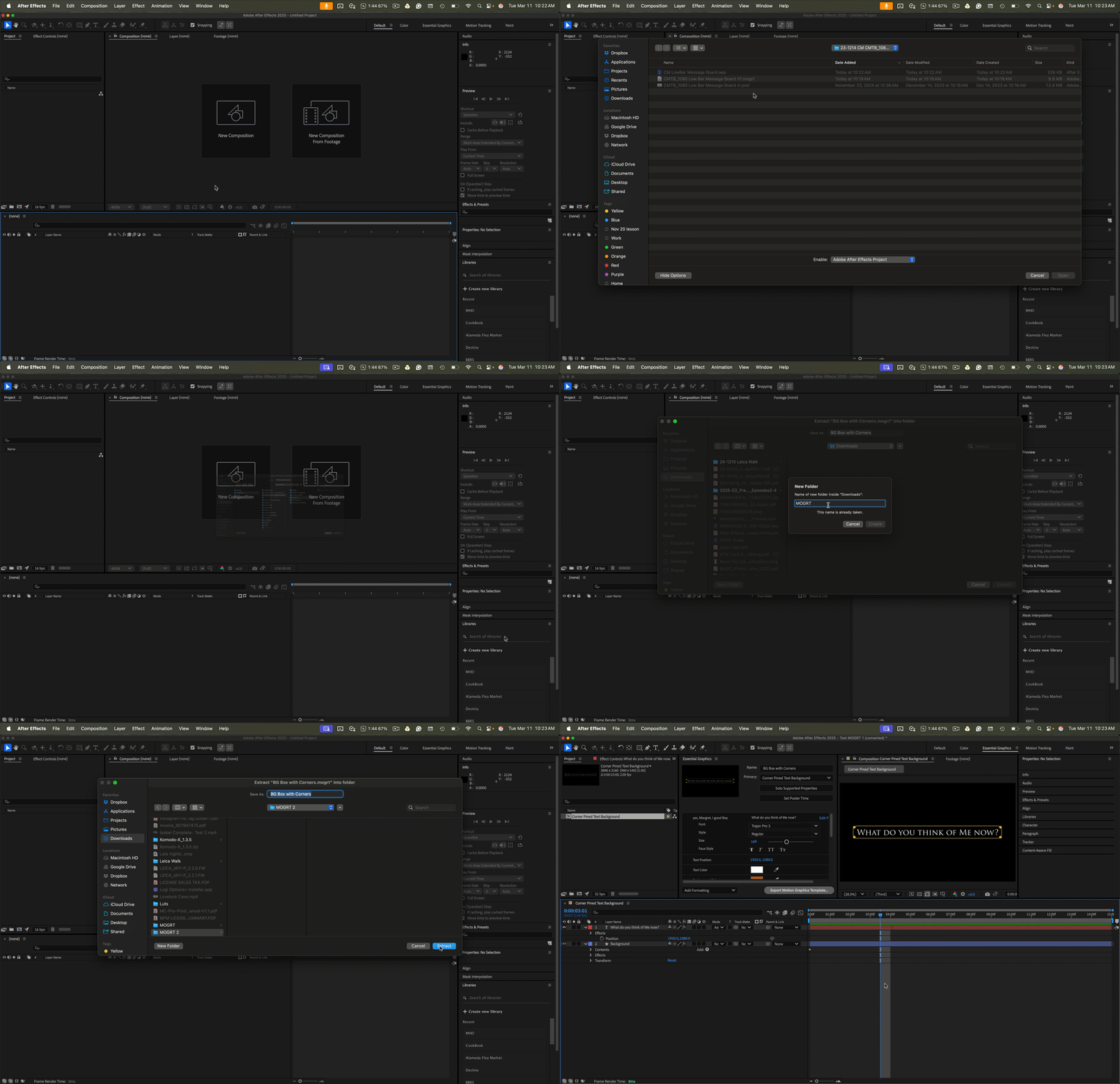
You can find those instructions in the After Effects Help files.

4 replies

Participating Frequently
October 26, 2025

Just came to add that it's beyond ridiculous that you can't import a mogrt from the library panel into After Effects. Yes it's great that I can publish mogrts for the editors on my team to use in Premiere. But what about the motion designers and people working in AE?

For them, I have to:

  1. manually export the mogrt files to my local drive
  2. share those files using a different cloud service
  3. have my AE guys download/sync the files
  4. have them import the files using AE Viewer (a third party add-on)

    That creates three copies of the same data and completely nullifies the point of having the mogrts in a shared Creative Cloud library! You need to fix this Adobe. It's a massive pain and the need for the functionality is crystal clear. I know for a fact that it wouldn't be hard to add. So please get your development team onto this. People have been asking for this for years now. 
nishu_kush
Legend
March 11, 2025

Thanks for writing in, Eswar.


In addition to what Rick said, I downloaded the same MOGRT on my end. I am able to open it in After Effects as well as use it in Premiere Pro. What version of After Effects and Premiere Pro are you using? If they are the latest and you are still seeing the issue, you might need to download the MOGRT again.

Hope it helps.


Thanks,
Nishu

Participating Frequently
March 11, 2025

Thank you somuch Rick and Nishu for the short video and the replay on my post, now some are working fine, if you create a folder through the Aftereffect interface. Howevery now i face somthing diffrent issue for this file "AdobeStock_292366780"please see the attachment.
Good news is some are working Thank you for your support and replays.

Participating Frequently
March 11, 2025

After Effects -25.1.0
Premiere Pro - 25.1.0

Rick GerardCommunity ExpertCorrect answer
Community Expert
March 11, 2025

You don't import a MOGRT. You open the MOGRT the same way you open an After Effects Project (AEP)  file.


Go to File/Open, browse to the MOGRT, then create a folder, and the Project will open.


Here is the workflow:

You can find those instructions in the After Effects Help files.

kglad
Community Expert
Community Expert
March 11, 2025

in the future, to find the best place to post your message, use the list here, https://community.adobe.com/

p.s. i don't think the adobe website, and forums in particular, are easy to navigate, so don't spend a lot of time searching that forum list. do your best and we'll move the post (like this one has already been moved) if it helps you get responses.


<"moved from using the community bugs">
Participating Frequently
March 11, 2025

So how can i get this solution for this...?

kglad
Community Expert
Community Expert
March 11, 2025

please await the response of ae experts.
