

Exit
  • Global community
    • Language:
      • Deutsch
      • English
      • Español
      • Français
      • Português
  • 日本語コミュニティ
  • 한국 커뮤니티
0

Motion Array's Auto Scaling Text Box code (sourceRectAtTime) suddenly not working

Participant ,
Oct 06, 2020 Oct 06, 2020

Hello,


I often use Motion Array's Auto Scaling Text Box code in my workflow. It has always worked flawlessly. However, I am trying it now and for whatever reason it is not working. Unless my lack of sleep is catching up with me and I'm just missing something painfully obvious, is there anyone else experiencing issues with sourceRectAtTime coding not working in AE 17.1.4?


The code (which I've used successfully a million times!) is:


s=[pickwhip to source text]


w=s.sourceRectAtTime().width;

h=s.sourceRectAtTime().height;


[w,h]
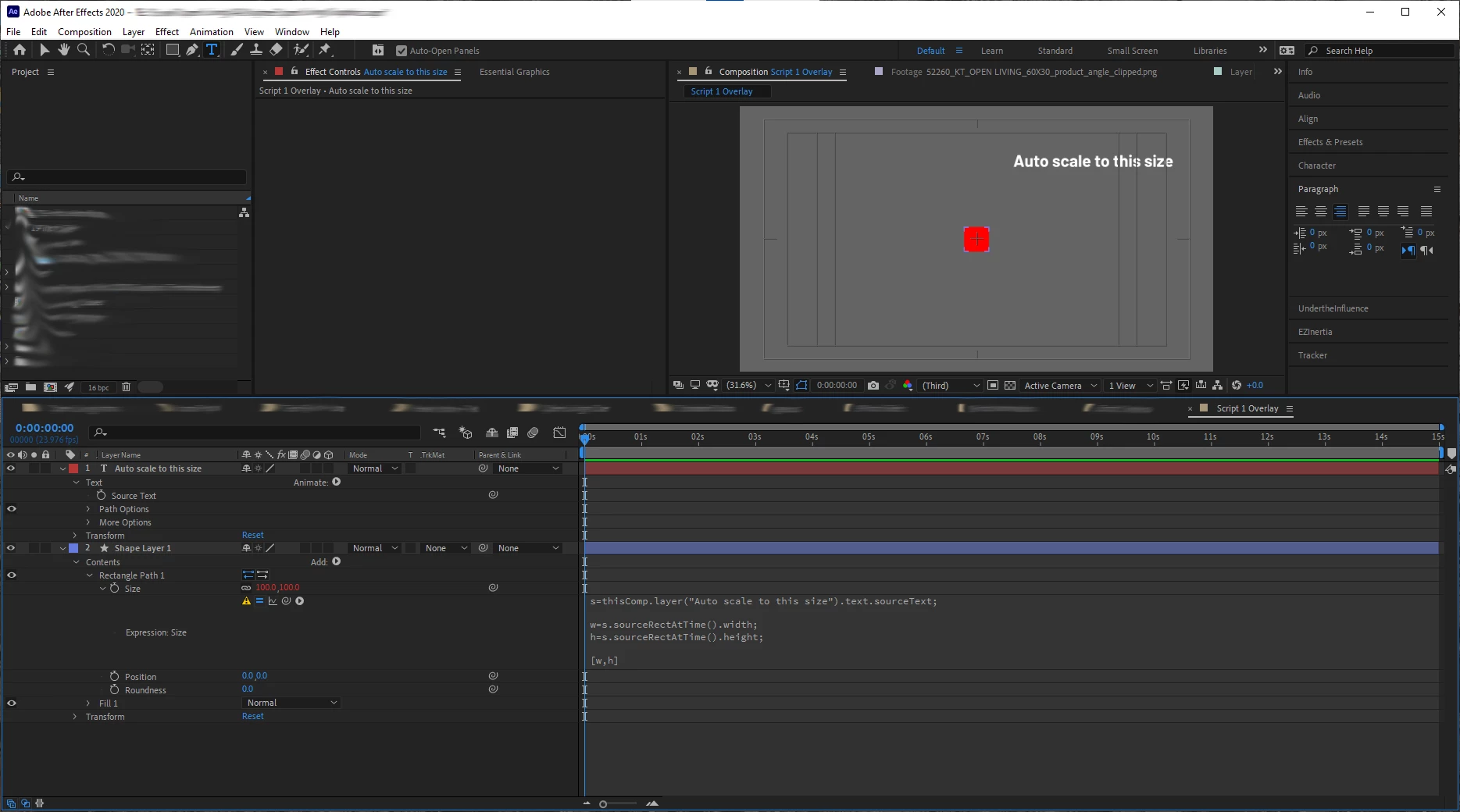
 

Auto Scale Not working.png

As you can see, the code is in, and the box should be the size of the text above, but it isn't.


I have tried toggling between JavaScript and Legacy ExtendScript for my Expressions Engine--neither has worked. I have purged the cache. I have uninstalled and reinstalled AE.


WHAT AM I MISSING?

TOPICS
Expressions , Scripting
811
Translate
Report
Community guidelines
Be kind and respectful, give credit to the original source of content, and search for duplicates before posting. Learn more
community guidelines

correct answers 1 Correct answer

Community Expert , Oct 06, 2020 Oct 06, 2020

You should pickwhip s to the text layer itself, not its source text.


Dan

Translate
Participant ,
Oct 06, 2020 Oct 06, 2020

Here's the error code I get...but I don't think I typed anything wrong.

Auto Scale Error.png

Translate
Report
Community guidelines
Be kind and respectful, give credit to the original source of content, and search for duplicates before posting. Learn more
community guidelines
Community Expert ,
Oct 06, 2020 Oct 06, 2020

You should pickwhip s to the text layer itself, not its source text.


Dan

Translate
Report
Community guidelines
Be kind and respectful, give credit to the original source of content, and search for duplicates before posting. Learn more
community guidelines
Participant ,
Oct 06, 2020 Oct 06, 2020

Of course! Thank you. I guess I do need some more Zzz's

Translate
Report
Community guidelines
Be kind and respectful, give credit to the original source of content, and search for duplicates before posting. Learn more
community guidelines
Explorer ,
Oct 06, 2020 Oct 06, 2020

Hi Evan,


if you pickwhip the Layer instead of the sourceText, it should work?


Translate
Report
Community guidelines
Be kind and respectful, give credit to the original source of content, and search for duplicates before posting. Learn more
community guidelines
Community Expert ,
Oct 07, 2020 Oct 07, 2020
LATEST

For more complex dynamic text layouts and boxes, my extension Pins & Boxes is also very helpful:

https://aescripts.com/pins-and-boxes/


And if all you need is a very simple box that grows with your text, here is a very good approach that creates this just with a few effects on the text layer itself:

https://mamoworld.com/motion-graphics-ebook/content47.html


Mathias Möhl - Developer of tools like BeatEdit and Automation Blocks for Premiere Pro and After Effects
Translate
Report
Community guidelines
Be kind and respectful, give credit to the original source of content, and search for duplicates before posting. Learn more
community guidelines