
Participant
March 11, 2018
Answered

Motion tile not working (please help)

  • March 11, 2018
  • 2 replies
  • 6994 views

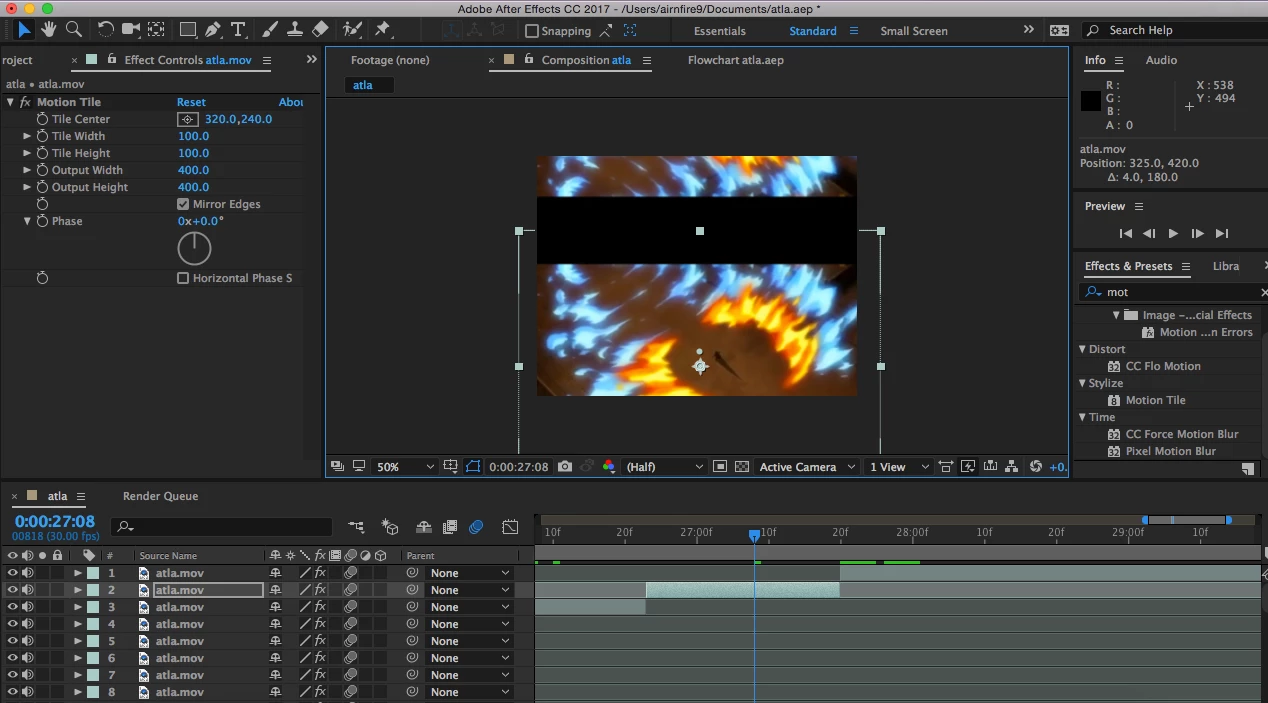
I just started using ae to make edits to post on Instagram. In all the tutorials it says to add motion tile and it works on the sides but on the top and bottom there are very large black bars and I don't know how to get rid of them(I put my clips together on fcp before I go to ae if that has anything to do with it). It is very frustrating because I want to do rotations but it looks stupid with the black bars. I have tried precomposing already and I don't know what else to do. Anyone know how to fix this???                                            
This topic has been closed for replies.
Correct answer Mylenium

Adjust the source tile height/ width and/or crop the iumage inside a pre-comp. the effect works just fine.

Mylenium

2 replies

tilend94020061
Participant
July 11, 2019

Please check my case. It doesn't work for me...

Motion Tile & RepeTile problem with black borders

Community Expert
July 12, 2019

Motion tile uses the entire layer size. If there is a mask or an alpha channel those areas will be included and, as shown in the screenshot above, you'll get black bars. These look black:

But they are actually transparent:

If you need to keep the mask pre-compose moving all attributes to the new comp then resize the comp to match the mask or use the Region of Interest and crop the comp to the region of interest. You could also scale up the layer with the mask until the mask is the same size as the comp panel.

The other fix, delete the mask. Motion Tile will always render any transparent pixels in the layer and if that transparency is on the edges you'll get black lines between the tiles.

Mylenium
MyleniumCorrect answer
Legend
March 11, 2018

Adjust the source tile height/ width and/or crop the iumage inside a pre-comp. the effect works just fine.

Mylenium